> ## Documentation Index
> Fetch the complete documentation index at: https://docs.gcore.com/llms.txt
> Use this file to discover all available pages before exploring further.

# Modify cache key

> Choose request variables that separate cached objects on a CDN resource and manage cache key modification settings.

export const MethodSection = ({children}) => children ?? null;

export const MethodSwitch = ({children}) => {
  const tabs = React.Children.toArray(children).map(c => {
    if (!c || !c.props) return null;
    if (c.props.id) return c;
    const inner = c.props.children;
    if (inner && inner.props && inner.props.id) return inner;
    return null;
  }).filter(Boolean);
  const firstId = tabs.length > 0 ? tabs[0].props.id : "";
  const [active, setActive] = React.useState(firstId);
  React.useEffect(() => {
    try {
      const saved = localStorage.getItem("gcore_docs_method");
      if (saved && tabs.find(t => t.props.id === saved)) {
        setActive(saved);
      }
    } catch (_) {}
  }, []);
  React.useEffect(() => {
    try {
      document.querySelectorAll("h2[id], h3[id]").forEach(heading => {
        const visible = heading.offsetParent !== null;
        document.querySelectorAll(`a[href="#${heading.id}"]`).forEach(link => {
          if (link.closest("h1,h2,h3,h4,h5,h6")) return;
          const li = link.closest("li");
          if (li) li.style.display = visible ? "" : "none";
        });
      });
    } catch (_) {}
    window.dispatchEvent(new Event("scroll"));
  }, [active]);
  const handleClick = id => {
    setActive(id);
    try {
      localStorage.setItem("gcore_docs_method", id);
    } catch (_) {}
  };
  return <div>
      <div className="not-prose flex gap-0 border-b border-zinc-200 dark:border-zinc-800 mb-8 mt-2" role="tablist">
        {tabs.map(tab => {
    const isActive = active === tab.props.id;
    return <button key={tab.props.id} role="tab" aria-selected={isActive} onClick={() => handleClick(tab.props.id)} className={["px-4 py-2 text-sm font-medium border-b-2 -mb-px transition-colors cursor-pointer", isActive ? "border-primary text-primary" : "border-transparent text-zinc-500 hover:text-zinc-800 dark:hover:text-zinc-200"].join(" ")}>
              {tab.props.label}
            </button>;
  })}
      </div>

      {tabs.map(tab => <div key={tab.props.id} style={{
    display: active === tab.props.id ? "" : "none"
  }}>
          {tab.props.children}
        </div>)}
    </div>;
};

<MethodSwitch>
  <MethodSection id="portal" label="Customer Portal">
    <p>Select which request variables separate cached objects on a CDN resource. Requests that produce the same key share one cached object.</p>

    ## Cache key modification

    <p>Save the selection as **Cache key modification** on the CDN resource.</p>

    <Warning>
      Enabling or changing cache key modification can invalidate cached objects and reduce the cache hit ratio. [Purge by pattern](/cdn/clear-cdn-resource-cache-by-url-pattern-or-all) is unavailable while this option is enabled.
    </Warning>

    <Steps>
      <Step title="Reach the resource list">
        In the [Gcore Customer Portal](https://portal.gcore.com), navigate to **CDN**. The **CDN resources** page opens.
      </Step>

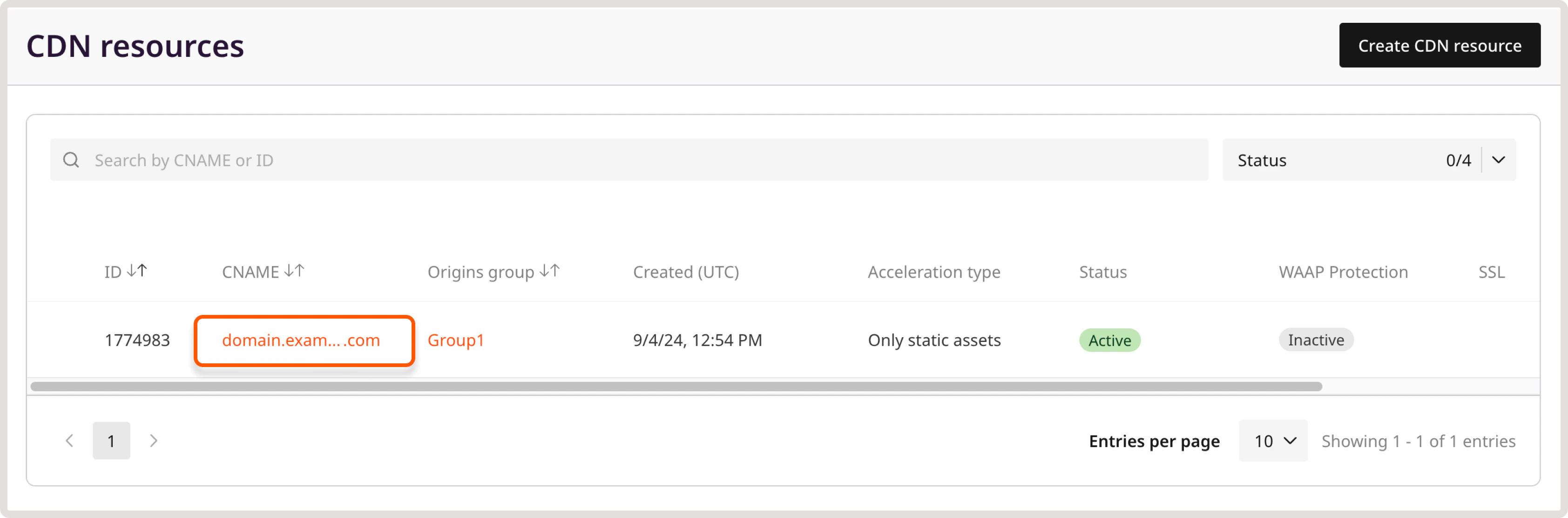
      <Step title="Select the resource">
        Click the resource CNAME.

        <Frame>
          <img src="https://mintcdn.com/gcore/dhq9BHRl9-5hEcw1/images/docs/cdn/cdn-resource-options/cache/modify-cache-key/cdn-resource-name.png?fit=max&auto=format&n=dhq9BHRl9-5hEcw1&q=85&s=31c43df19dee66042ec594e4a48f79c1" alt="CDN resource CNAME in the resources list" width="3368" height="1112" data-path="images/docs/cdn/cdn-resource-options/cache/modify-cache-key/cdn-resource-name.png" />
        </Frame>
      </Step>

      <Step title="Find cache key modification">
        In the **Cache** section, click **Cache key modification**.
      </Step>

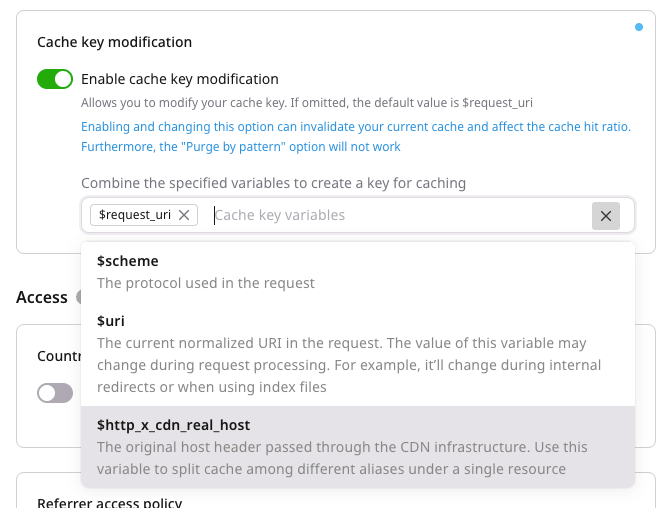
      <Step title="Set the variables">
        Turn on the **Enable cache key modification** toggle and add variables from [Supported variables](#supported-variables).

        <Frame>
          <img src="https://mintcdn.com/gcore/EKCXsKO2SAmIaNmP/images/docs/cdn/cdn-resource-options/cache/modify-cache-key/cache-key-modification-section.png?fit=max&auto=format&n=EKCXsKO2SAmIaNmP&q=85&s=ec7c5fd96157abb32322b6c943ebc7e0" alt="Cache key modification settings" width="670" height="508" data-path="images/docs/cdn/cdn-resource-options/cache/modify-cache-key/cache-key-modification-section.png" />
        </Frame>
      </Step>

      <Step title="Save the cache key">
        Click **Save changes**.
      </Step>
    </Steps>

    ## Supported variables

    <p>Include a variable when its values must be cached as separate objects.</p>

    * `$request_uri`: Full original request URI, including the query string. With the [rewrite feature](/cdn/cdn-resource-options/rewrite-redirect-requests-from-the-cdn-to-the-origin), this variable keeps the original URI rather than the rewritten path.
    * `$scheme`: Request protocol.
    * `$uri`: Normalized request URI. The value can change during request processing, including internal redirects and index files.
    * `$http_x_cdn_real_host`: Original Host header passed through the CDN. It splits the cache across aliases on one resource.

    ## Interactions and limitations

    <p>These combinations change which requests still share one object.</p>

    * If the key includes both `$uri` and `$request_uri`, the query string remains part of the cache key because `$request_uri` includes it.
    * When **Redirect HTTP to HTTPS** is enabled, `$scheme` does not create separate HTTP and HTTPS cache variants, because HTTP requests are redirected to HTTPS.
    * `$uri` overrides [Ignore query string](/cdn/cdn-resource-options/cache/ignore-the-set-cookie-or-query-string-parameters-when-caching-content-on-cdn-servers).
    * Administrator-restricted cache keys stay as set by Gcore. [Contact support](mailto:support@gcore.com) to request a change.
  </MethodSection>

  <MethodSection id="api" label="REST API">
    <p>Set `proxy_cache_key` to select which request variables separate cached objects. Find the resource ID in [list CDN resources](/api-reference/cdn/cdn-resources/list-cdn-resources).</p>

    <Info>
      An [API token](/account-settings/api-tokens) is required.
    </Info>

    <p>Open a terminal and export the required variables:</p>

    ```bash theme={null}
    export GCORE_API_KEY="{YOUR_API_KEY}"
    export CDN_RESOURCE_ID="{YOUR_RESOURCE_ID}"
    ```

    ## Cache key

    <p>`value` joins the variables that should separate cached objects. Each variable appears at most once, with no separator between them.</p>

    | Variable | Description |
    | - | - |
    | `$request_uri` | Full original request URI, including the query string. With the [rewrite feature](/cdn/cdn-resource-options/rewrite-redirect-requests-from-the-cdn-to-the-origin), this variable keeps the original URI |
    | `$scheme` | Request protocol, `http` or `https` |
    | `$uri` | Normalized request URI. The value can change during request processing. This variable overrides [Ignore query string](/cdn/cdn-resource-options/cache/ignore-the-set-cookie-or-query-string-parameters-when-caching-content-on-cdn-servers) |
    | `$http_x_cdn_real_host` | Original Host header. It splits the cache across aliases on one resource |

    * If the key includes both `$uri` and `$request_uri`, the query string remains part of the cache key because `$request_uri` includes it.
    * When **Redirect HTTP to HTTPS** is enabled, `$scheme` does not create separate HTTP and HTTPS cache variants, because HTTP requests are redirected to HTTPS.
    * Administrator-restricted cache keys stay as set by Gcore. [Contact support](mailto:support@gcore.com) to request a change.

    <Warning>
      Enabling or changing cache key modification can invalidate cached objects and reduce the cache hit ratio. [Purge by pattern](/cdn/clear-cdn-resource-cache-by-url-pattern-or-all) is unavailable while this option is enabled.
    </Warning>

    <p>Unsupported variables, a repeated variable, or other text return HTTP 400.</p>

    <p>`enabled` and `value` are both required. A blank `value` returns HTTP 400.</p>

    <p>Send `proxy_cache_key` with `enabled` true. Variable order matters: `$scheme$uri` and `$uri$scheme` produce different cache key strings.</p>

    <Tabs>
      <Tab title="Python SDK">
        ```python theme={null}
        import os
        from gcore import Gcore

        client = Gcore()

        resource = client.cdn.cdn_resources.update(
            int(os.environ["CDN_RESOURCE_ID"]),
            options={
                "proxy_cache_key": {"enabled": True, "value": "$scheme$uri"},
            },
        )
        print(resource.options.proxy_cache_key.enabled, resource.options.proxy_cache_key.value)
        ```
      </Tab>

      <Tab title="Go SDK">
        ```go theme={null}
        package main

        import (
            "context"
            "fmt"
            "os"
            "strconv"

            gcore "github.com/G-Core/gcore-go"
            "github.com/G-Core/gcore-go/cdn"
        )

        func main() {
            client := gcore.NewClient()
            ctx := context.Background()
            resourceID, err := strconv.ParseInt(os.Getenv("CDN_RESOURCE_ID"), 10, 64)
            if err != nil {
                panic(err)
            }

            resource, err := client.CDN.CDNResources.Update(ctx, resourceID, cdn.CDNResourceUpdateParams{
                Options: cdn.CDNResourceUpdateParamsOptions{
                    ProxyCacheKey: cdn.CDNResourceUpdateParamsOptionsProxyCacheKey{
                        Enabled: true,
                        Value:   "$scheme$uri",
                    },
                },
            })
            if err != nil {
                panic(err)
            }
            fmt.Println(resource.Options.ProxyCacheKey.Enabled, resource.Options.ProxyCacheKey.Value)
        }
        ```
      </Tab>

      <Tab title="curl">
        ```bash theme={null}
        curl -X PATCH "https://api.gcore.com/cdn/resources/$CDN_RESOURCE_ID" \
          -H "Authorization: APIKey $GCORE_API_KEY" \
          -H "Content-Type: application/json" \
          -d '{
            "options": {
              "proxy_cache_key": {
                "enabled": true,
                "value": "$scheme$uri"
              }
            }
          }'
        ```

        <p>The API returns HTTP 200:</p>

        ```json theme={null}
        {
          "id": 12345,
          "options": {
            "proxy_cache_key": {
              "enabled": true,
              "value": "$scheme$uri"
            }
          }
        }
        ```
      </Tab>
    </Tabs>

    <p>Set `enabled` to false to turn cache key modification off. `value` remains required, and the stored string stays in place.</p>

    <Note>
      In the Go SDK, set `Value` to an allowed non-empty string when `Enabled` is false. An empty `Value` is omitted, and the stored option stays unchanged.
    </Note>
  </MethodSection>

  <MethodSection id="terraform" label="Terraform">
    <p>Set `proxy_cache_key` so selected request variables separate cached objects, using the [Terraform provider](/developer-tools/terraform/overview) v2. Requests that produce the same key share one cached object.</p>

    <p>`value` joins the allowed variables with no separator, and each variable appears at most once. The allowed variables are `$http_x_cdn_real_host` (original Host header), `$request_uri` (full original request URI, including the query string), `$scheme` (request protocol), and `$uri` (normalized request URI). A blank `value`, a repeated variable, or any other text returns HTTP 400. Leaving `proxy_cache_key` out of `options` leaves the stored option unchanged. Run `terraform apply` after editing `options`.</p>

    <p>With the [rewrite feature](/cdn/cdn-resource-options/rewrite-redirect-requests-from-the-cdn-to-the-origin), `$request_uri` keeps the original URI rather than the rewritten path. If the key includes both `$uri` and `$request_uri`, the query string stays in the key because `$request_uri` includes it. When **Redirect HTTP to HTTPS** is enabled, `$scheme` does not create separate HTTP and HTTPS variants, because HTTP requests are redirected to HTTPS. `$uri` overrides [Ignore query string](/cdn/cdn-resource-options/cache/ignore-the-set-cookie-or-query-string-parameters-when-caching-content-on-cdn-servers). Administrator-restricted cache keys stay as set by Gcore. [Contact support](mailto:support@gcore.com) to request a change.</p>

    <Warning>
      Enabling or changing cache key modification can invalidate cached objects and reduce the cache hit ratio. [Purge by pattern](/cdn/clear-cdn-resource-cache-by-url-pattern-or-all) is unavailable while this option is enabled.
    </Warning>

    ## Cache key

    <p>Set `enabled` to true. `$scheme$uri` and `$uri$scheme` are stored as different keys.</p>

    ```hcl theme={null}
    resource "gcore_cdn_origin_group" "example" {
      name = "my-origin-group"

      sources = [
        {
          source  = "example.com"
          enabled = true
        }
      ]
    }

    resource "gcore_cdn_resource" "example" {
      cname           = "cdn.example.com"
      origin_group    = gcore_cdn_origin_group.example.id
      origin_protocol = "HTTPS"

      options = {
        proxy_cache_key = {
          enabled = true
          value   = "$scheme$uri"
        }
      }
    }
    ```

    ### Turn cache key modification off

    <p>Set `enabled` to false and keep `value`. Cache key modification is off, and the stored string stays in place. This configuration keeps `$scheme$uri`.</p>

    ```hcl theme={null}
    resource "gcore_cdn_origin_group" "example" {
      name = "my-origin-group"

      sources = [
        {
          source  = "example.com"
          enabled = true
        }
      ]
    }

    resource "gcore_cdn_resource" "example" {
      cname           = "cdn.example.com"
      origin_group    = gcore_cdn_origin_group.example.id
      origin_protocol = "HTTPS"

      options = {
        proxy_cache_key = {
          enabled = false
          value   = "$scheme$uri"
        }
      }
    }
    ```
  </MethodSection>
</MethodSwitch>