> ## Documentation Index
> Fetch the complete documentation index at: https://docs.gcore.com/llms.txt
> Use this file to discover all available pages before exploring further.

# Configure image compression to WebP and AVIF

> Convert JPG and PNG images to WebP or AVIF during CDN delivery to reduce file size without visible quality loss.

export const MethodSection = ({children}) => children ?? null;

export const MethodSwitch = ({children}) => {
  const tabs = React.Children.toArray(children).map(c => {
    if (!c || !c.props) return null;
    if (c.props.id) return c;
    const inner = c.props.children;
    if (inner && inner.props && inner.props.id) return inner;
    return null;
  }).filter(Boolean);
  const firstId = tabs.length > 0 ? tabs[0].props.id : "";
  const [active, setActive] = React.useState(firstId);
  React.useEffect(() => {
    try {
      const saved = localStorage.getItem("gcore_docs_method");
      if (saved && tabs.find(t => t.props.id === saved)) {
        setActive(saved);
      }
    } catch (_) {}
  }, []);
  React.useEffect(() => {
    try {
      document.querySelectorAll("h2[id], h3[id]").forEach(heading => {
        const visible = heading.offsetParent !== null;
        document.querySelectorAll(`a[href="#${heading.id}"]`).forEach(link => {
          if (link.closest("h1,h2,h3,h4,h5,h6")) return;
          const li = link.closest("li");
          if (li) li.style.display = visible ? "" : "none";
        });
      });
    } catch (_) {}
    window.dispatchEvent(new Event("scroll"));
  }, [active]);
  const handleClick = id => {
    setActive(id);
    try {
      localStorage.setItem("gcore_docs_method", id);
    } catch (_) {}
  };
  return <div>
      <div className="not-prose flex gap-0 border-b border-zinc-200 dark:border-zinc-800 mb-8 mt-2" role="tablist">
        {tabs.map(tab => {
    const isActive = active === tab.props.id;
    return <button key={tab.props.id} role="tab" aria-selected={isActive} onClick={() => handleClick(tab.props.id)} className={["px-4 py-2 text-sm font-medium border-b-2 -mb-px transition-colors cursor-pointer", isActive ? "border-primary text-primary" : "border-transparent text-zinc-500 hover:text-zinc-800 dark:hover:text-zinc-200"].join(" ")}>
              {tab.props.label}
            </button>;
  })}
      </div>

      {tabs.map(tab => <div key={tab.props.id} style={{
    display: active === tab.props.id ? "" : "none"
  }}>
          {tab.props.children}
        </div>)}
    </div>;
};

<MethodSwitch>
  <MethodSection id="portal" label="Customer Portal">
    <p>Compression converts JPG and PNG images to WebP or AVIF format during CDN delivery, reducing file size without visible quality loss. WebP and AVIF use advanced compression algorithms — the painting by Wassily Kandinsky below demonstrates: sharpness and color rendering are the same across formats, but the WebP and AVIF files are smaller.</p>

    <p>To apply compression, configure it in the [Gcore Customer Portal](https://portal.gcore.com) or add the `fmt` query string to individual image URLs.</p>

    <Tabs>
      <Tab title="PNG (1860 KB)">
        <Frame>
          <img src="https://mintcdn.com/gcore/jGvvbKmzzlO7ynHV/images/docs/cdn/cdn-resource-options/image-optimization-paid/image-stack-tools/configure-image-compression-to-webp-and-avif/11028965206801.png?fit=max&auto=format&n=jGvvbKmzzlO7ynHV&q=85&s=7b776385963bc3405a3e2145dfef702c" alt="PNG example" width="70%" data-path="images/docs/cdn/cdn-resource-options/image-optimization-paid/image-stack-tools/configure-image-compression-to-webp-and-avif/11028965206801.png" />
        </Frame>
      </Tab>

      <Tab title="JPG (169 KB)">
        <Frame>
          <img src="https://mintcdn.com/gcore/jGvvbKmzzlO7ynHV/images/docs/cdn/cdn-resource-options/image-optimization-paid/image-stack-tools/configure-image-compression-to-webp-and-avif/11028965205905.png?fit=max&auto=format&n=jGvvbKmzzlO7ynHV&q=85&s=15327a8b68f2ca2c297b578719417e49" alt="JPG example" width="70%" data-path="images/docs/cdn/cdn-resource-options/image-optimization-paid/image-stack-tools/configure-image-compression-to-webp-and-avif/11028965205905.png" />
        </Frame>
      </Tab>

      <Tab title="WebP (136 KB)">
        <Frame>
          <img src="https://mintcdn.com/gcore/jGvvbKmzzlO7ynHV/images/docs/cdn/cdn-resource-options/image-optimization-paid/image-stack-tools/configure-image-compression-to-webp-and-avif/11028965337873.png?fit=max&auto=format&n=jGvvbKmzzlO7ynHV&q=85&s=91d3d7fac50322b6fadcd7bfc5035344" alt="WebP example" width="70%" data-path="images/docs/cdn/cdn-resource-options/image-optimization-paid/image-stack-tools/configure-image-compression-to-webp-and-avif/11028965337873.png" />
        </Frame>
      </Tab>

      <Tab title="AVIF (113 KB)">
        <Frame>
          <img src="https://mintcdn.com/gcore/jGvvbKmzzlO7ynHV/images/docs/cdn/cdn-resource-options/image-optimization-paid/image-stack-tools/configure-image-compression-to-webp-and-avif/11028965357457.png?fit=max&auto=format&n=jGvvbKmzzlO7ynHV&q=85&s=ed3417b1c462fef3a1a460170a8fab33" alt="AVIF example" width="70%" data-path="images/docs/cdn/cdn-resource-options/image-optimization-paid/image-stack-tools/configure-image-compression-to-webp-and-avif/11028965357457.png" />
        </Frame>
      </Tab>
    </Tabs>

    ## Enable compression

    <p>Compression is part of the paid Image Stack option, which also supports resizing, cropping, and quality adjustment. Before enabling compression, activate Image Stack — [Enable Image Stack](/cdn/cdn-resource-options/image-optimization-paid/enable-image-stack).</p>

    ## Use compression

    <p>Two methods are available: the Gcore Customer Portal and query strings. The portal method applies compression to all images matching the rule's URL pattern. The query string method applies compression per individual image URL.</p>

    ### Use compression in the customer portal

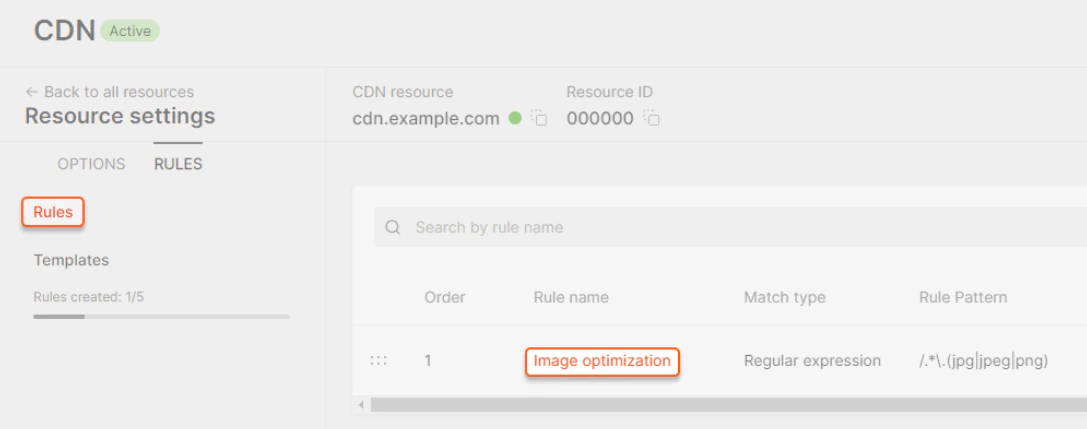
    <p>1. Navigate to **Rules** in the CDN resource and open the **Image optimization** rule.</p>

    <Frame>
      <img src="https://mintcdn.com/gcore/F7YE0r2TBLzG8llg/images/docs/cdn/cdn-resource-options/image-optimization-paid/image-stack-tools/configure-image-compression-to-webp-and-avif/configure-image-compression-image1.png?fit=max&auto=format&n=F7YE0r2TBLzG8llg&q=85&s=1e4591bd334ae2e485399771f488e2d6" alt="Rules list showing the Image optimization rule" width="70%" data-path="images/docs/cdn/cdn-resource-options/image-optimization-paid/image-stack-tools/configure-image-compression-to-webp-and-avif/configure-image-compression-image1.png" />
    </Frame>

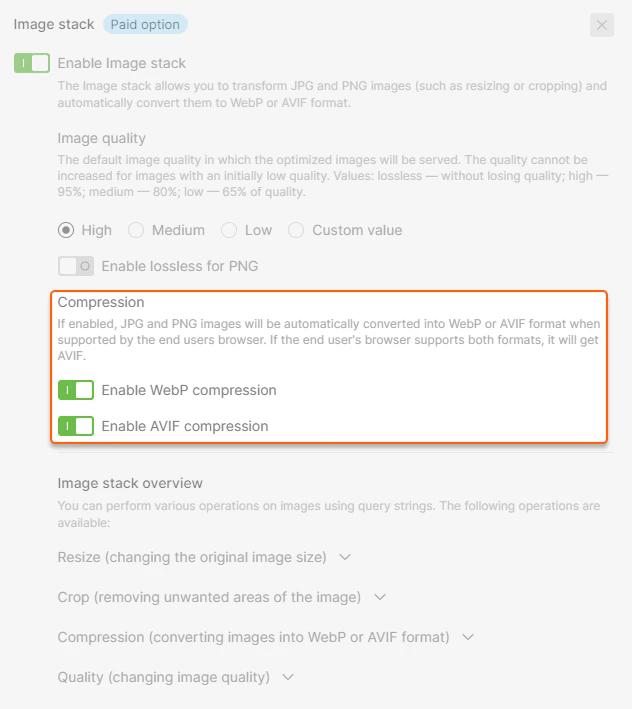
    <p>2. Select **Enable WebP compression** and/or **Enable AVIF compression**. When both are enabled, the format is chosen based on browser support — browsers that support both receive AVIF.</p>

    <Frame>
      <img src="https://mintcdn.com/gcore/F7YE0r2TBLzG8llg/images/docs/cdn/cdn-resource-options/image-optimization-paid/image-stack-tools/configure-image-compression-to-webp-and-avif/configure-image-compression-image2.png?fit=max&auto=format&n=F7YE0r2TBLzG8llg&q=85&s=e1cd17cf94ce246f7af3337cad774635" alt="Image Stack settings with Enable WebP compression and Enable AVIF compression checkboxes" width="70%" data-path="images/docs/cdn/cdn-resource-options/image-optimization-paid/image-stack-tools/configure-image-compression-to-webp-and-avif/configure-image-compression-image2.png" />
    </Frame>

    <p>3. Click **Save changes** at the top right of the page. Saving the Image Stack rule clears the resource cache, and CDN servers request the images from the origin. Enable [Origin Shielding](/cdn/cdn-resource-options/general/enable-and-configure-origin-shielding) first, or save the change during low-traffic hours.</p>

    <p>Images are served in WebP or AVIF format to supported browsers.</p>

    ### Use compression via query parameters

    <p>1. Open the website source code.</p>

    <p>2. Find the URLs of the images to convert.</p>

    <p>3. Add a query string to each image URL:</p>

    ```
    image.jpg?fmt=value
    ```

    <p>where `value` is one of:</p>

    * `webp` — converts to WebP format
    * `avif` — converts to AVIF format
    * `avif,webp` — converts to WebP or AVIF based on browser support: `image.jpg?fmt=avif,webp`

    <p>4. Save the changes. Images are served in the configured format.</p>

    ## Check HTTP headers

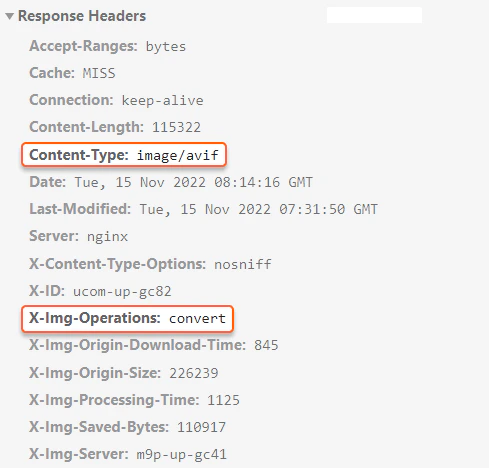
    <p>After converting, an image does not change its URL or extension. Use the HTTP response headers to verify the conversion.</p>

    <p>The `X-Img-Operations` header reflects all the conversions performed. If the value includes `convert`, the image format has been converted.</p>

    <p>The `Content-Type` header shows the compression format. The value `image/webp` or `image/avif` confirms the image is in the new format.</p>

    <Frame>
      <img src="https://mintcdn.com/gcore/jGvvbKmzzlO7ynHV/images/docs/cdn/cdn-resource-options/image-optimization-paid/image-stack-tools/configure-image-compression-to-webp-and-avif/11028965537425.png?fit=max&auto=format&n=jGvvbKmzzlO7ynHV&q=85&s=32ca773b8fead4da8bc420cdbcf4a139" alt="X-Img-Operations and Content-Type headers in a CDN response showing successful WebP conversion" width="70%" data-path="images/docs/cdn/cdn-resource-options/image-optimization-paid/image-stack-tools/configure-image-compression-to-webp-and-avif/11028965537425.png" />
    </Frame>

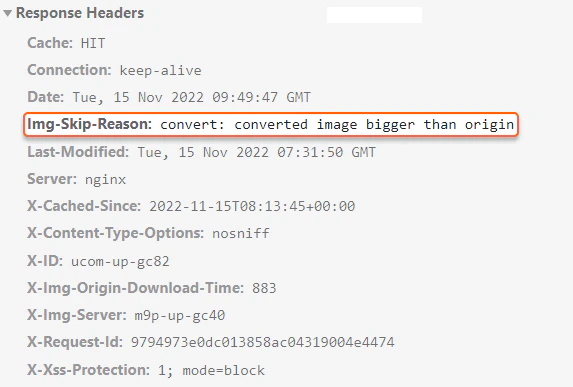
    <p>If the `X-Img-Operations` header contains no convert value and the CDN returns the original image, inspect the `Img-Skip-Reason` HTTP header for the skip reason. The value `converted image bigger than origin value` means the configured quality exceeds the source image quality — lower the quality setting in [Change image quality](/cdn/cdn-resource-options/image-optimization-paid/image-stack-tools/change-image-quality).</p>

    <Frame>
      <img src="https://mintcdn.com/gcore/jGvvbKmzzlO7ynHV/images/docs/cdn/cdn-resource-options/image-optimization-paid/image-stack-tools/configure-image-compression-to-webp-and-avif/11028973043857.png?fit=max&auto=format&n=jGvvbKmzzlO7ynHV&q=85&s=5148e2f0479ede4f2f47d24347887c0e" alt="Img-Skip-Reason header showing why the image conversion was skipped" width="70%" data-path="images/docs/cdn/cdn-resource-options/image-optimization-paid/image-stack-tools/configure-image-compression-to-webp-and-avif/11028973043857.png" />
    </Frame>
  </MethodSection>

  <MethodSection id="api" label="REST API">
    <p>Compression converts the pictures Gcore CDN delivers to WebP or AVIF. The choice is `webp_enabled` and `avif_enabled` on Image Stack, for images that match a rule, or an `fmt` query parameter on one image URL. Saving the rule clears the resource cache, including a later change to WebP or AVIF, and CDN servers request the images from the origin. Enable [Origin Shielding](/cdn/cdn-resource-options/general/enable-and-configure-origin-shielding) first, or make the change during low-traffic hours.</p>

    <Info>
      An [API token](/account-settings/api-tokens) is required. The CDN resource ID is the `id` from the [resources list](/api-reference/cdn/cdn-resources/list-cdn-resources) call.
    </Info>

    ```bash theme={null}
    export GCORE_API_KEY="{YOUR_API_KEY}"
    export CDN_RESOURCE_ID="{YOUR_CDN_RESOURCE_ID}"
    ```

    ## Set WebP and AVIF for image paths

    <p>A rule stores the compression choice for paths that match `/.*\.(jpg|jpeg|png)`. `ruleType` 0 is a regular expression and must start with `^/` or `/`.</p>

    <p>`enabled` is required. This call turns WebP and AVIF on, sets `quality` to 80, and leaves `png_lossless` off.</p>

    <p>A field left out of the request is stored as its default, so send every field that should stay set. The JSON field is `image_stack`; `imageStack` is ignored.</p>

    <Tabs>
      <Tab title="Python SDK">
        ```python theme={null}
        import os

        from gcore import Gcore

        client = Gcore()
        resource_id = int(os.environ["CDN_RESOURCE_ID"])

        rule = client.cdn.cdn_resources.rules.create(
            resource_id,
            name="image-compression",
            rule="/.*\\.(jpg|jpeg|png)",
            rule_type=0,
            options={
                "image_stack": {
                    "enabled": True,
                    "quality": 80,
                    "webp_enabled": True,
                    "avif_enabled": True,
                    "png_lossless": False,
                }
            },
        )
        saved = rule.options.image_stack
        print(rule.id, saved.enabled, saved.quality, saved.webp_enabled, saved.avif_enabled, saved.png_lossless)
        ```
      </Tab>

      <Tab title="Go SDK">
        ```go theme={null}
        package main

        import (
            "context"
            "fmt"
            "os"
            "strconv"

            gcore "github.com/G-Core/gcore-go"
            "github.com/G-Core/gcore-go/cdn"
        )

        func main() {
            client := gcore.NewClient()
            ctx := context.Background()
            resourceID, err := strconv.ParseInt(os.Getenv("CDN_RESOURCE_ID"), 10, 64)
            if err != nil {
                panic(err)
            }

            rule, err := client.CDN.CDNResources.Rules.New(ctx, resourceID, cdn.CDNResourceRuleNewParams{
                Name:     "image-compression",
                Rule:     "/.*\\.(jpg|jpeg|png)",
                RuleType: 0,
                Options: cdn.CDNResourceRuleNewParamsOptions{
                    ImageStack: cdn.CDNResourceRuleNewParamsOptionsImageStack{
                        Enabled:     true,
                        Quality:     gcore.Int(80),
                        WebpEnabled: gcore.Bool(true),
                        AvifEnabled: gcore.Bool(true),
                        PngLossless: gcore.Bool(false),
                    },
                },
            })
            if err != nil {
                panic(err)
            }
            saved := rule.Options.ImageStack
            fmt.Println(rule.ID, saved.Enabled, saved.Quality, saved.WebpEnabled, saved.AvifEnabled, saved.PngLossless)
        }
        ```
      </Tab>

      <Tab title="curl">
        ```bash theme={null}
        curl -X POST "https://api.gcore.com/cdn/resources/$CDN_RESOURCE_ID/rules" \
          -H "Authorization: APIKey $GCORE_API_KEY" \
          -H "Content-Type: application/json" \
          -d '{
            "name": "image-compression",
            "rule": "/.*\\.(jpg|jpeg|png)",
            "ruleType": 0,
            "options": {
              "image_stack": {
                "enabled": true,
                "quality": 80,
                "webp_enabled": true,
                "avif_enabled": true,
                "png_lossless": false
              }
            }
          }'
        ```

        <p>The API returns HTTP 201. The saved option is:</p>

        ```json theme={null}
        {
          "enabled": true,
          "avif_enabled": true,
          "webp_enabled": true,
          "quality": 80,
          "png_lossless": false
        }
        ```
      </Tab>
    </Tabs>

    <p>When both formats are on, a browser that accepts both receives AVIF. An omitted `quality` is stored as 95, and an omitted flag is stored as false.</p>

    ## Use WebP only

    <p>The rule ID is the `id` returned when the rule is created. Send the full `image_stack` object again. This call keeps WebP on and turns AVIF off.</p>

    ```bash theme={null}
    export CDN_RULE_ID="{YOUR_CDN_RULE_ID}"
    ```

    <Tabs>
      <Tab title="Python SDK">
        ```python theme={null}
        import os

        from gcore import Gcore

        client = Gcore()
        resource_id = int(os.environ["CDN_RESOURCE_ID"])
        rule_id = int(os.environ["CDN_RULE_ID"])

        updated = client.cdn.cdn_resources.rules.update(
            rule_id,
            resource_id=resource_id,
            options={
                "image_stack": {
                    "enabled": True,
                    "quality": 80,
                    "webp_enabled": True,
                    "avif_enabled": False,
                    "png_lossless": False,
                }
            },
        )
        saved = updated.options.image_stack
        print(saved.enabled, saved.quality, saved.webp_enabled, saved.avif_enabled, saved.png_lossless)
        ```
      </Tab>

      <Tab title="Go SDK">
        ```go theme={null}
        package main

        import (
            "context"
            "fmt"
            "os"
            "strconv"

            gcore "github.com/G-Core/gcore-go"
            "github.com/G-Core/gcore-go/cdn"
        )

        func main() {
            client := gcore.NewClient()
            ctx := context.Background()
            resourceID, err := strconv.ParseInt(os.Getenv("CDN_RESOURCE_ID"), 10, 64)
            if err != nil {
                panic(err)
            }
            ruleID, err := strconv.ParseInt(os.Getenv("CDN_RULE_ID"), 10, 64)
            if err != nil {
                panic(err)
            }

            updated, err := client.CDN.CDNResources.Rules.Update(ctx, ruleID, cdn.CDNResourceRuleUpdateParams{
                ResourceID: resourceID,
                Options: cdn.CDNResourceRuleUpdateParamsOptions{
                    ImageStack: cdn.CDNResourceRuleUpdateParamsOptionsImageStack{
                        Enabled:     true,
                        Quality:     gcore.Int(80),
                        WebpEnabled: gcore.Bool(true),
                        AvifEnabled: gcore.Bool(false),
                        PngLossless: gcore.Bool(false),
                    },
                },
            })
            if err != nil {
                panic(err)
            }
            saved := updated.Options.ImageStack
            fmt.Println(saved.Enabled, saved.Quality, saved.WebpEnabled, saved.AvifEnabled, saved.PngLossless)
        }
        ```
      </Tab>

      <Tab title="curl">
        ```bash theme={null}
        curl -X PATCH "https://api.gcore.com/cdn/resources/$CDN_RESOURCE_ID/rules/$CDN_RULE_ID" \
          -H "Authorization: APIKey $GCORE_API_KEY" \
          -H "Content-Type: application/json" \
          -d '{
            "options": {
              "image_stack": {
                "enabled": true,
                "quality": 80,
                "webp_enabled": true,
                "avif_enabled": false,
                "png_lossless": false
              }
            }
          }'
        ```

        <p>The API returns HTTP 200. The saved option is:</p>

        ```json theme={null}
        {
          "enabled": true,
          "avif_enabled": false,
          "webp_enabled": true,
          "quality": 80,
          "png_lossless": false
        }
        ```
      </Tab>
    </Tabs>

    ## Use AVIF only

    <p>Send the full `image_stack` object again. This call turns WebP off and turns AVIF on.</p>

    ```bash theme={null}
    export CDN_RULE_ID="{YOUR_CDN_RULE_ID}"
    ```

    <Tabs>
      <Tab title="Python SDK">
        ```python theme={null}
        import os

        from gcore import Gcore

        client = Gcore()
        resource_id = int(os.environ["CDN_RESOURCE_ID"])
        rule_id = int(os.environ["CDN_RULE_ID"])

        updated = client.cdn.cdn_resources.rules.update(
            rule_id,
            resource_id=resource_id,
            options={
                "image_stack": {
                    "enabled": True,
                    "quality": 80,
                    "webp_enabled": False,
                    "avif_enabled": True,
                    "png_lossless": False,
                }
            },
        )
        saved = updated.options.image_stack
        print(saved.enabled, saved.quality, saved.webp_enabled, saved.avif_enabled, saved.png_lossless)
        ```
      </Tab>

      <Tab title="Go SDK">
        ```go theme={null}
        package main

        import (
            "context"
            "fmt"
            "os"
            "strconv"

            gcore "github.com/G-Core/gcore-go"
            "github.com/G-Core/gcore-go/cdn"
        )

        func main() {
            client := gcore.NewClient()
            ctx := context.Background()
            resourceID, err := strconv.ParseInt(os.Getenv("CDN_RESOURCE_ID"), 10, 64)
            if err != nil {
                panic(err)
            }
            ruleID, err := strconv.ParseInt(os.Getenv("CDN_RULE_ID"), 10, 64)
            if err != nil {
                panic(err)
            }

            updated, err := client.CDN.CDNResources.Rules.Update(ctx, ruleID, cdn.CDNResourceRuleUpdateParams{
                ResourceID: resourceID,
                Options: cdn.CDNResourceRuleUpdateParamsOptions{
                    ImageStack: cdn.CDNResourceRuleUpdateParamsOptionsImageStack{
                        Enabled:     true,
                        Quality:     gcore.Int(80),
                        WebpEnabled: gcore.Bool(false),
                        AvifEnabled: gcore.Bool(true),
                        PngLossless: gcore.Bool(false),
                    },
                },
            })
            if err != nil {
                panic(err)
            }
            saved := updated.Options.ImageStack
            fmt.Println(saved.Enabled, saved.Quality, saved.WebpEnabled, saved.AvifEnabled, saved.PngLossless)
        }
        ```
      </Tab>

      <Tab title="curl">
        ```bash theme={null}
        curl -X PATCH "https://api.gcore.com/cdn/resources/$CDN_RESOURCE_ID/rules/$CDN_RULE_ID" \
          -H "Authorization: APIKey $GCORE_API_KEY" \
          -H "Content-Type: application/json" \
          -d '{
            "options": {
              "image_stack": {
                "enabled": true,
                "quality": 80,
                "webp_enabled": false,
                "avif_enabled": true,
                "png_lossless": false
              }
            }
          }'
        ```

        <p>The API returns HTTP 200. The saved option is:</p>

        ```json theme={null}
        {
          "enabled": true,
          "avif_enabled": true,
          "webp_enabled": false,
          "quality": 80,
          "png_lossless": false
        }
        ```
      </Tab>
    </Tabs>

    ## Set the format on one image URL

    <p>`fmt` is not an API field. A `fmt` key inside `image_stack` is not stored. Add `fmt` to the image URL:</p>

    ```
    image.jpg?fmt=webp
    image.jpg?fmt=avif
    image.jpg?fmt=avif,webp
    ```

    <p>`webp` converts the image to WebP. `avif` converts it to AVIF. `avif,webp` follows browser support, and a browser that accepts both receives AVIF.</p>

    ## Check the delivered image

    <p>After converting, the image URL and file extension stay the same. The `X-Img-Operations` header lists the conversions. If the value includes `convert`, the image format changed. `Content-Type` is `image/webp` or `image/avif` for the new format.</p>

    <p>If `X-Img-Operations` does not contain `convert` and the CDN returns the original image, the `Img-Skip-Reason` header explains the skip. The value `converted image bigger than origin value` means the configured quality is higher than the original image quality.</p>
  </MethodSection>

  <MethodSection id="terraform" label="Terraform">
    <p>Compression converts the pictures Gcore CDN delivers to WebP or AVIF. The choice is `webp_enabled` and `avif_enabled` on Image Stack for paths that match a rule, or an `fmt` query parameter on one image URL. Saving the rule clears the resource cache, including a later change to WebP or AVIF, and CDN servers request the images from the origin. Enable [Origin Shielding](/cdn/cdn-resource-options/general/enable-and-configure-origin-shielding) first, or apply the change during low-traffic hours. Declare the rule with the [Terraform provider](/developer-tools/terraform/overview) v2.</p>

    <p>`image_stack` has no `fmt` argument. An `fmt` key in that object is left out of the saved option. Add `fmt` to the image URL. When both formats are on, a browser that accepts both receives AVIF.</p>

    ## Set WebP and AVIF for image paths

    <p>A rule stores the compression choice for paths that match `/.*\.(jpg|jpeg|png)`. `rule_type` 0 is a regular expression and must start with `^/` or `/`. Set `enabled`, `quality` to 80, WebP on, AVIF on, and `png_lossless` off, then run `terraform apply`. A field left out of the object is stored as its default, so an omitted `quality` becomes 95 and omitted flags become false.</p>

    ```hcl theme={null}
    resource "gcore_cdn_origin_group" "example" {
      name = "my-origin-group"

      sources = [
        {
          source  = "example.com"
          enabled = true
        }
      ]
    }

    resource "gcore_cdn_resource" "example" {
      cname           = "cdn.example.com"
      origin_group    = gcore_cdn_origin_group.example.id
      origin_protocol = "HTTPS"
    }

    resource "gcore_cdn_resource_rule" "images" {
      resource_id = gcore_cdn_resource.example.id
      name        = "image-compression"
      rule        = "/.*\\.(jpg|jpeg|png)"
      rule_type   = 0

      options = {
        image_stack = {
          enabled      = true
          quality      = 80
          webp_enabled = true
          avif_enabled = true
          png_lossless = false
        }
      }
    }
    ```

    ## Use WebP only

    <p>Edit the same object and run `terraform apply`. This configuration keeps WebP on and turns AVIF off. Keep every field that should stay set, because a field left out is stored as its default.</p>

    ```hcl theme={null}
    resource "gcore_cdn_origin_group" "example" {
      name = "my-origin-group"

      sources = [
        {
          source  = "example.com"
          enabled = true
        }
      ]
    }

    resource "gcore_cdn_resource" "example" {
      cname           = "cdn.example.com"
      origin_group    = gcore_cdn_origin_group.example.id
      origin_protocol = "HTTPS"
    }

    resource "gcore_cdn_resource_rule" "images" {
      resource_id = gcore_cdn_resource.example.id
      name        = "image-compression"
      rule        = "/.*\\.(jpg|jpeg|png)"
      rule_type   = 0

      options = {
        image_stack = {
          enabled      = true
          quality      = 80
          webp_enabled = true
          avif_enabled = false
          png_lossless = false
        }
      }
    }
    ```

    ## Use AVIF only

    <p>Edit the same object and run `terraform apply`. This configuration turns WebP off and turns AVIF on.</p>

    ```hcl theme={null}
    resource "gcore_cdn_origin_group" "example" {
      name = "my-origin-group"

      sources = [
        {
          source  = "example.com"
          enabled = true
        }
      ]
    }

    resource "gcore_cdn_resource" "example" {
      cname           = "cdn.example.com"
      origin_group    = gcore_cdn_origin_group.example.id
      origin_protocol = "HTTPS"
    }

    resource "gcore_cdn_resource_rule" "images" {
      resource_id = gcore_cdn_resource.example.id
      name        = "image-compression"
      rule        = "/.*\\.(jpg|jpeg|png)"
      rule_type   = 0

      options = {
        image_stack = {
          enabled      = true
          quality      = 80
          webp_enabled = false
          avif_enabled = true
          png_lossless = false
        }
      }
    }
    ```

    ## Set the format on one image URL

    <p>`fmt` is not a Terraform field. Add it to the image URL:</p>

    ```
    image.jpg?fmt=webp
    image.jpg?fmt=avif
    image.jpg?fmt=avif,webp
    ```

    <p>`webp` converts the image to WebP. `avif` converts it to AVIF. `avif,webp` follows browser support, and a browser that accepts both receives AVIF.</p>

    ## Check the delivered image

    <p>After converting, the image URL and file extension stay the same. The `X-Img-Operations` header lists the conversions. If the value includes `convert`, the image format changed. `Content-Type` is `image/webp` or `image/avif` for the new format.</p>

    <p>If `X-Img-Operations` does not contain `convert` and the CDN returns the original image, the `Img-Skip-Reason` header explains the skip. The value `converted image bigger than origin value` means the configured quality is higher than the original image quality.</p>
  </MethodSection>
</MethodSwitch>