> ## Documentation Index
> Fetch the complete documentation index at: https://docs.gcore.com/llms.txt
> Use this file to discover all available pages before exploring further.
# Query String Forwarding: forward parameters to sub-requests
## Overview
**Query String Forwarding** copies selected query string parameters from a parent file request to nested file requests. It is mainly used for HLS and MPEG-DASH video, where a viewer requests a master manifest first, and that manifest references rendition manifests, media segments, subtitles, or other related files.
For example, a viewer can request a protected HLS master manifest with a secure token:
```text theme={null}
http://demo-files-protected.gvideo.io/coffee_run/master.m3u8?expires=1893456000&md5=eBx15p01_a9JNuo1iZpTfQ
```
Without this option, nested manifests and segments in the manifest body are transferred as is, meaning they don't have query string parameters:
```text theme={null}
manifest.m3u8?expires=1893456000&md5=eBx15p01_a9JNuo1iZpTfQ
index720.m3u8 <= as is, without token parameters
chunk720-1.ts <= as is, without token parameters
```
When `Query String Forwarding` is enabled, the CDN automatically inserts the parameters from the initial request into nested manifests and segments. For example, for Secure Token, the `md5` and `expires` parameters are forwarded:
```text theme={null}
manifest.m3u8?expires=1893456000&md5=eBx15p01_a9JNuo1iZpTfQ
index720.m3u8?expires=1893456000&md5=eBx15p01_a9JNuo1iZpTfQ
chunk720-1.ts?expires=1893456000&md5=eBx15p01_a9JNuo1iZpTfQ
```
Example with enabled Query String Forwarding:
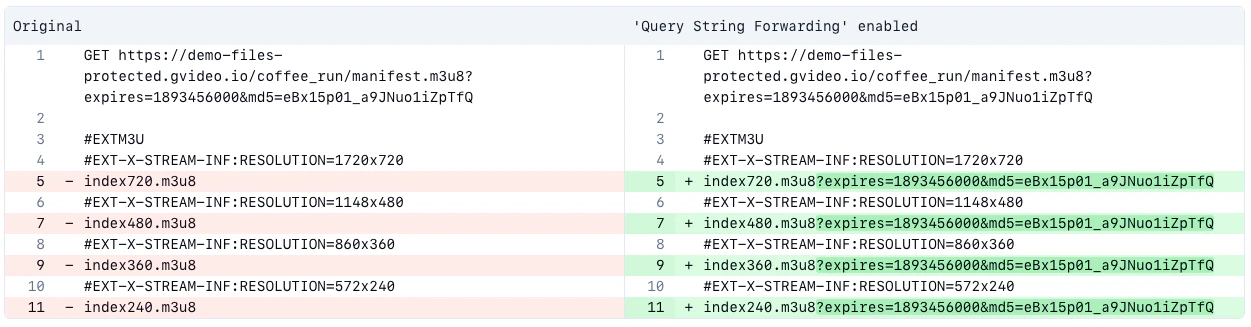 A video player requests only the main manifest and receives a modified version with security parameters already included in all internal links:
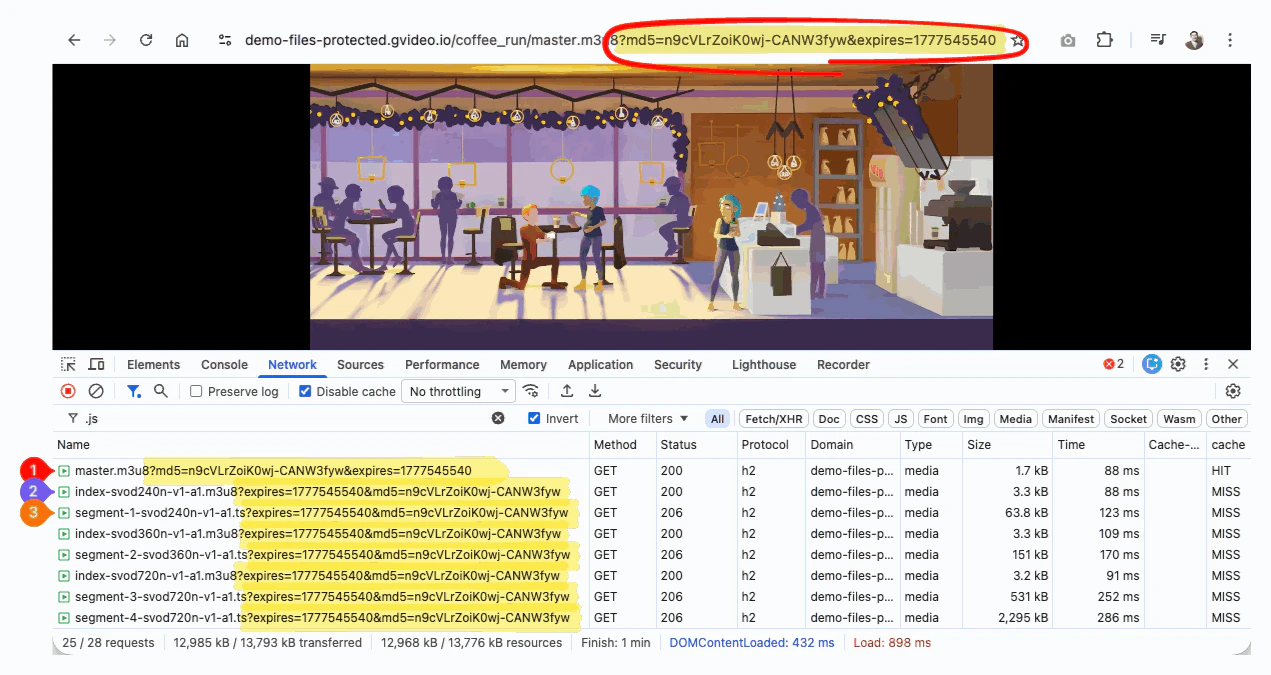
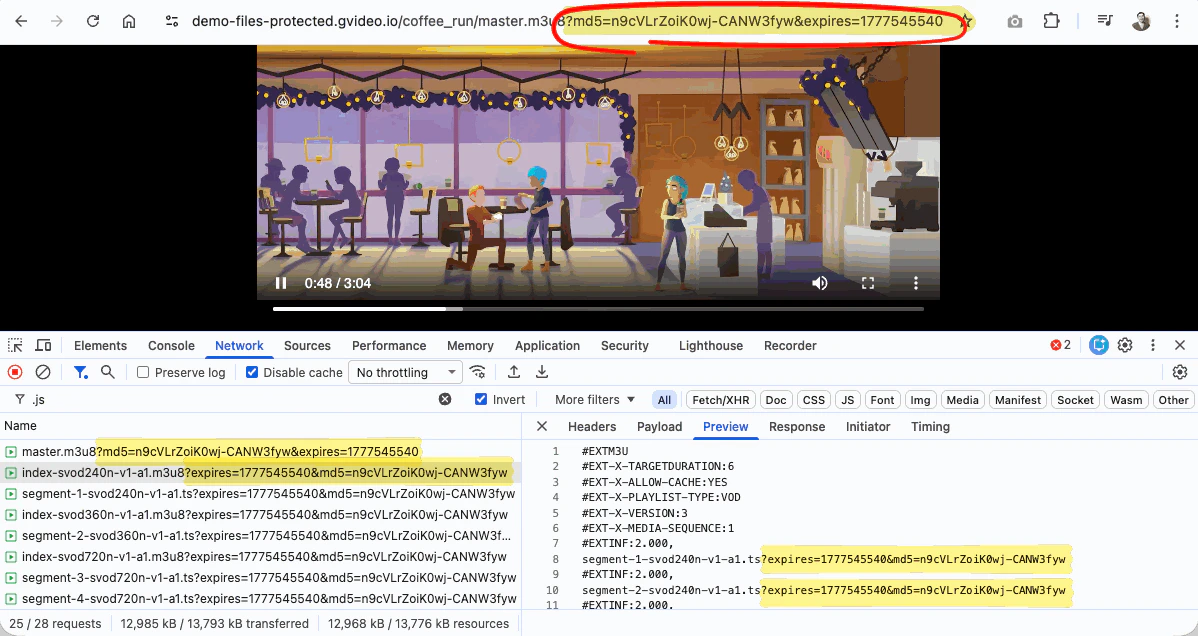 As the result, the video player doesn't need to operate with tokens for each file, as it reads data from modified manifests instead.
 ## Configure in the Customer Portal
To configure Query String Forwarding in the Gcore Customer Portal:
1. Go to **CDN** and select the CDN resource you want to configure.
2. In the sidebar, under the **Content** section, click **Query String Forwarding**.
## Configure in the Customer Portal
To configure Query String Forwarding in the Gcore Customer Portal:
1. Go to **CDN** and select the CDN resource you want to configure.
2. In the sidebar, under the **Content** section, click **Query String Forwarding**.
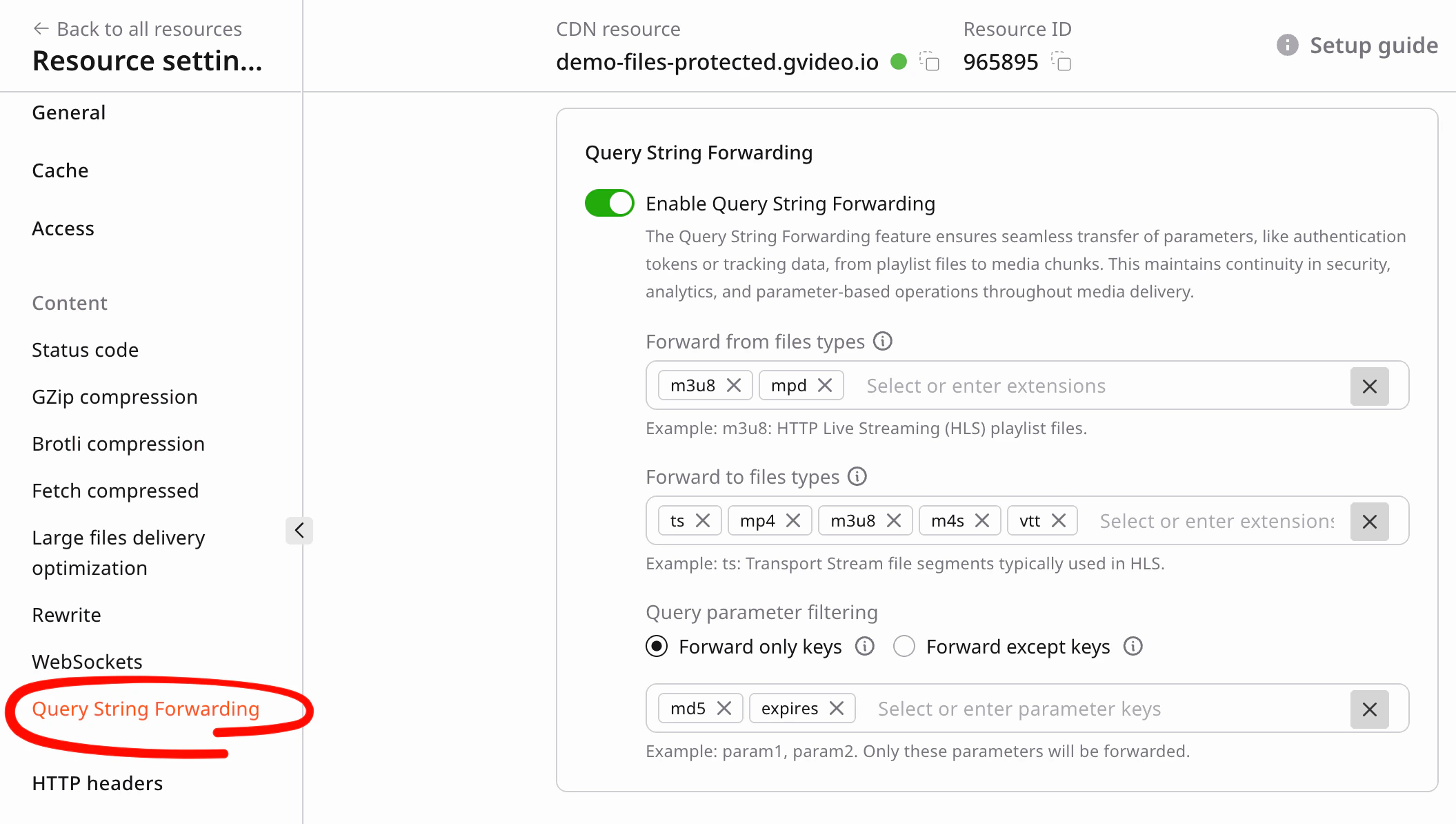 3. Enable the option.
4. Apply settings (example for HLS/DASH video):
* **Forward from file types**: add `m3u8`, `mpd`, or any others.
* **Forward to file types**: add `ts`, `mp4`, `m3u8`, `m4s`, `vtt`, or any others.
* **Forward only keys**: add `md5`, `expires`, or any others.
5. Save the CDN resource.
## Configure by API
Use the same values when updating a CDN resource by API.
When automating CDN resource setup, enable Query String Forwarding and pass this JSON object in the CDN resource update payload:
```json theme={null}
{
"enabled": true,
"forward_from_file_types": [
"m3u8",
"mpd"
],
"forward_to_file_types": [
"ts",
"mp4",
"m3u8",
"m4s",
"vtt"
],
"forward_only_keys": [
"md5",
"expires"
]
}
```
## Demo links
Use these links to check how Query String Forwarding work with a real ABR stream:
* Manifest URL: [master.m3u8](http://demo-files-protected.gvideo.io/coffee_run/master.m3u8?md5=eBx15p01_a9JNuo1iZpTfQ\&expires=1893456000\&other=parameter)
* hls.js player demo: [open protected HLS stream](https://hlsjs.video-dev.org/demo/?src=https%3A%2F%2Fdemo-files-protected.gvideo.io%2Fcoffee_run%2Fmaster.m3u8%3Fmd5%3DeBx15p01_a9JNuo1iZpTfQ%26expires%3D1893456000%26other%3Dparameter)
* MPEG-DASH manifest URL: [master.mpd](https://demo-files-protected.gvideo.io/coffee_run/master.mpd?md5=eBx15p01_a9JNuo1iZpTfQ\&expires=1893456000\&other=parameter)
* dash.js player demo: [open protected MPEG-DASH stream](https://reference.dashif.org/dash.js/nightly/samples/dash-if-reference-player/index.html?autoplay=true\&loop=true\&stream=https%3A%2F%2Fdemo-files-protected.gvideo.io%2Fcoffee_run%2Fmaster.mpd%3Fmd5%3DeBx15p01_a9JNuo1iZpTfQ%26expires%3D1893456000%26other%3Dparameter)
Links to demo files are valid until January 1, 2030.
## Recommended settings for HLS and MPEG-DASH
For video-specific setup, recommended file types, and Secure Token path rules, see [Secure token for video](/cdn/video-cdn/secure-token#recommended-settings-for-hls-and-mpeg-dash).
3. Enable the option.
4. Apply settings (example for HLS/DASH video):
* **Forward from file types**: add `m3u8`, `mpd`, or any others.
* **Forward to file types**: add `ts`, `mp4`, `m3u8`, `m4s`, `vtt`, or any others.
* **Forward only keys**: add `md5`, `expires`, or any others.
5. Save the CDN resource.
## Configure by API
Use the same values when updating a CDN resource by API.
When automating CDN resource setup, enable Query String Forwarding and pass this JSON object in the CDN resource update payload:
```json theme={null}
{
"enabled": true,
"forward_from_file_types": [
"m3u8",
"mpd"
],
"forward_to_file_types": [
"ts",
"mp4",
"m3u8",
"m4s",
"vtt"
],
"forward_only_keys": [
"md5",
"expires"
]
}
```
## Demo links
Use these links to check how Query String Forwarding work with a real ABR stream:
* Manifest URL: [master.m3u8](http://demo-files-protected.gvideo.io/coffee_run/master.m3u8?md5=eBx15p01_a9JNuo1iZpTfQ\&expires=1893456000\&other=parameter)
* hls.js player demo: [open protected HLS stream](https://hlsjs.video-dev.org/demo/?src=https%3A%2F%2Fdemo-files-protected.gvideo.io%2Fcoffee_run%2Fmaster.m3u8%3Fmd5%3DeBx15p01_a9JNuo1iZpTfQ%26expires%3D1893456000%26other%3Dparameter)
* MPEG-DASH manifest URL: [master.mpd](https://demo-files-protected.gvideo.io/coffee_run/master.mpd?md5=eBx15p01_a9JNuo1iZpTfQ\&expires=1893456000\&other=parameter)
* dash.js player demo: [open protected MPEG-DASH stream](https://reference.dashif.org/dash.js/nightly/samples/dash-if-reference-player/index.html?autoplay=true\&loop=true\&stream=https%3A%2F%2Fdemo-files-protected.gvideo.io%2Fcoffee_run%2Fmaster.mpd%3Fmd5%3DeBx15p01_a9JNuo1iZpTfQ%26expires%3D1893456000%26other%3Dparameter)
Links to demo files are valid until January 1, 2030.
## Recommended settings for HLS and MPEG-DASH
For video-specific setup, recommended file types, and Secure Token path rules, see [Secure token for video](/cdn/video-cdn/secure-token#recommended-settings-for-hls-and-mpeg-dash).