> ## Documentation Index
> Fetch the complete documentation index at: https://docs.gcore.com/llms.txt
> Use this file to discover all available pages before exploring further.
# Configure and use secure token
## Configure secure token
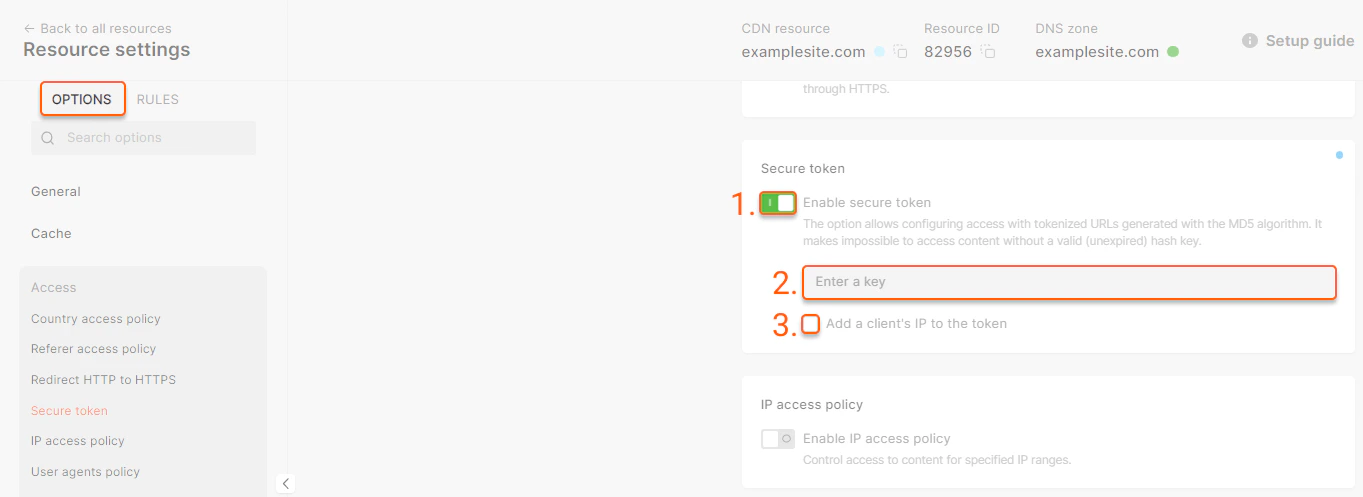
Do the first three steps in Gcore Customer Portal on the **Secure token** tab.
1\. Enable the **Secure token** option in the resource settings.
2\. Enter a key that contains between 6 and 32 characters.
3\. If you want your content to be accessible from any IP address, leave the **Add a client's IP to the token** unchecked. If you want to make your content available only from one IP, check the checkbox (you will specify the allowlisted IP address later at Step 4).
4\. Do this step on your origin server. Insert a script on your website which generates secure links. The generated links should look like as below:
Where:
* `http://cdn.example.com/photo.jpeg` is the path to the file,
* `DMF1ucDxtHCxwYQ` is the output of the "MD5(String)" hash function, where *String* is the parameter obtained by merging elements: ``,
* `2147483647` is the time in the UNIX timestamp format until which the link is considered valid.
We have prepared script templates for PHP, Python, and OpenSSL — just copy one of them from the [Scripts for link generation](/cdn/cdn-resource-options/security/use-a-secure-token/configure-and-use-secure-token#scripts-for-link-generation) section below. The script will start creating secure links to the content.
5\. Do this step on your origin server. Arrange the content on your website to allow access to the protected files only over a secured link — that is, rule out the delivery of the required content over a link without a secure token.
Moreover, make sure our CDN can access the content on your origin server regardless of whether a key is present or not.
**Warning**
After enabling the secure token option, the cache hit ratio may decrease; to improve it, we recommend enabling the [Ignore Query String](/cdn/cdn-resource-options/cache/ignore-the-set-cookie-or-query-string-parameters-when-caching-content-on-cdn-servers#query-string-setting) option, which treats objects with different query parameters as a single cacheable object instead of multiple separate ones.
## How secure token URL matching works
Secure Token validates three things from the request URL:
* `md5`: the token hash.
* `expires`: the Unix timestamp until which the URL is valid.
* Path: the file path or directory path that was used when the token was generated.
The path is important. The CDN validates the token against the path used in the hash string. If the token was generated for an exact file, it works only for that file. If the token was generated for a directory and Query String Forwarding is enabled, it can work for files inside that directory and pass the same query parameters to related HLS or MPEG-DASH files.
### Token for exact file
Use an exact file token for standalone files such as images, archives, MP4 files or one protected video manifest when you do not need to authorize nested requests with the same token.
Example protected file:
```text theme={null}
/images/poster.jpeg
```
Generate the token with this path:
```text theme={null}
/images/poster.jpeg
```
The user requests:
```text theme={null}
https://cdn.example.com/images/poster.jpeg?md5=TOKEN&expires=1777545540
```
This token is valid only for `/images/poster.jpeg`. This token does not provide access to adjacent files, for example:
```text theme={null}
https://cdn.example.com/images/poster.webp 403 Forbidden
https://cdn.example.com/images/poster.png 403 Forbidden
https://cdn.example.com/images/master.m3u8 403 Forbidden
```
### Token with Query String Forwarding
Use a token with Query String Forwarding enabled for HLS and MPEG-DASH when the player must request a master manifest, nested rendition manifests, media segments, and subtitles under the same path.
In this mode, do not include a filename in token generation. Generate the token for the full directory path only. For example, for files in:
```text theme={null}
/videos/video-1/
```
use this path in the token generation script:
For PHP:
```php theme={null}
$path = '/videos/video-1/';
```
For Python:
```py theme={null}
path = /videos/video-1/"
```
This token works only for files directly inside `/videos/video-1/`. It does not work for files in subdirectories such as `/videos/video-1/360p/`. If your HLS or MPEG-DASH files are split across subdirectories, generate and use tokens for those directories separately or place the related manifests and segments under one directory.
Example HLS files:
```text theme={null}
/videos/video-1/master.m3u8
/videos/video-1/rendition-1080.m3u8
/videos/video-1/segment-001.ts
/videos/video-1/segment-002.ts
```
Generate the token with the directory path:
```text theme={null}
/videos/video-1/
```
The user requests only the master manifest with the token:
```text theme={null}
https://cdn.example.com/videos/video-1/master.m3u8?md5=TOKEN&expires=1893456000
```
With [Query String Forwarding](/cdn/cdn-resource-options/query-string-forwarding) enabled, the CDN automatically inserts the same query parameters into related manifest body links. The video player then requests nested files with the forwarded token:
```text theme={null}
https://cdn.example.com/videos/video-1/rendition-1080.m3u8?md5=TOKEN&expires=1893456000
https://cdn.example.com/videos/video-1/segment-001.ts?md5=TOKEN&expires=1893456000
https://cdn.example.com/videos/video-1/segment-002.ts?md5=TOKEN&expires=1893456000
```
For HLS and MPEG-DASH, configure a CDN-resource to use Query String Forwarding with:
```json theme={null}
{
"forward_from_file_types": [
"m3u8",
"mpd"
],
"forward_to_file_types": [
"ts",
"mp4",
"m3u8",
"m4s",
"vtt"
],
"forward_only_keys": [
"md5",
"expires"
]
}
```
To check how Query String Forwarding works in real life, open this demo HLS manifest:
* manifest URL: [master.m3u8](http://demo-files-protected.gvideo.io/coffee_run/master.m3u8?md5=eBx15p01_a9JNuo1iZpTfQ\&expires=1893456000\&other=parameter)
* hls.js player demo: [master.m3u8](https://hlsjs.video-dev.org/demo/?src=https%3A%2F%2Fdemo-files-protected.gvideo.io%2Fcoffee_run%2Fmasterm3u8%3Fmd5%3DeBx15p01_a9JNuo1iZpTfQ%26expires%3D1893456000%26other%3Dparameter)
It will open the master file with nested files (note that \&other=parameter is not forwarded):
```
http://demo-files-protected.gvideo.io/coffee_run/master.m3u8?md5=eBx15p01_a9JNuo1iZpTfQ&expires=1893456000&other=parameter
http://demo-files-protected.gvideo.io/coffee_run/index-svod720n-v1-a1.m3u8?expires=1893456000&md5=eBx15p01_a9JNuo1iZpTfQ
http://demo-files-protected.gvideo.io/coffee_run/segment-1-svod720n-v1-a1.ts?expires=1893456000&md5=eBx15p01_a9JNuo1iZpTfQ
http://demo-files-protected.gvideo.io/coffee_run/segment-2-svod720n-v1-a1.ts?expires=1893456000&md5=eBx15p01_a9JNuo1iZpTfQ
```
### Token in a path
Tokens embedded into the URL path are not supported for now by CDN natively. This option is available for [Gcore Video Streaming](/streaming/interaction-with-cdn/video-secure-token):
```text theme={null}
https://cdn.example.com/secure/TOKEN/1777545540/coffee_run/master.m3u8
https://cdn.example.com/secure/TOKEN/1777545540/coffee_run/rendition-1080.m3u8
https://cdn.example.com/secure/TOKEN/1777545540/coffee_run/segment-001.ts
```
Example of token in path for Gcore Video Streaming:
```text theme={null}
https://demo-protected.gvideo.io/videos/2675_pG8TfmKx2LU2qs/rI1224fiE3USCa8qYnMuGQ/1861919999/master.m3u8
```
Where:
* `https://demo-protected.gvideo.io` is the CDN URL,
* `/videos/2675_pG8TfmKx2LU2qs/` is the video ID,
* `rI1224fiE3USCa8qYnMuGQ` is the token,
* `1861919999` is the expiration time in the UNIX timestamp format until which the link is considered valid.
## Scripts for link generation
### Generate links with a secure token in PHP
Below is the script for creating temporary links with the IP-based access restriction. The files will be accessible only from an allowlisted IP address and only until the link expires.
```php theme={null}
Where:
* *[http://cdn.example.com/photo.jpeg](http://cdn.example.com/photo.jpeg)* is the path to the file,
* *DMF1ucDxtHCxwYQ* is a secure token,
* *2147483647* is the time in the UNIX timestamp format until which the link is considered valid.
## IP binding and mobile networks
When you bind a secure token to the client's IP address, the CDN recomputes the hash using the IP address it sees on the incoming request.
This becomes a problem on some mobile networks. In certain countries, mobile ISPs change a subscriber's public IP address very aggressively — sometimes within minutes — because they route many subscribers through carrier-grade NAT (CGNAT) and rotate addresses across a pool. A token signed for one IP fails as soon as the carrier moves the user to another.
The effect is most visible with [Query String Forwarding](/cdn/cdn-resource-options/query-string-forwarding) for video. The player requests the manifest, gets a token, and the token is forwarded to the related sub-segments. If the mobile ISP switches the client IP between requests, the next segment is downloaded from a different IP and returns `403`, while earlier segments returned `200`. So a single user can receive `200` and `403` responses almost simultaneously, and this is a strong indicator that the cause is mobile IP rotation rather than an expired or malformed token.
If you observe this pattern — `200` and `403` mixed together for the same user on a mobile network — we can change the default token behavior from binding to a dedicated IP to binding to a wider subnet mask, such as `/24` or even `/16` for very aggressive mobile operators. A wider mask still ties the URL to the user's ISP block (so external sharing and hotlinking remain blocked) while tolerating IP rotation within that block.
This option is available for Enterprise customers. To enable it, contact our [support team](https://gcore.com/support) or your account manager.
 1\. Enable the **Secure token** option in the resource settings.
2\. Enter a key that contains between 6 and 32 characters.
3\. If you want your content to be accessible from any IP address, leave the **Add a client's IP to the token** unchecked. If you want to make your content available only from one IP, check the checkbox (you will specify the allowlisted IP address later at Step 4).
4\. Do this step on your origin server. Insert a script on your website which generates secure links. The generated links should look like as below:
1\. Enable the **Secure token** option in the resource settings.
2\. Enter a key that contains between 6 and 32 characters.
3\. If you want your content to be accessible from any IP address, leave the **Add a client's IP to the token** unchecked. If you want to make your content available only from one IP, check the checkbox (you will specify the allowlisted IP address later at Step 4).
4\. Do this step on your origin server. Insert a script on your website which generates secure links. The generated links should look like as below:
 Where:
* *[http://cdn.example.com/photo.jpeg](http://cdn.example.com/photo.jpeg)* is the path to the file,
* *DMF1ucDxtHCxwYQ* is a secure token,
* *2147483647* is the time in the UNIX timestamp format until which the link is considered valid.
## IP binding and mobile networks
When you bind a secure token to the client's IP address, the CDN recomputes the hash using the IP address it sees on the incoming request.
This becomes a problem on some mobile networks. In certain countries, mobile ISPs change a subscriber's public IP address very aggressively — sometimes within minutes — because they route many subscribers through carrier-grade NAT (CGNAT) and rotate addresses across a pool. A token signed for one IP fails as soon as the carrier moves the user to another.
The effect is most visible with [Query String Forwarding](/cdn/cdn-resource-options/query-string-forwarding) for video. The player requests the manifest, gets a token, and the token is forwarded to the related sub-segments. If the mobile ISP switches the client IP between requests, the next segment is downloaded from a different IP and returns `403`, while earlier segments returned `200`. So a single user can receive `200` and `403` responses almost simultaneously, and this is a strong indicator that the cause is mobile IP rotation rather than an expired or malformed token.
If you observe this pattern — `200` and `403` mixed together for the same user on a mobile network — we can change the default token behavior from binding to a dedicated IP to binding to a wider subnet mask, such as `/24` or even `/16` for very aggressive mobile operators. A wider mask still ties the URL to the user's ISP block (so external sharing and hotlinking remain blocked) while tolerating IP rotation within that block.
This option is available for Enterprise customers. To enable it, contact our [support team](https://gcore.com/support) or your account manager.
Where:
* *[http://cdn.example.com/photo.jpeg](http://cdn.example.com/photo.jpeg)* is the path to the file,
* *DMF1ucDxtHCxwYQ* is a secure token,
* *2147483647* is the time in the UNIX timestamp format until which the link is considered valid.
## IP binding and mobile networks
When you bind a secure token to the client's IP address, the CDN recomputes the hash using the IP address it sees on the incoming request.
This becomes a problem on some mobile networks. In certain countries, mobile ISPs change a subscriber's public IP address very aggressively — sometimes within minutes — because they route many subscribers through carrier-grade NAT (CGNAT) and rotate addresses across a pool. A token signed for one IP fails as soon as the carrier moves the user to another.
The effect is most visible with [Query String Forwarding](/cdn/cdn-resource-options/query-string-forwarding) for video. The player requests the manifest, gets a token, and the token is forwarded to the related sub-segments. If the mobile ISP switches the client IP between requests, the next segment is downloaded from a different IP and returns `403`, while earlier segments returned `200`. So a single user can receive `200` and `403` responses almost simultaneously, and this is a strong indicator that the cause is mobile IP rotation rather than an expired or malformed token.
If you observe this pattern — `200` and `403` mixed together for the same user on a mobile network — we can change the default token behavior from binding to a dedicated IP to binding to a wider subnet mask, such as `/24` or even `/16` for very aggressive mobile operators. A wider mask still ties the URL to the user's ISP block (so external sharing and hotlinking remain blocked) while tolerating IP rotation within that block.
This option is available for Enterprise customers. To enable it, contact our [support team](https://gcore.com/support) or your account manager.