> ## Documentation Index
> Fetch the complete documentation index at: https://docs.gcore.com/llms.txt
> Use this file to discover all available pages before exploring further.

# Manage containers

export const MethodSection = ({children}) => children ?? null;

export const MethodSwitch = ({children}) => {
  const tabs = React.Children.toArray(children).map(c => {
    if (!c || !c.props) return null;
    if (c.props.id) return c;
    const inner = c.props.children;
    if (inner && inner.props && inner.props.id) return inner;
    return null;
  }).filter(Boolean);
  const firstId = tabs.length > 0 ? tabs[0].props.id : "";
  const [active, setActive] = React.useState(firstId);
  React.useEffect(() => {
    try {
      const saved = localStorage.getItem("gcore_docs_method");
      if (saved && tabs.find(t => t.props.id === saved)) {
        setActive(saved);
      }
    } catch (_) {}
  }, []);
  React.useEffect(() => {
    try {
      document.querySelectorAll("h2[id], h3[id]").forEach(heading => {
        const visible = heading.offsetParent !== null;
        document.querySelectorAll(`a[href="#${heading.id}"]`).forEach(link => {
          if (link.closest("h1,h2,h3,h4,h5,h6")) return;
          const li = link.closest("li");
          if (li) li.style.display = visible ? "" : "none";
        });
      });
    } catch (_) {}
    window.dispatchEvent(new Event("scroll"));
  }, [active]);
  const handleClick = id => {
    setActive(id);
    try {
      localStorage.setItem("gcore_docs_method", id);
    } catch (_) {}
  };
  return <div>
      <div className="not-prose flex gap-0 border-b border-zinc-200 dark:border-zinc-800 mb-8 mt-2" role="tablist">
        {tabs.map(tab => {
    const isActive = active === tab.props.id;
    return <button key={tab.props.id} role="tab" aria-selected={isActive} onClick={() => handleClick(tab.props.id)} className={["px-4 py-2 text-sm font-medium border-b-2 -mb-px transition-colors cursor-pointer", isActive ? "border-primary text-primary" : "border-transparent text-zinc-500 hover:text-zinc-800 dark:hover:text-zinc-200"].join(" ")}>
              {tab.props.label}
            </button>;
  })}
      </div>

      {tabs.map(tab => <div key={tab.props.id} style={{
    display: active === tab.props.id ? "" : "none"
  }}>
          {tab.props.children}
        </div>)}
    </div>;
};

<MethodSwitch>
  <MethodSection id="portal" label="Customer Portal">
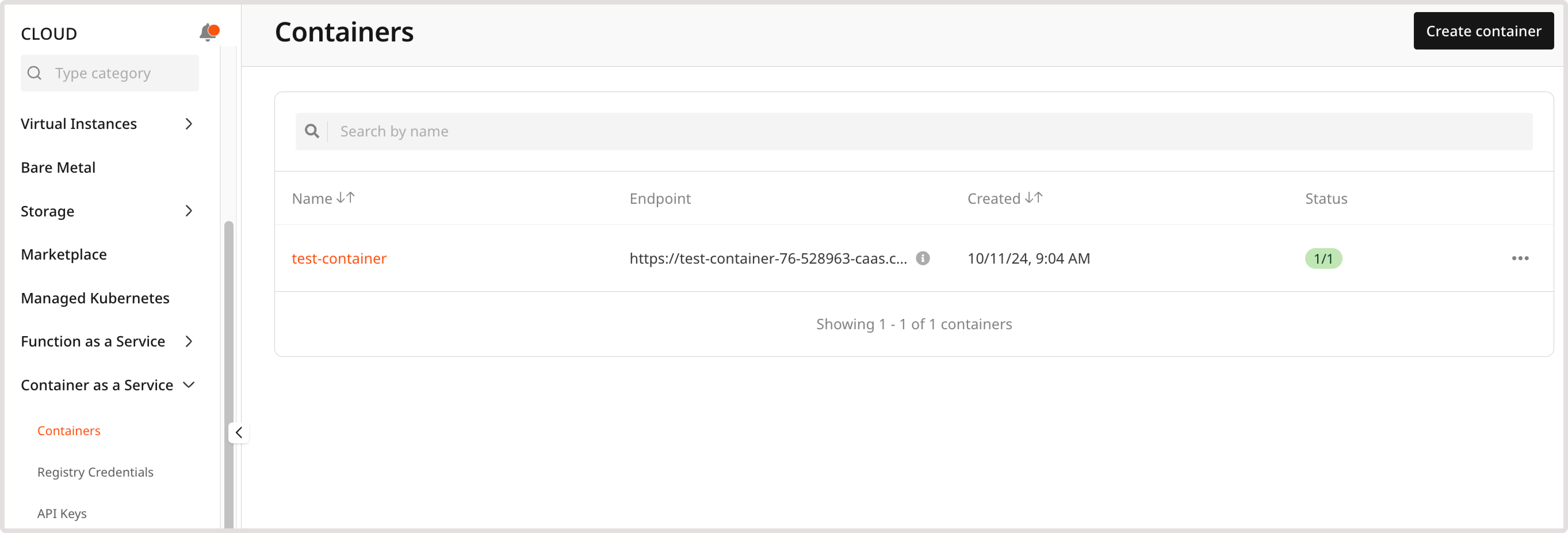
    <p>After [creating a container](/cloud/caas/create-a-container), view and update its configuration in the [Gcore Customer Portal](https://portal.gcore.com) by navigating to **Cloud** > **Container as a Service** > **Containers**:</p>

    <Frame>
      <img src="https://mintcdn.com/gcore/QIEAnezmG8Bl8nMk/images/docs/cloud/caas/manage-containers/containers-page.png?fit=max&auto=format&n=QIEAnezmG8Bl8nMk&q=85&s=9be77561b73459b7e5724bb723a01665" alt="Containers page" width="5452" height="1852" data-path="images/docs/cloud/caas/manage-containers/containers-page.png" />
    </Frame>

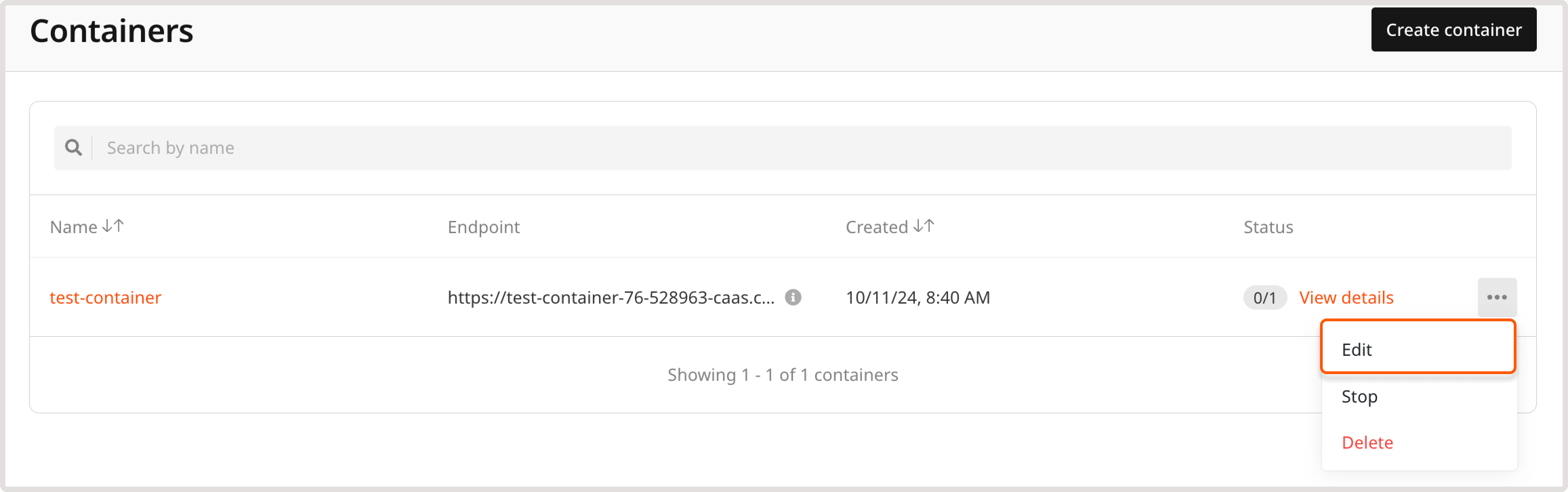
    <p>Click a container name to open its settings. Alternatively, click the three-dot icon next to it and select **Edit**, **Stop**, or **Delete**.</p>

    <Frame>
      <img src="https://mintcdn.com/gcore/QIEAnezmG8Bl8nMk/images/docs/cloud/caas/manage-containers/edit-container.png?fit=max&auto=format&n=QIEAnezmG8Bl8nMk&q=85&s=c0a9ba32142840ff7fa730554d905e21" alt="Edit container menu" width="4628" height="1452" data-path="images/docs/cloud/caas/manage-containers/edit-container.png" />
    </Frame>

    ## Container statuses

    <p>A container can have the following statuses:</p>

    * **Pending**: The required resources have been created, but the container has not been scheduled to a node yet.
    * **Deploying**: The container image is being pulled and the container is starting up.
    * **Ready**: The container is up and running.
    * **Disabled**: The container was manually disabled in settings.
    * **Error**: There were issues with the container image in its initial configuration, and the container failed to start.

    ## Container settings

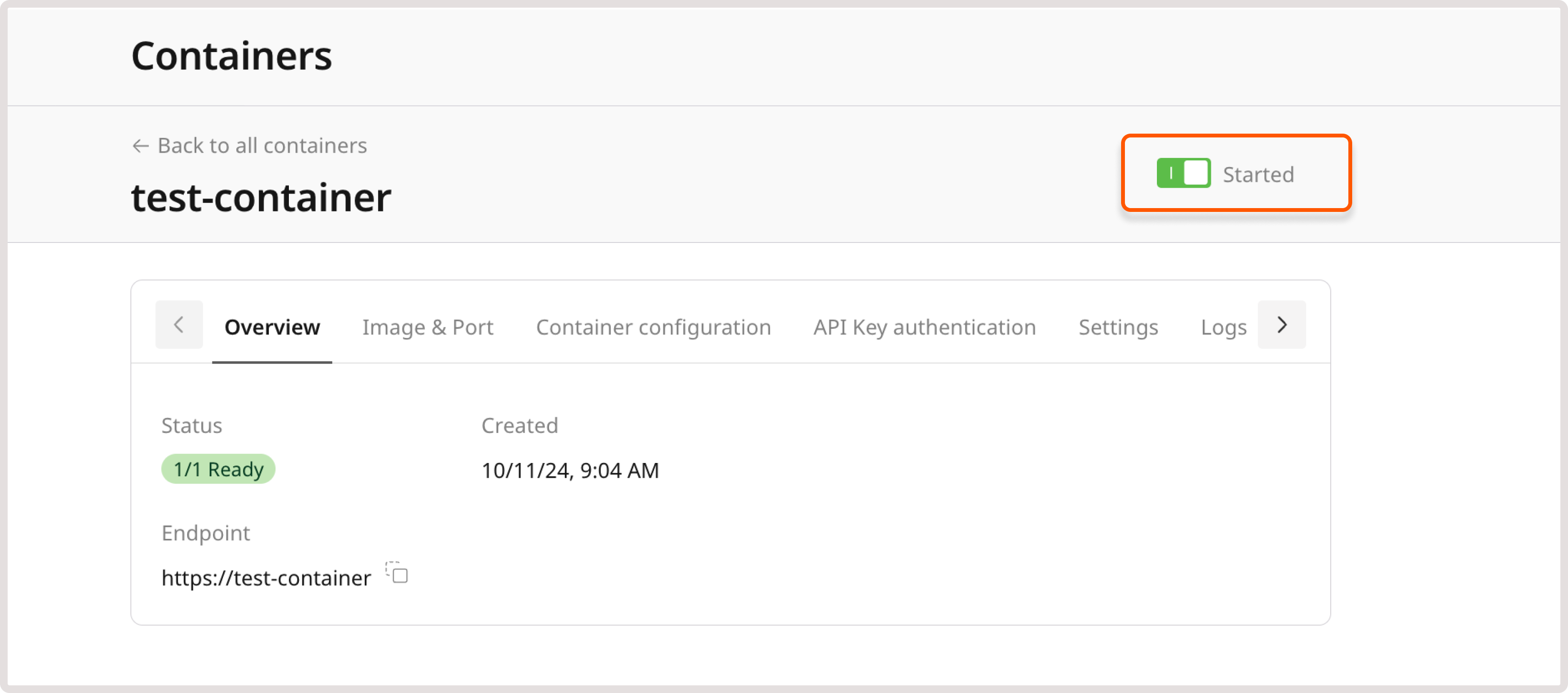
    <p>To start or stop the container, open the container settings and enable or disable the **Started** toggle:</p>

    <Frame>
      <img src="https://mintcdn.com/gcore/QIEAnezmG8Bl8nMk/images/docs/cloud/caas/manage-containers/stop-container.png?fit=max&auto=format&n=QIEAnezmG8Bl8nMk&q=85&s=f8e8b5bc468bd0c4ff3ad10e8fe938f5" alt="Started toggle enabled" width="3284" height="1452" data-path="images/docs/cloud/caas/manage-containers/stop-container.png" />
    </Frame>

    <p>**Overview**</p>

    <p>The **Overview** tab shows the container status, endpoint, description (if added during creation), and date of creation. This information cannot be changed after the container is created.</p>

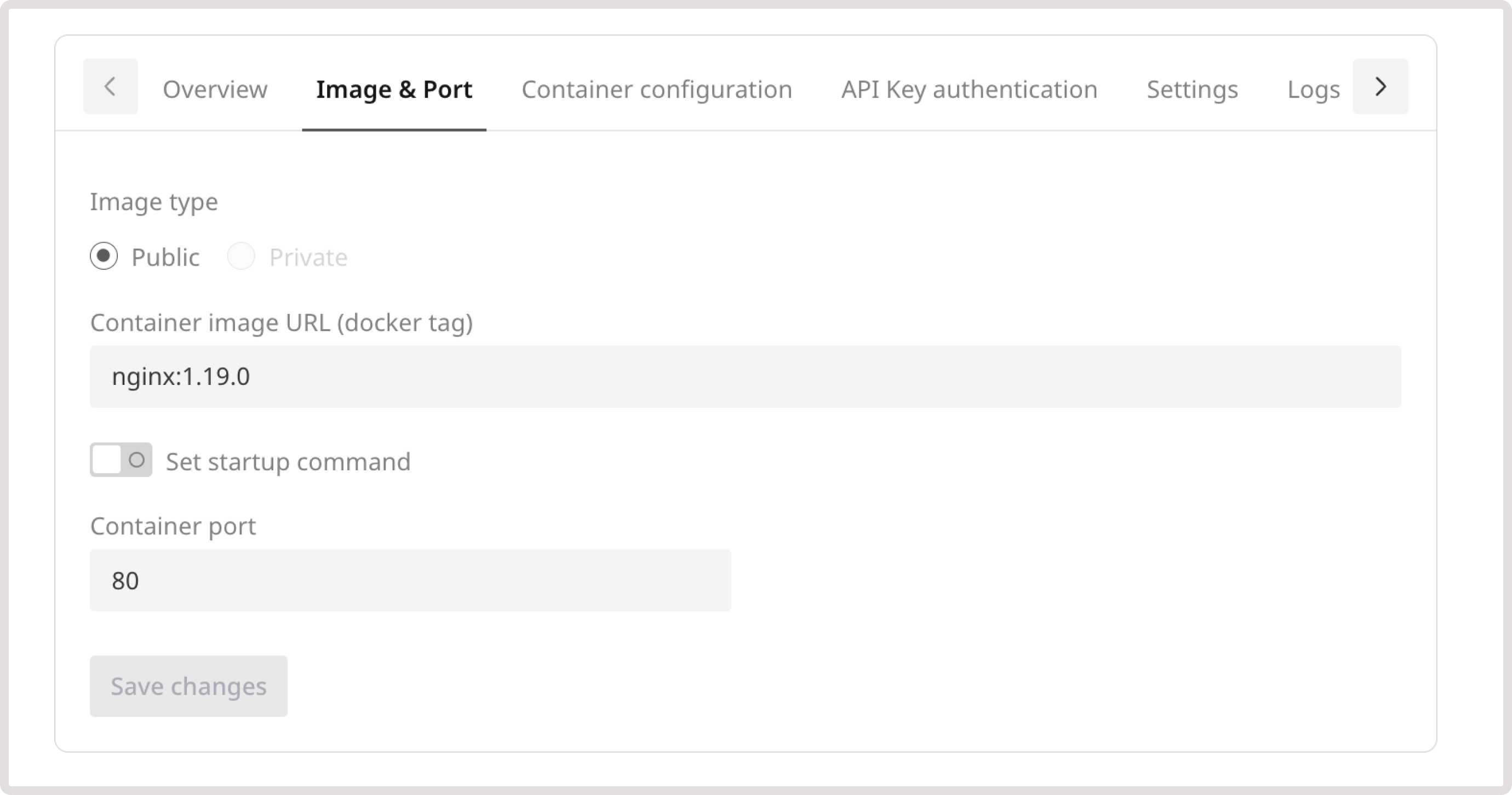
    <p>**Image & Port**</p>

    <p>On the **Image & Port** tab, add a container startup command, or update the port and protocol used to connect to the container. These settings can be changed at any time.</p>

    <Frame>
      <img src="https://mintcdn.com/gcore/QIEAnezmG8Bl8nMk/images/docs/cloud/caas/manage-containers/image-port.png?fit=max&auto=format&n=QIEAnezmG8Bl8nMk&q=85&s=8d4c8aa105a5c0d77a85908b8af29211" alt="Image & port tab" width="2760" height="1452" data-path="images/docs/cloud/caas/manage-containers/image-port.png" />
    </Frame>

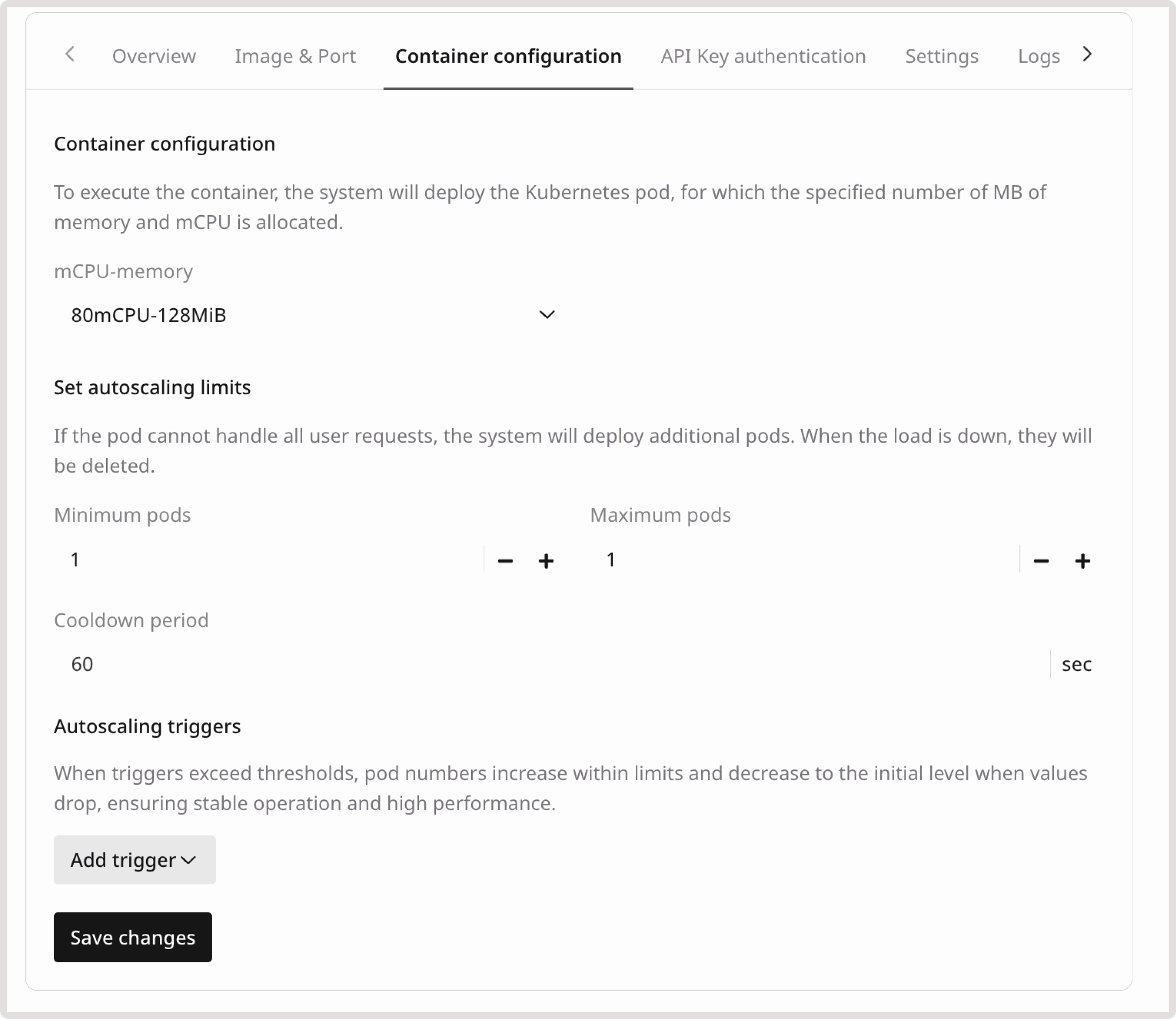
    <p>**Container configuration**</p>

    <p>View and adjust the number of MiB of memory, allocated mCPU, and autoscaling limits and triggers. For details, see the relevant steps in the [Create a container](/cloud/caas/create-a-container#step-4-configure-autoscaling) guide.</p>

    <Frame>
      <img src="https://mintcdn.com/gcore/QIEAnezmG8Bl8nMk/images/docs/cloud/caas/manage-containers/container-configuration.png?fit=max&auto=format&n=QIEAnezmG8Bl8nMk&q=85&s=9874af4a28390d38782bf0677705ae51" alt="Container configuration tab" width="2760" height="2392" data-path="images/docs/cloud/caas/manage-containers/container-configuration.png" />
    </Frame>

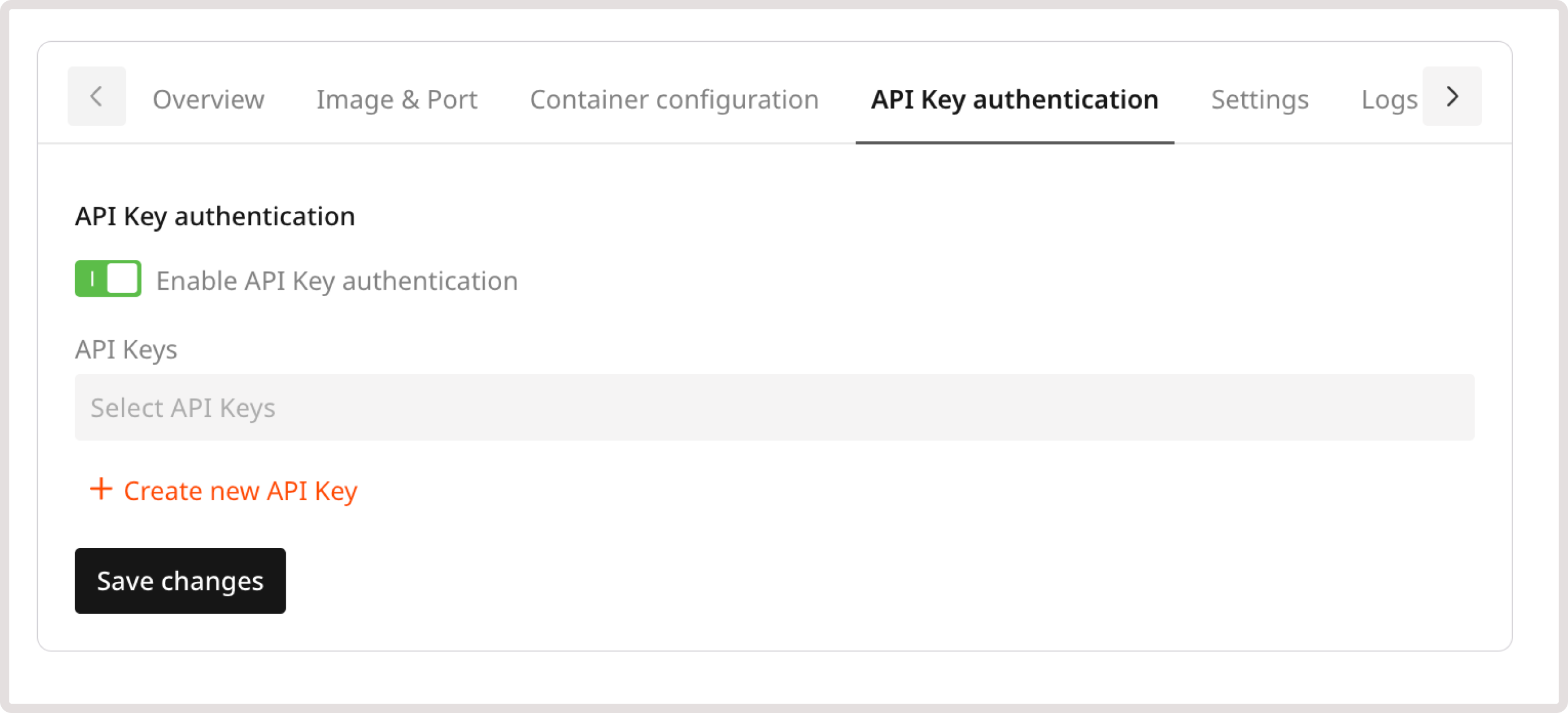
    <p>**API Key authentication**</p>

    <p>To configure authentication to the container via API key, use this tab. Turn on the **Enable API Key authentication** toggle and add or update keys as needed.</p>

    <Frame>
      <img src="https://mintcdn.com/gcore/QIEAnezmG8Bl8nMk/images/docs/cloud/caas/manage-containers/api-key-auth.png?fit=max&auto=format&n=QIEAnezmG8Bl8nMk&q=85&s=2f3f14ae8af4b844cfd82a3d11e84662" alt="API key authentication tab" width="2700" height="1228" data-path="images/docs/cloud/caas/manage-containers/api-key-auth.png" />
    </Frame>

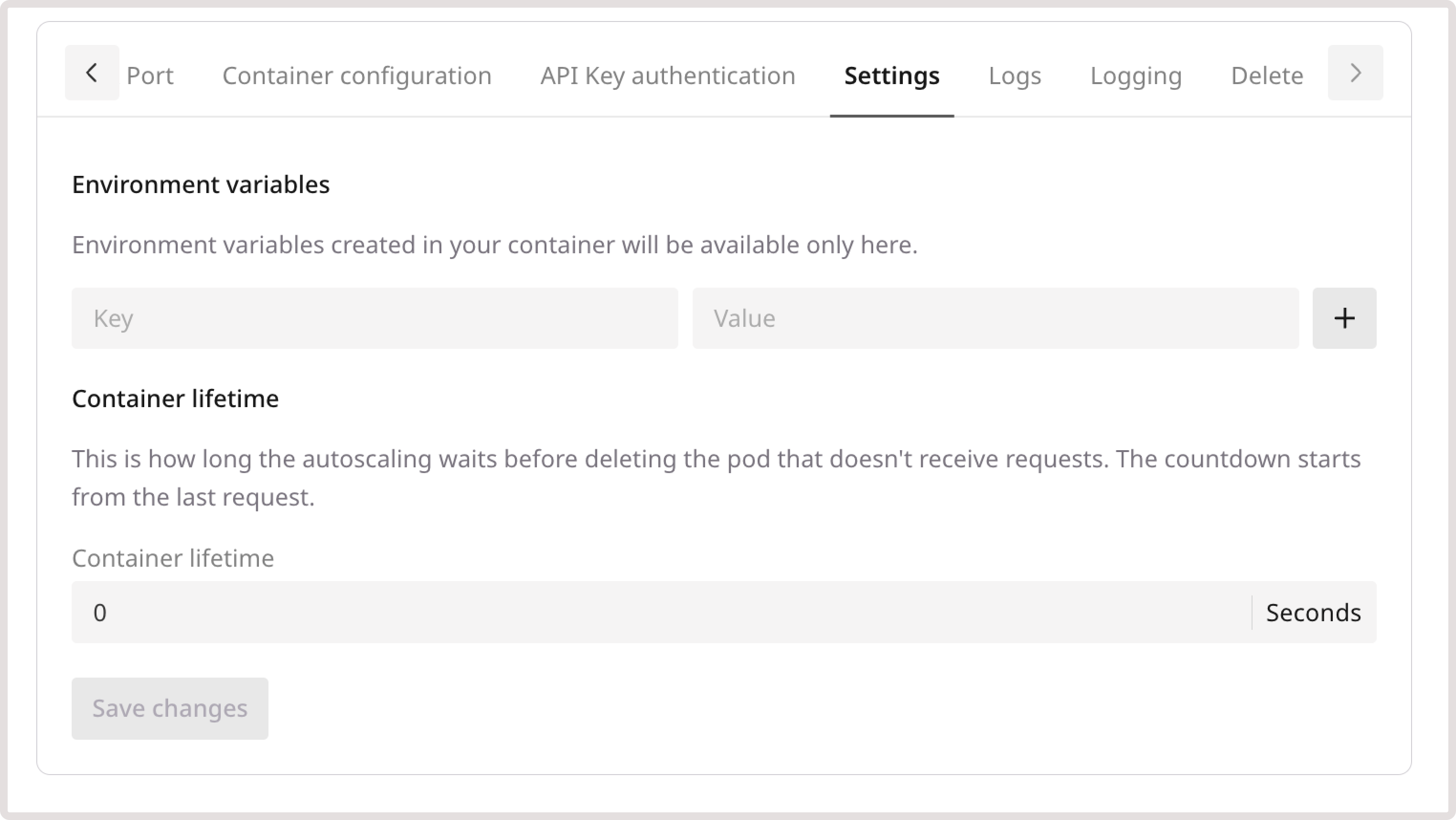
    <p>**Settings**</p>

    <p>The **Settings** tab configures [environment variables](/cloud/caas/create-a-container#step-6-optional-add-environment-variables) and sets the duration the container continues running without receiving requests before it is automatically deleted.</p>

    <Frame>
      <img src="https://mintcdn.com/gcore/QIEAnezmG8Bl8nMk/images/docs/cloud/caas/manage-containers/settings.png?fit=max&auto=format&n=QIEAnezmG8Bl8nMk&q=85&s=b48079bf35aeecf0fd72587b485c283c" alt="Settings tab" width="3048" height="1716" data-path="images/docs/cloud/caas/manage-containers/settings.png" />
    </Frame>

    ## Logs

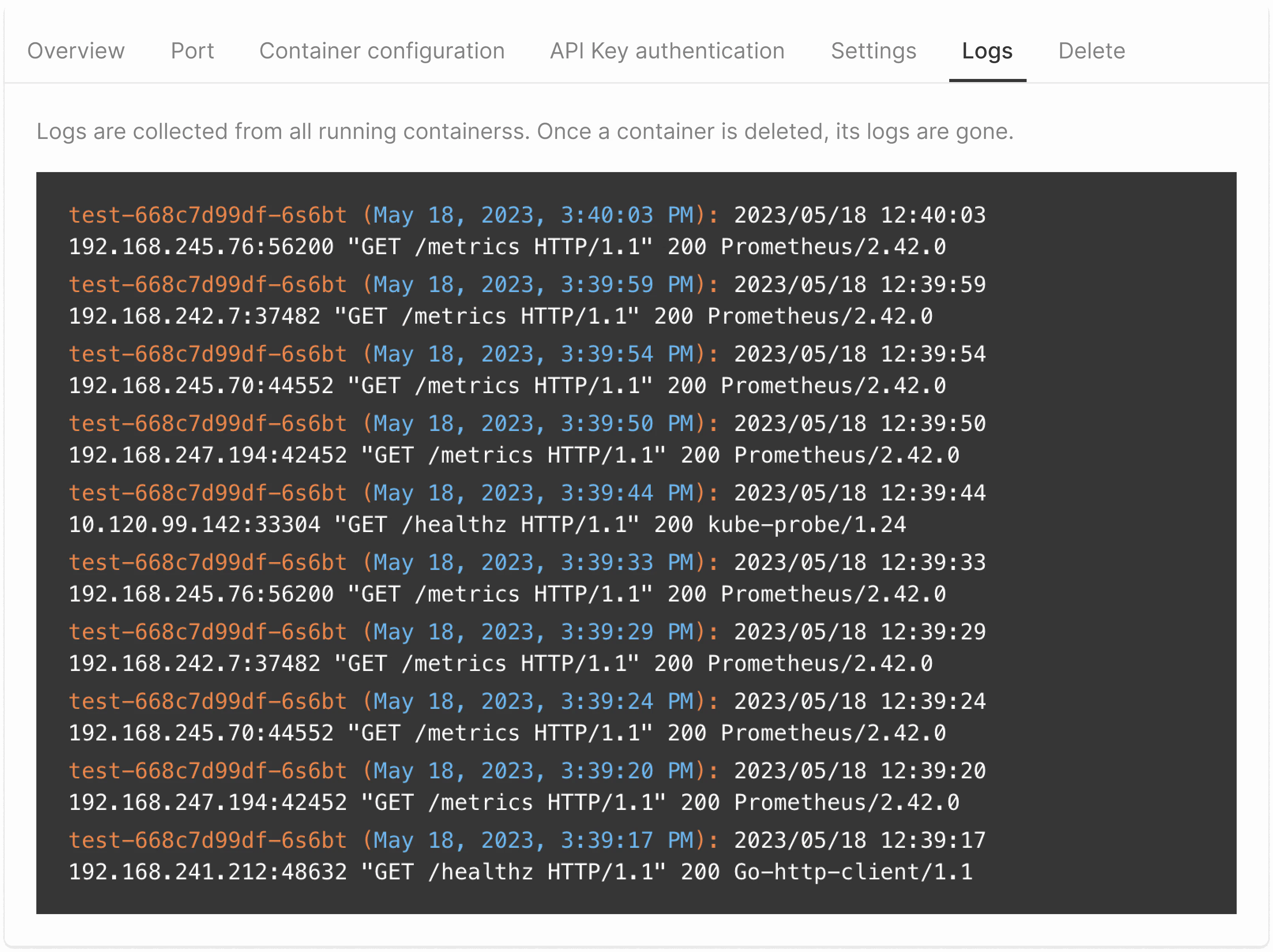
    <p>View aggregated log data about requests to all running containers. Logs are deleted when the container is deleted.</p>

    <p>Log entries appear in the following format:</p>

    ```
    Container name_Date_Date 
    IP_Method_Endpoint_HTTP type_ Resonse code_Monitoring technology name
    ```
    <Frame>
      <img src="https://mintcdn.com/gcore/QIEAnezmG8Bl8nMk/images/docs/cloud/caas/manage-containers/manage-containers-140.png?fit=max&auto=format&n=QIEAnezmG8Bl8nMk&q=85&s=110ed01200a809dd90c06758a281cc6b" alt="Example of the logs" width="3224" height="2412" data-path="images/docs/cloud/caas/manage-containers/manage-containers-140.png" />
    </Frame>

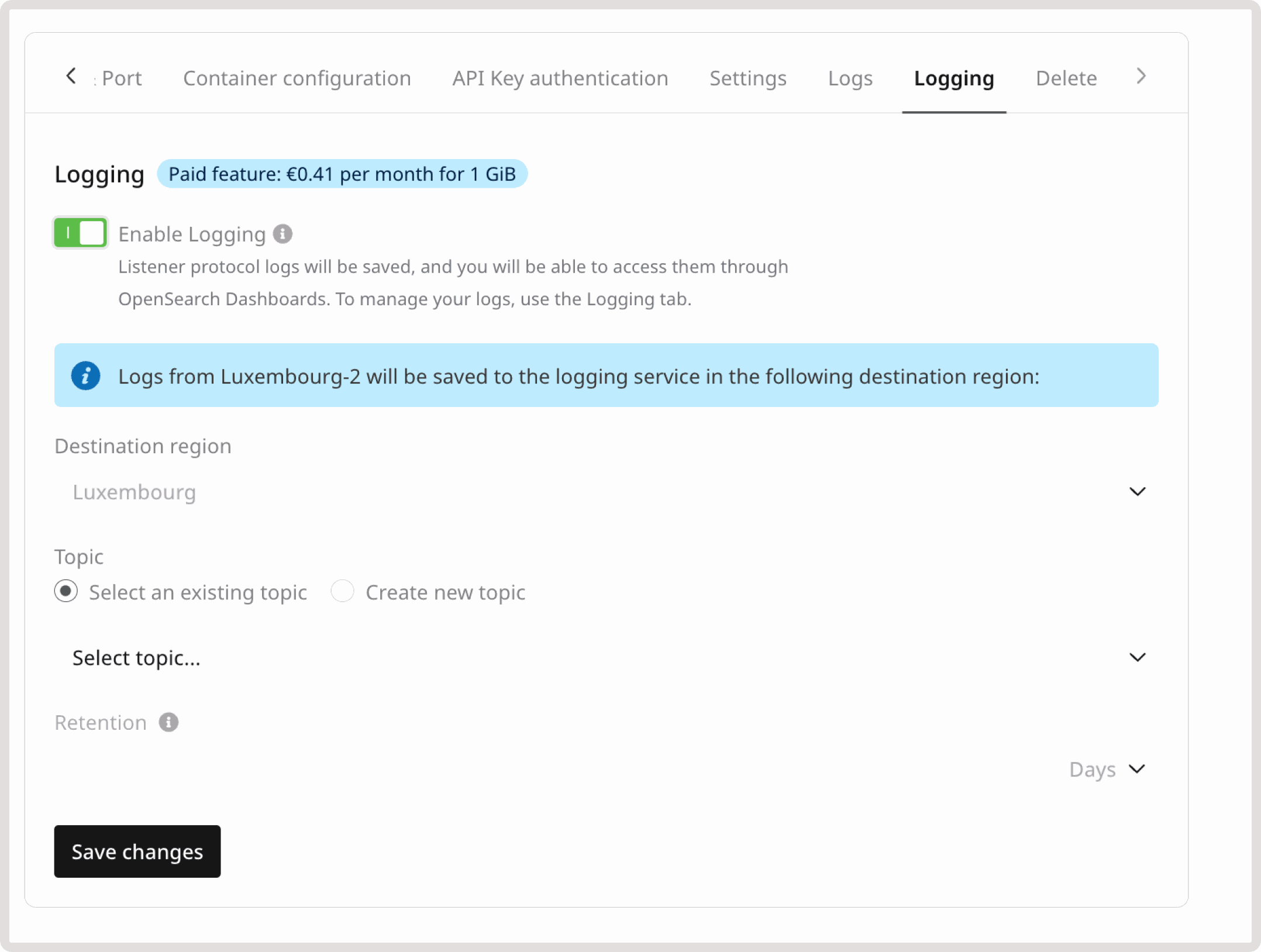
    <p>**Logging**</p>

    <p>Activate the Logging service to store logs. To learn how it works and how to configure it, refer to [Logging as a Service](/cloud/logging-as-a-service/about-logging-as-a-service).</p>

    <Frame>
      <img src="https://mintcdn.com/gcore/QIEAnezmG8Bl8nMk/images/docs/cloud/caas/manage-containers/logging.png?fit=max&auto=format&n=QIEAnezmG8Bl8nMk&q=85&s=c48abdc2cd194b93e4b78e76241b3655" alt="Logging tab" width="2156" height="1628" data-path="images/docs/cloud/caas/manage-containers/logging.png" />
    </Frame>

    <p>**Delete**</p>

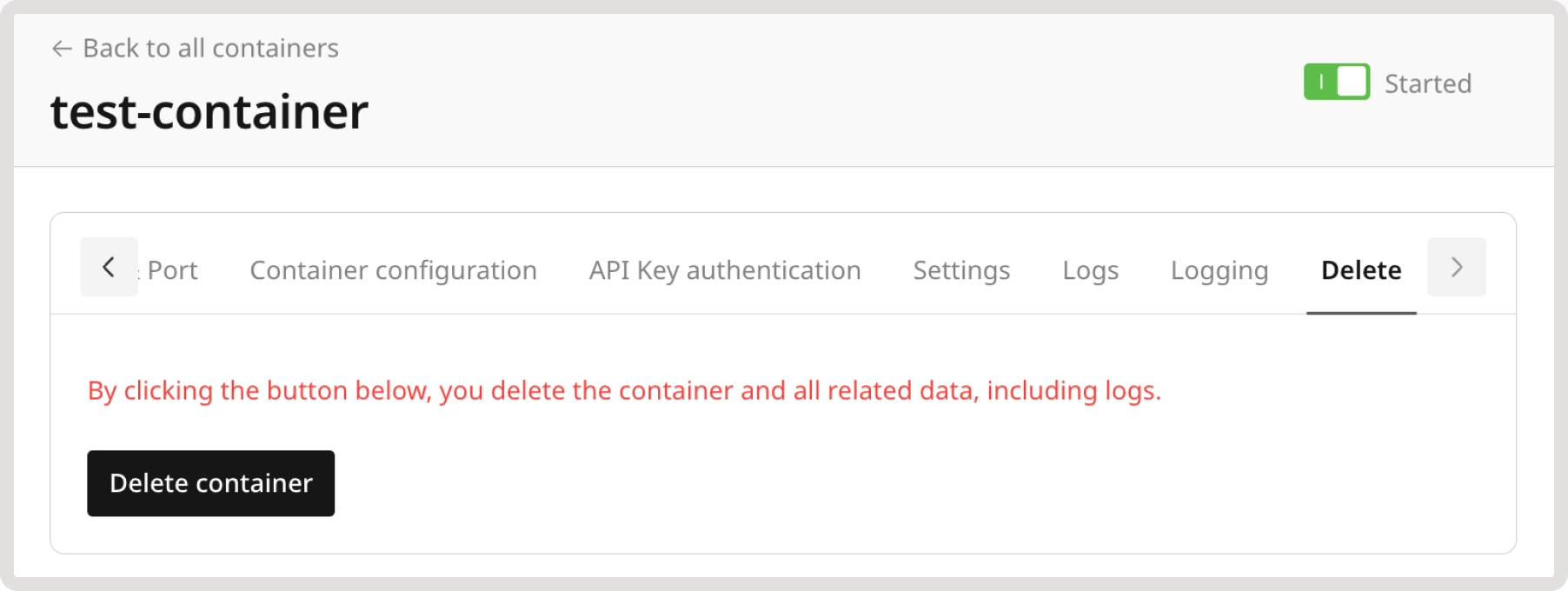
    <p>To permanently remove the container and all its logs, click the **Delete container** button and confirm by typing **Delete**.</p>

    <Frame>
      <img src="https://mintcdn.com/gcore/QIEAnezmG8Bl8nMk/images/docs/cloud/caas/manage-containers/delete-container.png?fit=max&auto=format&n=QIEAnezmG8Bl8nMk&q=85&s=cc4447377a9f2bc12b7e4f3ef5ba60dc" alt="Container deletion" width="1804" height="680" data-path="images/docs/cloud/caas/manage-containers/delete-container.png" />
    </Frame>
  </MethodSection>

  <MethodSection id="api" label="REST API">
    Use the REST API to inspect container state, update configuration, manage the lifecycle, and access runtime logs.

    <Info>
      An [API token](/account-settings/api-tokens) is required, along with a [project ID](/api-reference/cloud/projects/list-projects) and [region ID](/api-reference/cloud/regions/list-regions).
    </Info>

    Set the following environment variables before running the examples:

    ```bash theme={null}
    export GCORE_API_KEY="{YOUR_API_KEY}"
    export GCORE_CLOUD_PROJECT_ID="{YOUR_PROJECT_ID}"
    export GCORE_CLOUD_REGION_ID="{YOUR_REGION_ID}"
    export CONTAINER_NAME="{YOUR_CONTAINER_NAME}"
    ```

    <Info>
      **CONTAINER\_NAME** is the name of an existing CaaS container. To create a container or find its name, see [Create a container](/cloud/caas/create-a-container).
    </Info>

    ## Get container status

    Returns the full container configuration along with the current status and the public HTTPS endpoint.

    <Tabs>
      <Tab title="Python">
        ```python theme={null}
        import os
        import requests

        API_KEY        = os.environ["GCORE_API_KEY"]
            PROJECT_ID     = os.environ["GCORE_CLOUD_PROJECT_ID"]
            REGION_ID      = os.environ["GCORE_CLOUD_REGION_ID"]
        CONTAINER_NAME = os.environ["CONTAINER_NAME"]
        BASE    = f"https://api.gcore.com/cloud/v1/caas/{PROJECT_ID}/{REGION_ID}/containers"
        HEADERS = {"Authorization": f"APIKey {API_KEY}"}

        c = requests.get(f"{BASE}/{CONTAINER_NAME}", headers=HEADERS).json()
        print(f"Status:  {c['status']}")
        print(f"Address: {c['address']}")
        print(f"Flavor:  {c['flavor']}")
        ```
      </Tab>

      <Tab title="Go">
        ```go theme={null}
        import (
            "encoding/json"
            "fmt"
            "net/http"
            "os"
        )

        apiKey        := os.Getenv("GCORE_API_KEY")
                projectID     := os.Getenv("GCORE_CLOUD_PROJECT_ID")
                regionID      := os.Getenv("GCORE_CLOUD_REGION_ID")
        containerName := os.Getenv("CONTAINER_NAME")

        req, _ := http.NewRequest("GET",
            fmt.Sprintf("https://api.gcore.com/cloud/v1/caas/%s/%s/containers/%s",
                projectID, regionID, containerName), nil)
        req.Header.Set("Authorization", "APIKey "+apiKey)
        resp, _ := http.DefaultClient.Do(req)
        defer resp.Body.Close()

        var c map[string]any
        json.NewDecoder(resp.Body).Decode(&c)
        fmt.Printf("Status: %s  Address: %s  Flavor: %s\n",
            c["status"], c["address"], c["flavor"])
        ```
      </Tab>

      <Tab title="curl">
        ```bash theme={null}
        curl -s \
          "https://api.gcore.com/cloud/v1/caas/$GCORE_CLOUD_PROJECT_ID/$GCORE_CLOUD_REGION_ID/containers/$CONTAINER_NAME" \
          -H "Authorization: APIKey $GCORE_API_KEY"
        ```

        Response:

        ```json theme={null}
        {
          "name": "my-container",
          "status": "Ready",
          "address": "https://my-container-180-1186668-caas.caas.k1.frankfurt-2.cloud.gcore.dev/",
          "flavor": "80mCPU-128MiB",
          "image": "nginx:latest",
          "listening_port": 80,
          "is_disabled": false,
          "scale": {
            "min": 1,
            "max": 1,
            "cooldown_period": 60,
            "triggers": {
              "cpu": {"threshold": 80},
              "memory": {"threshold": 80},
              "http": null
            }
          },
          "envs": {"APP_ENV": "staging"},
          "deploy_status": {"total": 1, "ready": 1},
          "created_at": "2026-05-30T20:56:36Z"
        }
        ```
      </Tab>
    </Tabs>

    The [get container](/api-reference/cloud/container-as-a-service/get-container) endpoint also returns `deploy_status.ready`, which shows how many pods are currently running.

    ## Update container configuration

    Send a PATCH request with any combination of updatable fields. All fields are optional — include only the ones to change.

    | Parameter        | Description                                                                                                     |
    | ---------------- | --------------------------------------------------------------------------------------------------------------- |
    | `flavor`         | New flavor name; call <code>GET /cloud/v1/caas/flavors/{project_id}/{region_id}</code> to list available values |
    | `scale`          | Autoscaling bounds: `min`, `max`, and optional `cooldown_period` in seconds                                     |
    | `envs`           | Full replacement of environment variables as a key-value object                                                 |
    | `image`          | New container image tag                                                                                         |
    | `listening_port` | New port the container listens on                                                                               |
    | `commands`       | Startup command string                                                                                          |

    <Tabs>
      <Tab title="Python">
        ```python theme={null}
        import os
        import time
        import requests

        API_KEY        = os.environ["GCORE_API_KEY"]
            PROJECT_ID     = os.environ["GCORE_CLOUD_PROJECT_ID"]
            REGION_ID      = os.environ["GCORE_CLOUD_REGION_ID"]
        CONTAINER_NAME = os.environ["CONTAINER_NAME"]
        BASE    = f"https://api.gcore.com/cloud/v1/caas/{PROJECT_ID}/{REGION_ID}/containers"
        HEADERS = {"Authorization": f"APIKey {API_KEY}", "Content-Type": "application/json"}

        r = requests.patch(f"{BASE}/{CONTAINER_NAME}", headers=HEADERS, json={
            "flavor": "160mCPU-256MiB",
            "scale":  {"min": 1, "max": 2},
            "envs":   {"APP_ENV": "production", "LOG_LEVEL": "info"},
        })
        task_id = r.json()["tasks"][0]

        while True:
            state = requests.get(
                f"https://api.gcore.com/cloud/v1/tasks/{task_id}",
                headers={"Authorization": f"APIKey {API_KEY}"},
            ).json()["state"]
            if state == "FINISHED":
                break
            time.sleep(5)
        print("Updated.")
        ```
      </Tab>

      <Tab title="Go">
        ```go theme={null}
        import (
            "bytes"
            "encoding/json"
            "fmt"
            "net/http"
            "os"
            "time"
        )

        apiKey        := os.Getenv("GCORE_API_KEY")
                projectID     := os.Getenv("GCORE_CLOUD_PROJECT_ID")
                regionID      := os.Getenv("GCORE_CLOUD_REGION_ID")
        containerName := os.Getenv("CONTAINER_NAME")
        url           := fmt.Sprintf("https://api.gcore.com/cloud/v1/caas/%s/%s/containers/%s",
            projectID, regionID, containerName)

        body, _ := json.Marshal(map[string]any{
            "flavor": "160mCPU-256MiB",
            "scale":  map[string]any{"min": 1, "max": 2},
            "envs":   map[string]any{"APP_ENV": "production", "LOG_LEVEL": "info"},
        })
        req, _ := http.NewRequest("PATCH", url, bytes.NewReader(body))
        req.Header.Set("Authorization", "APIKey "+apiKey)
        req.Header.Set("Content-Type", "application/json")
        resp, _ := http.DefaultClient.Do(req)
        defer resp.Body.Close()

        var r map[string]any
        json.NewDecoder(resp.Body).Decode(&r)
        taskID := r["tasks"].([]any)[0].(string)

        for {
            tr, _ := http.NewRequest("GET", "https://api.gcore.com/cloud/v1/tasks/"+taskID, nil)
            tr.Header.Set("Authorization", "APIKey "+apiKey)
            tResp, _ := http.DefaultClient.Do(tr)
            var ts map[string]any
            json.NewDecoder(tResp.Body).Decode(&ts)
            tResp.Body.Close()
            if ts["state"] == "FINISHED" {
                break
            }
            time.Sleep(5 * time.Second)
        }
        fmt.Println("Updated.")
        ```
      </Tab>

      <Tab title="curl">
        ```bash theme={null}
        TASK=$(curl -s -X PATCH \
          "https://api.gcore.com/cloud/v1/caas/$GCORE_CLOUD_PROJECT_ID/$GCORE_CLOUD_REGION_ID/containers/$CONTAINER_NAME" \
          -H "Authorization: APIKey $GCORE_API_KEY" \
          -H "Content-Type: application/json" \
          -d '{"flavor":"160mCPU-256MiB","scale":{"min":1,"max":2},"envs":{"APP_ENV":"production"}}' \
          | python3 -c "import sys,json; print(json.load(sys.stdin)['tasks'][0])")

        until [ "$(curl -s "https://api.gcore.com/cloud/v1/tasks/$TASK" \
          -H "Authorization: APIKey $GCORE_API_KEY" \
          | python3 -c "import sys,json; print(json.load(sys.stdin)['state'])")" = "FINISHED" ]; do
          sleep 5
        done
        ```

        Response:

        ```json theme={null}
        {"tasks": ["43b8aefe-050f-49f6-90ec-6d9251b7091a"]}
        ```
      </Tab>
    </Tabs>

    Poll <code>GET /cloud/v1/tasks/{task_id}</code> every 5 seconds until `state` is `FINISHED`. The update typically completes in under 30 seconds.

    The complete list of patchable fields is in the [update container](/api-reference/cloud/container-as-a-service/update-container) endpoint spec.

    ## Stop a container

    Send `is_disabled: true` as the only field in the PATCH body. Do not include other fields in the same request — combining them returns a 405 error.

    <Tabs>
      <Tab title="Python">
        ```python theme={null}
        import os
        import time
        import requests

        API_KEY        = os.environ["GCORE_API_KEY"]
            PROJECT_ID     = os.environ["GCORE_CLOUD_PROJECT_ID"]
            REGION_ID      = os.environ["GCORE_CLOUD_REGION_ID"]
        CONTAINER_NAME = os.environ["CONTAINER_NAME"]
        BASE    = f"https://api.gcore.com/cloud/v1/caas/{PROJECT_ID}/{REGION_ID}/containers"
        HEADERS = {"Authorization": f"APIKey {API_KEY}", "Content-Type": "application/json"}

        r = requests.patch(f"{BASE}/{CONTAINER_NAME}", headers=HEADERS,
                           json={"is_disabled": True})
        task_id = r.json()["tasks"][0]

        while True:
            state = requests.get(
                f"https://api.gcore.com/cloud/v1/tasks/{task_id}",
                headers={"Authorization": f"APIKey {API_KEY}"},
            ).json()["state"]
            if state == "FINISHED":
                break
            time.sleep(5)
        print("Container stopped.")
        ```
      </Tab>

      <Tab title="Go">
        ```go theme={null}
        import (
            "bytes"
            "encoding/json"
            "fmt"
            "net/http"
            "os"
            "time"
        )

        apiKey        := os.Getenv("GCORE_API_KEY")
                projectID     := os.Getenv("GCORE_CLOUD_PROJECT_ID")
                regionID      := os.Getenv("GCORE_CLOUD_REGION_ID")
        containerName := os.Getenv("CONTAINER_NAME")
        url           := fmt.Sprintf("https://api.gcore.com/cloud/v1/caas/%s/%s/containers/%s",
            projectID, regionID, containerName)

        body, _ := json.Marshal(map[string]any{"is_disabled": true})
        req, _ := http.NewRequest("PATCH", url, bytes.NewReader(body))
        req.Header.Set("Authorization", "APIKey "+apiKey)
        req.Header.Set("Content-Type", "application/json")
        resp, _ := http.DefaultClient.Do(req)
        defer resp.Body.Close()

        var r map[string]any
        json.NewDecoder(resp.Body).Decode(&r)
        taskID := r["tasks"].([]any)[0].(string)

        for {
            tr, _ := http.NewRequest("GET", "https://api.gcore.com/cloud/v1/tasks/"+taskID, nil)
            tr.Header.Set("Authorization", "APIKey "+apiKey)
            tResp, _ := http.DefaultClient.Do(tr)
            var ts map[string]any
            json.NewDecoder(tResp.Body).Decode(&ts)
            tResp.Body.Close()
            if ts["state"] == "FINISHED" {
                break
            }
            time.Sleep(5 * time.Second)
        }
        fmt.Println("Container stopped.")
        ```
      </Tab>

      <Tab title="curl">
        ```bash theme={null}
        TASK=$(curl -s -X PATCH \
          "https://api.gcore.com/cloud/v1/caas/$GCORE_CLOUD_PROJECT_ID/$GCORE_CLOUD_REGION_ID/containers/$CONTAINER_NAME" \
          -H "Authorization: APIKey $GCORE_API_KEY" \
          -H "Content-Type: application/json" \
          -d '{"is_disabled": true}' \
          | python3 -c "import sys,json; print(json.load(sys.stdin)['tasks'][0])")

        until [ "$(curl -s "https://api.gcore.com/cloud/v1/tasks/$TASK" \
          -H "Authorization: APIKey $GCORE_API_KEY" \
          | python3 -c "import sys,json; print(json.load(sys.stdin)['state'])")" = "FINISHED" ]; do
          sleep 5
        done
        ```
      </Tab>
    </Tabs>

    After the task finishes, the container status changes to `"Disabled"`.

    ## Start a container

    Send `is_disabled: false` as the only field in the PATCH body to re-enable the container. Do not include other fields in the same request.

    <Tabs>
      <Tab title="Python">
        ```python theme={null}
        import os
        import time
        import requests

        API_KEY        = os.environ["GCORE_API_KEY"]
            PROJECT_ID     = os.environ["GCORE_CLOUD_PROJECT_ID"]
            REGION_ID      = os.environ["GCORE_CLOUD_REGION_ID"]
        CONTAINER_NAME = os.environ["CONTAINER_NAME"]
        BASE    = f"https://api.gcore.com/cloud/v1/caas/{PROJECT_ID}/{REGION_ID}/containers"
        HEADERS = {"Authorization": f"APIKey {API_KEY}", "Content-Type": "application/json"}

        r = requests.patch(f"{BASE}/{CONTAINER_NAME}", headers=HEADERS,
                           json={"is_disabled": False})
        task_id = r.json()["tasks"][0]

        while True:
            state = requests.get(
                f"https://api.gcore.com/cloud/v1/tasks/{task_id}",
                headers={"Authorization": f"APIKey {API_KEY}"},
            ).json()["state"]
            if state == "FINISHED":
                break
            time.sleep(5)
        print("Container started.")
        ```
      </Tab>

      <Tab title="Go">
        ```go theme={null}
        import (
            "bytes"
            "encoding/json"
            "fmt"
            "net/http"
            "os"
            "time"
        )

        apiKey        := os.Getenv("GCORE_API_KEY")
                projectID     := os.Getenv("GCORE_CLOUD_PROJECT_ID")
                regionID      := os.Getenv("GCORE_CLOUD_REGION_ID")
        containerName := os.Getenv("CONTAINER_NAME")
        url           := fmt.Sprintf("https://api.gcore.com/cloud/v1/caas/%s/%s/containers/%s",
            projectID, regionID, containerName)

        body, _ := json.Marshal(map[string]any{"is_disabled": false})
        req, _ := http.NewRequest("PATCH", url, bytes.NewReader(body))
        req.Header.Set("Authorization", "APIKey "+apiKey)
        req.Header.Set("Content-Type", "application/json")
        resp, _ := http.DefaultClient.Do(req)
        defer resp.Body.Close()

        var r map[string]any
        json.NewDecoder(resp.Body).Decode(&r)
        taskID := r["tasks"].([]any)[0].(string)

        for {
            tr, _ := http.NewRequest("GET", "https://api.gcore.com/cloud/v1/tasks/"+taskID, nil)
            tr.Header.Set("Authorization", "APIKey "+apiKey)
            tResp, _ := http.DefaultClient.Do(tr)
            var ts map[string]any
            json.NewDecoder(tResp.Body).Decode(&ts)
            tResp.Body.Close()
            if ts["state"] == "FINISHED" {
                break
            }
            time.Sleep(5 * time.Second)
        }
        fmt.Println("Container started.")
        ```
      </Tab>

      <Tab title="curl">
        ```bash theme={null}
        TASK=$(curl -s -X PATCH \
          "https://api.gcore.com/cloud/v1/caas/$GCORE_CLOUD_PROJECT_ID/$GCORE_CLOUD_REGION_ID/containers/$CONTAINER_NAME" \
          -H "Authorization: APIKey $GCORE_API_KEY" \
          -H "Content-Type: application/json" \
          -d '{"is_disabled": false}' \
          | python3 -c "import sys,json; print(json.load(sys.stdin)['tasks'][0])")

        until [ "$(curl -s "https://api.gcore.com/cloud/v1/tasks/$TASK" \
          -H "Authorization: APIKey $GCORE_API_KEY" \
          | python3 -c "import sys,json; print(json.load(sys.stdin)['state'])")" = "FINISHED" ]; do
          sleep 5
        done
        ```
      </Tab>
    </Tabs>

    After the task finishes, the container status returns to `"Ready"`.

    ## Get container logs

    Returns the most recent log lines from all running container pods. Logs are removed when the container is deleted.

    | Parameter | Description                             |
    | --------- | --------------------------------------- |
    | `limit`   | Maximum number of log entries to return |

    <Tabs>
      <Tab title="Python">
        ```python theme={null}
        import os
        import requests

        API_KEY        = os.environ["GCORE_API_KEY"]
            PROJECT_ID     = os.environ["GCORE_CLOUD_PROJECT_ID"]
            REGION_ID      = os.environ["GCORE_CLOUD_REGION_ID"]
        CONTAINER_NAME = os.environ["CONTAINER_NAME"]
        BASE    = f"https://api.gcore.com/cloud/v1/caas/{PROJECT_ID}/{REGION_ID}/containers"
        HEADERS = {"Authorization": f"APIKey {API_KEY}"}

        r = requests.get(f"{BASE}/{CONTAINER_NAME}/logs?limit=20", headers=HEADERS)
        for entry in r.json()["logs"]:
            print(entry["time"], entry["message"])
        ```
      </Tab>

      <Tab title="Go">
        ```go theme={null}
        import (
            "encoding/json"
            "fmt"
            "net/http"
            "os"
        )

        apiKey        := os.Getenv("GCORE_API_KEY")
                projectID     := os.Getenv("GCORE_CLOUD_PROJECT_ID")
                regionID      := os.Getenv("GCORE_CLOUD_REGION_ID")
        containerName := os.Getenv("CONTAINER_NAME")

        req, _ := http.NewRequest("GET",
            fmt.Sprintf("https://api.gcore.com/cloud/v1/caas/%s/%s/containers/%s/logs?limit=20",
                projectID, regionID, containerName), nil)
        req.Header.Set("Authorization", "APIKey "+apiKey)
        resp, _ := http.DefaultClient.Do(req)
        defer resp.Body.Close()

        var result map[string]any
        json.NewDecoder(resp.Body).Decode(&result)
        for _, e := range result["logs"].([]any) {
            entry := e.(map[string]any)
            fmt.Println(entry["time"], entry["message"])
        }
        ```
      </Tab>

      <Tab title="curl">
        ```bash theme={null}
        curl -s \
          "https://api.gcore.com/cloud/v1/caas/$GCORE_CLOUD_PROJECT_ID/$GCORE_CLOUD_REGION_ID/containers/$CONTAINER_NAME/logs?limit=20" \
          -H "Authorization: APIKey $GCORE_API_KEY"
        ```

        Response:

        ```json theme={null}
        {
          "logs": [
            {
              "time": "2026-05-30T20:56:37.704572Z",
              "pod": "my-container-58fcc6c77b-f4vzd",
              "message": "2026/05/30 20:56:37 [notice] 1#1: start worker process 39"
            },
            {
              "time": "2026-05-30T20:56:37.703565Z",
              "pod": "my-container-58fcc6c77b-f4vzd",
              "message": "2026/05/30 20:56:37 [notice] 1#1: start worker process 38"
            }
          ]
        }
        ```
      </Tab>
    </Tabs>

    The [get logs](/api-reference/cloud/container-as-a-service/get-container-logs) endpoint supports a `limit` query parameter to control how many entries are returned.

    ## Delete a container

    Deleting a container permanently removes it and all its logs. The delete operation returns a task ID.

    <Tabs>
      <Tab title="Python">
        ```python theme={null}
        import os
        import time
        import requests

        API_KEY        = os.environ["GCORE_API_KEY"]
            PROJECT_ID     = os.environ["GCORE_CLOUD_PROJECT_ID"]
            REGION_ID      = os.environ["GCORE_CLOUD_REGION_ID"]
        CONTAINER_NAME = os.environ["CONTAINER_NAME"]
        BASE    = f"https://api.gcore.com/cloud/v1/caas/{PROJECT_ID}/{REGION_ID}/containers"
        HEADERS = {"Authorization": f"APIKey {API_KEY}"}

        r = requests.delete(f"{BASE}/{CONTAINER_NAME}", headers=HEADERS)
        task_id = r.json()["tasks"][0]

        while True:
            state = requests.get(
                f"https://api.gcore.com/cloud/v1/tasks/{task_id}", headers=HEADERS
            ).json()["state"]
            if state == "FINISHED":
                break
            time.sleep(5)
        print("Container deleted.")
        ```
      </Tab>

      <Tab title="Go">
        ```go theme={null}
        import (
            "encoding/json"
            "fmt"
            "net/http"
            "os"
            "time"
        )

        apiKey        := os.Getenv("GCORE_API_KEY")
                projectID     := os.Getenv("GCORE_CLOUD_PROJECT_ID")
                regionID      := os.Getenv("GCORE_CLOUD_REGION_ID")
        containerName := os.Getenv("CONTAINER_NAME")

        req, _ := http.NewRequest("DELETE",
            fmt.Sprintf("https://api.gcore.com/cloud/v1/caas/%s/%s/containers/%s",
                projectID, regionID, containerName), nil)
        req.Header.Set("Authorization", "APIKey "+apiKey)
        resp, _ := http.DefaultClient.Do(req)
        defer resp.Body.Close()

        var r map[string]any
        json.NewDecoder(resp.Body).Decode(&r)
        taskID := r["tasks"].([]any)[0].(string)

        for {
            tr, _ := http.NewRequest("GET", "https://api.gcore.com/cloud/v1/tasks/"+taskID, nil)
            tr.Header.Set("Authorization", "APIKey "+apiKey)
            tResp, _ := http.DefaultClient.Do(tr)
            var ts map[string]any
            json.NewDecoder(tResp.Body).Decode(&ts)
            tResp.Body.Close()
            if ts["state"] == "FINISHED" {
                break
            }
            time.Sleep(5 * time.Second)
        }
        fmt.Println("Container deleted.")
        ```
      </Tab>

      <Tab title="curl">
        ```bash theme={null}
        TASK=$(curl -s -X DELETE \
          "https://api.gcore.com/cloud/v1/caas/$GCORE_CLOUD_PROJECT_ID/$GCORE_CLOUD_REGION_ID/containers/$CONTAINER_NAME" \
          -H "Authorization: APIKey $GCORE_API_KEY" \
          | python3 -c "import sys,json; print(json.load(sys.stdin)['tasks'][0])")

        until [ "$(curl -s "https://api.gcore.com/cloud/v1/tasks/$TASK" \
          -H "Authorization: APIKey $GCORE_API_KEY" \
          | python3 -c "import sys,json; print(json.load(sys.stdin)['state'])")" = "FINISHED" ]; do
          sleep 5
        done
        echo "Container deleted."
        ```
      </Tab>
    </Tabs>
  </MethodSection>
</MethodSwitch>