> ## Documentation Index
> Fetch the complete documentation index at: https://docs.gcore.com/llms.txt
> Use this file to discover all available pages before exploring further.
# View user actions
The **User Actions** page in the [Gcore Customer Portal](https://portal.gcore.com) displays a log of all management operations performed on Cloud resources. To open it, navigate to **Cloud Management** > **User Actions**.
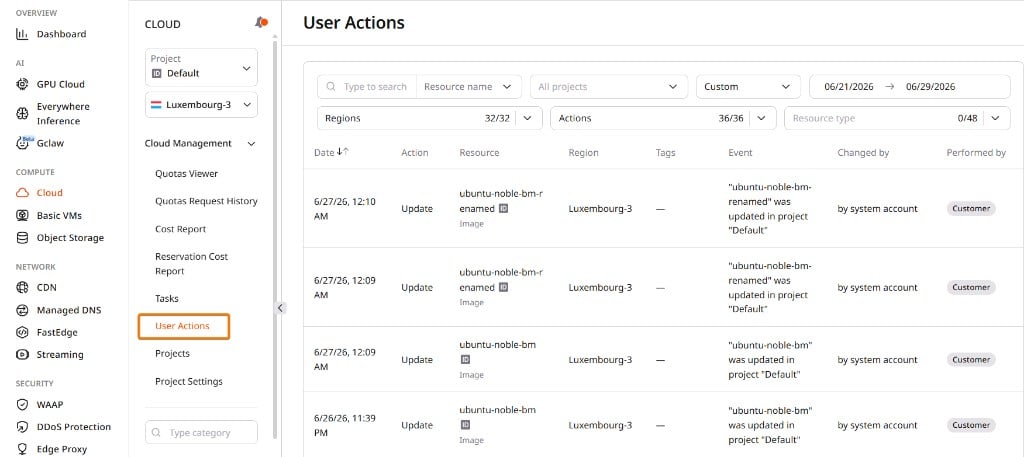 The page includes the following filters:
| Filter | Description |
| ----------------- | ----------------------------------------------------------------------------------------- |
| **Resource name** | Find actions for a specific resource — including Load Balancers searchable by VIP address |
| **All projects** | Limit results to a selected project |
| **Date range** | Choose a preset period or specify custom dates |
| **Regions** | Show actions from selected regions |
| **Actions** | Narrow results to a chosen set of operation types |
| **Resource type** | Show actions for a selected Cloud resource type |
The page includes the following filters:
| Filter | Description |
| ----------------- | ----------------------------------------------------------------------------------------- |
| **Resource name** | Find actions for a specific resource — including Load Balancers searchable by VIP address |
| **All projects** | Limit results to a selected project |
| **Date range** | Choose a preset period or specify custom dates |
| **Regions** | Show actions from selected regions |
| **Actions** | Narrow results to a chosen set of operation types |
| **Resource type** | Show actions for a selected Cloud resource type |
 **Actions** tracks operations across resource lifecycle (create, delete, start, stop, resize), networking (attach, detach, port security), access management, and scaling — the same events exposed by the [Cloud API](/api-reference/cloud) audit endpoint.