> ## Documentation Index
> Fetch the complete documentation index at: https://docs.gcore.com/llms.txt
> Use this file to discover all available pages before exploring further.
# Advanced cluster autoscaler settings
Cluster autoscaler settings control how the cluster adjusts its node count based on pod and node utilization. The autoscaler adds nodes when resources are insufficient and removes idle ones, optimizing resource usage and maintaining stable performance.
Configure advanced settings [during cluster creation](/cloud/kubernetes/clusters/create-a-kubernetes-cluster) or through an existing cluster's settings. The steps are identical in both cases.
## Advanced settings
To configure a new cluster, scroll down to the **Advanced settings** section. For an existing cluster, open the cluster overview and click the **Advanced settings** tab.
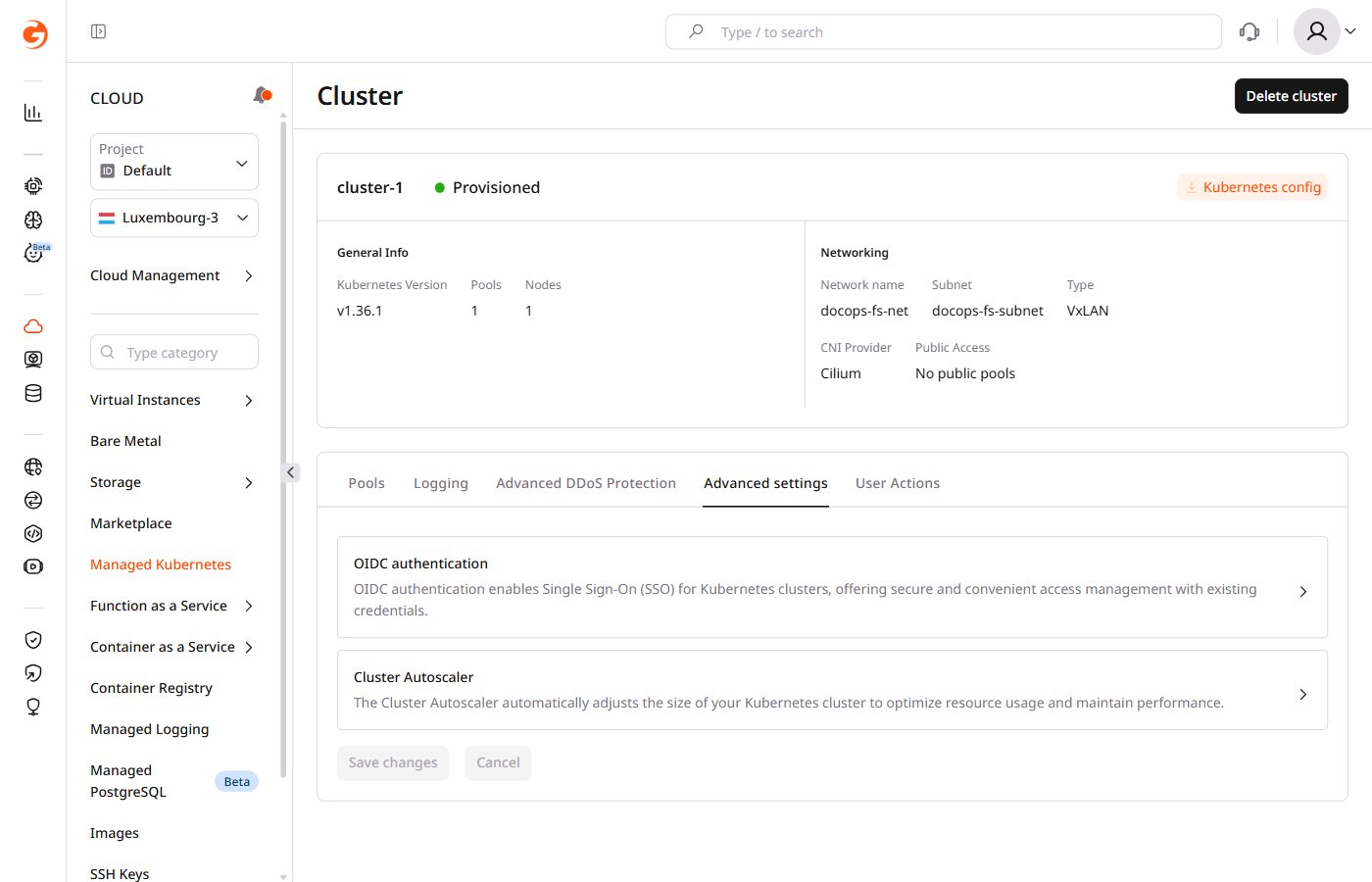 Configure the required settings, then click **Save changes**. The new autoscaler configuration takes effect immediately.
### Cluster expander
Select which node group to scale up when additional capacity is needed:
* `random`: selects a random node group.
* `most-pods`: selects the node group that can schedule the largest number of pending pods.
* `least-waste`: selects the node group that leaves the least unused CPU and memory.
* `price`: selects the lowest-cost node group.
* `priority`: selects a node group according to the configured priority list.
* `grpc`: delegates node group selection to an external gRPC service.
### Parameters
The remaining parameters control autoscaler behavior, including scan frequency, node provisioning, scale-down decisions, and node exclusion rules.
| Parameter | Description |
| -------------------------------------- | --------------------------------------------------------------------------------------------------------------------------------------------------------------------------------------------------------------------------------------------------------------- |
| Cluster scan interval | Defines how often the autoscaler checks the cluster for scaling opportunities. |
| Max node provision time | Defines the maximum time to wait for a newly provisioned node to become ready. If not ready within this time, the autoscaler considers it failed. |
| New pod scale up delay | Defines how long to wait before adding new nodes when a pod can't be scheduled. |
| Max percentage of unready nodes | Defines the maximum percentage of unready nodes before the autoscaler stops adding new nodes. |
| Allowed count of unready nodes | Defines the maximum number of unready nodes before the autoscaler stops adding new nodes. |
| Enable scale-down | Enables the autoscaler to remove unused nodes from the cluster. |
| Post-addition scale-down delay | Defines how long scale-down is paused after a node is added, even for unused nodes. |
| Post-deletion scale-down delay | Defines how long scale-down is paused after a node is deleted. |
| Failure scale-down delay | Defines how long to wait before retrying scale-down after a failed attempt. |
| Unready node delay | Defines how long before an unready node becomes a candidate for scale-down. |
| Unneeded node delay | Defines how long before an underutilized node is queued for scale-down. |
| Scale-down utilization threshold | Defines the utilization threshold below which nodes are considered unused and eligible for scale-down. |
| Max bulk deletion of empty nodes | Defines the maximum number of empty nodes the autoscaler can delete simultaneously. |
| Expendable pods priority cutoff | Pods below this priority can be evicted when the autoscaler removes a node, even if still running. Priority values are defined through [PriorityClass](https://kubernetes.io/docs/concepts/scheduling-eviction/pod-priority-preemption/) objects in Kubernetes. |
| Max graceful termination time | Defines the maximum time the autoscaler waits for pods to terminate gracefully before force-deleting them. |
| Ignore Daemonsets utilization | Excludes DaemonSet pods from node utilization calculations when evaluating scale-down. |
| Balance similar node groups | Enables the autoscaler to balance the size of similar node groups by instance type, resources, and labels. |
| Skip nodes with system pods | Prevents scale-down of nodes running critical system pods. |
| Skip nodes with local storage | Prevents scale-down of nodes with local storage to avoid potential data loss. |
| Skip nodes with custom controller pods | Prevents scale-down of nodes running pods managed by custom controllers, including those from third-party extensions. |
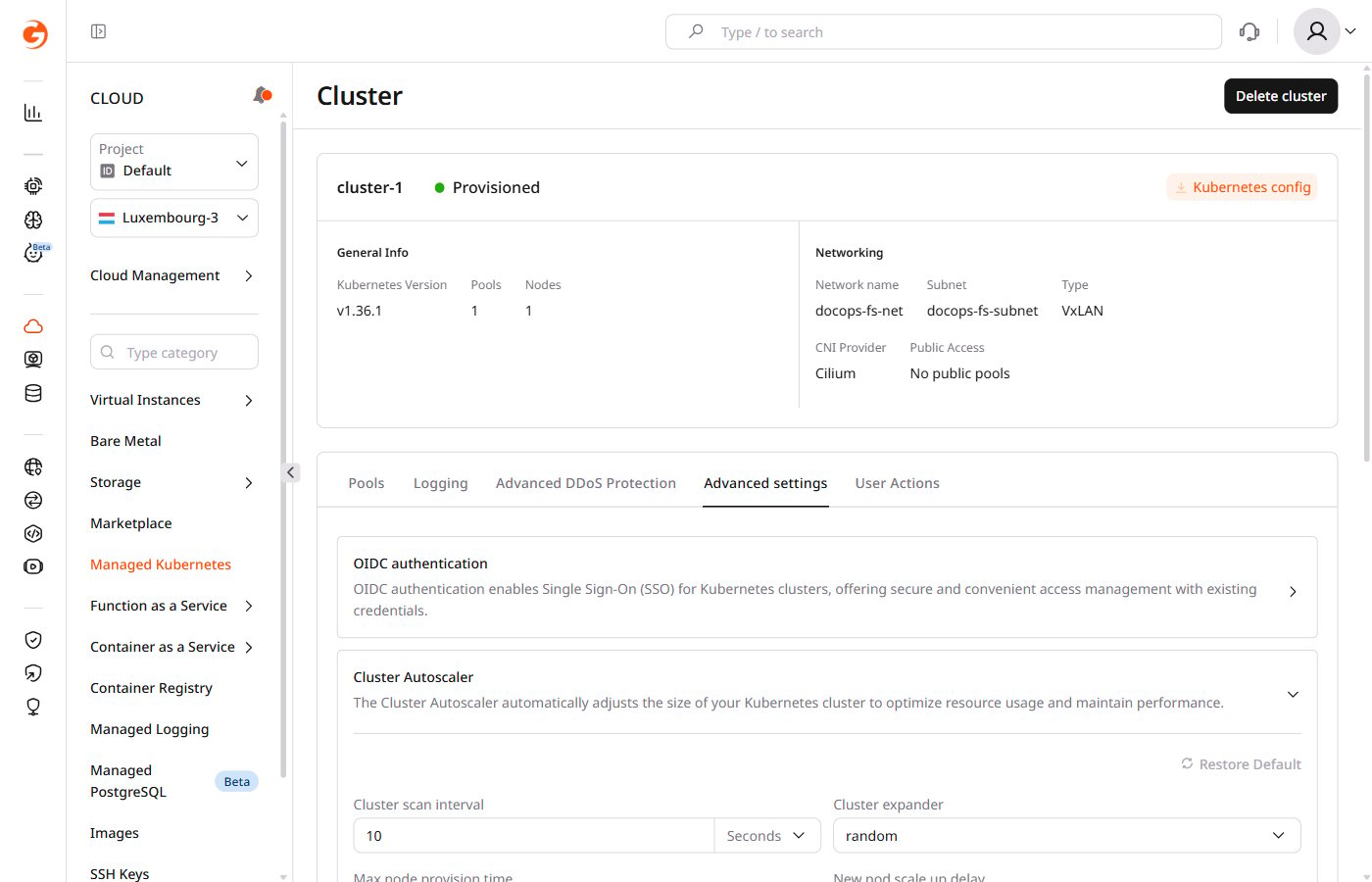
To reset all autoscaler settings to defaults, click **Restore Default**.
Configure the required settings, then click **Save changes**. The new autoscaler configuration takes effect immediately.
### Cluster expander
Select which node group to scale up when additional capacity is needed:
* `random`: selects a random node group.
* `most-pods`: selects the node group that can schedule the largest number of pending pods.
* `least-waste`: selects the node group that leaves the least unused CPU and memory.
* `price`: selects the lowest-cost node group.
* `priority`: selects a node group according to the configured priority list.
* `grpc`: delegates node group selection to an external gRPC service.
### Parameters
The remaining parameters control autoscaler behavior, including scan frequency, node provisioning, scale-down decisions, and node exclusion rules.
| Parameter | Description |
| -------------------------------------- | --------------------------------------------------------------------------------------------------------------------------------------------------------------------------------------------------------------------------------------------------------------- |
| Cluster scan interval | Defines how often the autoscaler checks the cluster for scaling opportunities. |
| Max node provision time | Defines the maximum time to wait for a newly provisioned node to become ready. If not ready within this time, the autoscaler considers it failed. |
| New pod scale up delay | Defines how long to wait before adding new nodes when a pod can't be scheduled. |
| Max percentage of unready nodes | Defines the maximum percentage of unready nodes before the autoscaler stops adding new nodes. |
| Allowed count of unready nodes | Defines the maximum number of unready nodes before the autoscaler stops adding new nodes. |
| Enable scale-down | Enables the autoscaler to remove unused nodes from the cluster. |
| Post-addition scale-down delay | Defines how long scale-down is paused after a node is added, even for unused nodes. |
| Post-deletion scale-down delay | Defines how long scale-down is paused after a node is deleted. |
| Failure scale-down delay | Defines how long to wait before retrying scale-down after a failed attempt. |
| Unready node delay | Defines how long before an unready node becomes a candidate for scale-down. |
| Unneeded node delay | Defines how long before an underutilized node is queued for scale-down. |
| Scale-down utilization threshold | Defines the utilization threshold below which nodes are considered unused and eligible for scale-down. |
| Max bulk deletion of empty nodes | Defines the maximum number of empty nodes the autoscaler can delete simultaneously. |
| Expendable pods priority cutoff | Pods below this priority can be evicted when the autoscaler removes a node, even if still running. Priority values are defined through [PriorityClass](https://kubernetes.io/docs/concepts/scheduling-eviction/pod-priority-preemption/) objects in Kubernetes. |
| Max graceful termination time | Defines the maximum time the autoscaler waits for pods to terminate gracefully before force-deleting them. |
| Ignore Daemonsets utilization | Excludes DaemonSet pods from node utilization calculations when evaluating scale-down. |
| Balance similar node groups | Enables the autoscaler to balance the size of similar node groups by instance type, resources, and labels. |
| Skip nodes with system pods | Prevents scale-down of nodes running critical system pods. |
| Skip nodes with local storage | Prevents scale-down of nodes with local storage to avoid potential data loss. |
| Skip nodes with custom controller pods | Prevents scale-down of nodes running pods managed by custom controllers, including those from third-party extensions. |
To reset all autoscaler settings to defaults, click **Restore Default**.
 The [cluster-autoscaler FAQ](https://github.com/kubernetes/autoscaler/blob/master/cluster-autoscaler/FAQ.md#what-are-the-parameters-to-ca) documents each parameter's default values and valid ranges.