> ## Documentation Index
> Fetch the complete documentation index at: https://docs.gcore.com/llms.txt
> Use this file to discover all available pages before exploring further.
# Traffic Analytics
Traffic Analytics in the [Gcore Customer Portal](https://portal.gcore.com/iaas-protection/reports/traffic-analytics) shows live traffic on resources with Advanced DDoS Protection. Use a time range or a destination IP to inspect volume, mitigation decisions, and top talkers.
The **Clean (P95)** value shows the 95th percentile of clean traffic volume, which is used for Advanced protection billing. For the measurement period and billing rules, see [Plan activation](/ddos-protection/onboarding-service/plan-activation).
## Traffic Analytics access
The page is under DDoS Protection reports. The steps below open it and apply a time range or destination IP.
In the [Gcore Customer Portal](https://portal.gcore.com), navigate to **DDoS Protection** → **Reports** → **Traffic Analytics**.
 Select a time preset or a custom range. Use **Search by IP address** to filter by destination IP.
## Summary cards and charts
Summary cards aggregate traffic for the selected window. Rate cards use bits per second (bps); **Event Count** is a count of incidents.
* **Inbound (Max)** — peak traffic received toward the protected resource before filtering, as the maximum rate in the window.
* **Outbound (Max)** — peak traffic sent from the protected resource, as the maximum rate in the window.
* **Blocked (Max)** — peak traffic the TMS discarded as malicious, as the maximum rate in the window.
* **Clean (P95)** — legitimate traffic forwarded after filtering, as the 95th percentile of clean volume in the window.
* **Event Count** — number of DDoS events detected in the window.
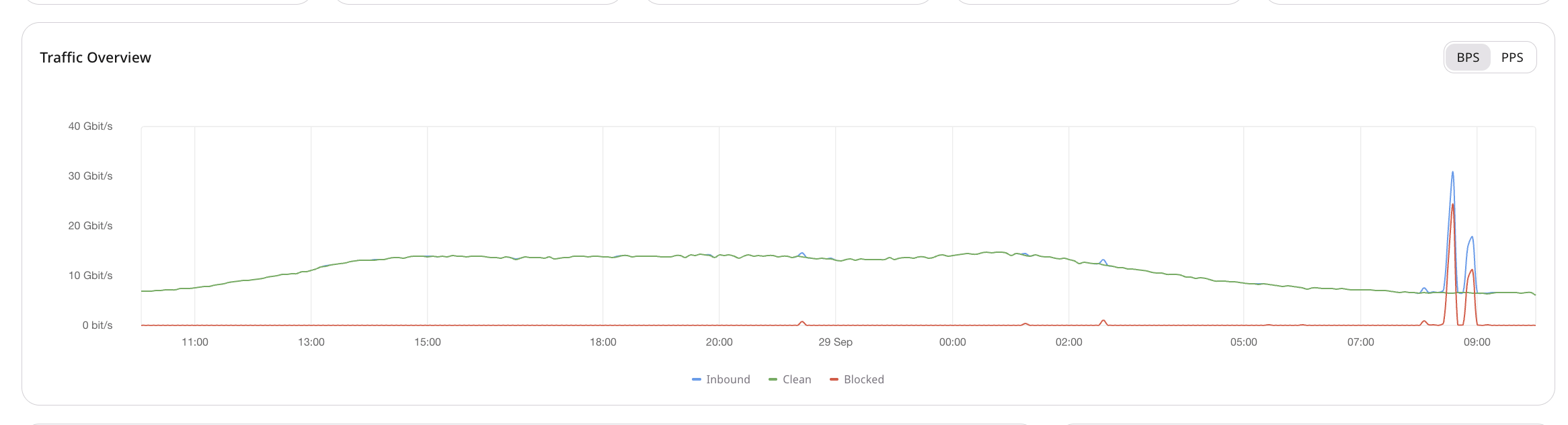
Charts below the cards show Traffic Overview, Policy Overview, Latest events, and Event Vectors. Traffic Overview plots **Inbound**, **Clean**, and **Blocked** over the selected window and can switch between bits per second (BPS) and packets per second (PPS).
Select a time preset or a custom range. Use **Search by IP address** to filter by destination IP.
## Summary cards and charts
Summary cards aggregate traffic for the selected window. Rate cards use bits per second (bps); **Event Count** is a count of incidents.
* **Inbound (Max)** — peak traffic received toward the protected resource before filtering, as the maximum rate in the window.
* **Outbound (Max)** — peak traffic sent from the protected resource, as the maximum rate in the window.
* **Blocked (Max)** — peak traffic the TMS discarded as malicious, as the maximum rate in the window.
* **Clean (P95)** — legitimate traffic forwarded after filtering, as the 95th percentile of clean volume in the window.
* **Event Count** — number of DDoS events detected in the window.
Charts below the cards show Traffic Overview, Policy Overview, Latest events, and Event Vectors. Traffic Overview plots **Inbound**, **Clean**, and **Blocked** over the selected window and can switch between bits per second (BPS) and packets per second (PPS).
 * **Policy Overview** — traffic in the selected window grouped by the protection policy that processed it, so it is clear which policies were active.
* **Latest events** — a table of recent incidents that match the current filters. Open a row to continue the investigation, or use the [Events log](/ddos-protection/events-log) for a three-month history and per-incident detail.
* **Event Vectors** — the mix of event types in the window, which helps identify the dominant flood pattern.
## Advanced Analytics
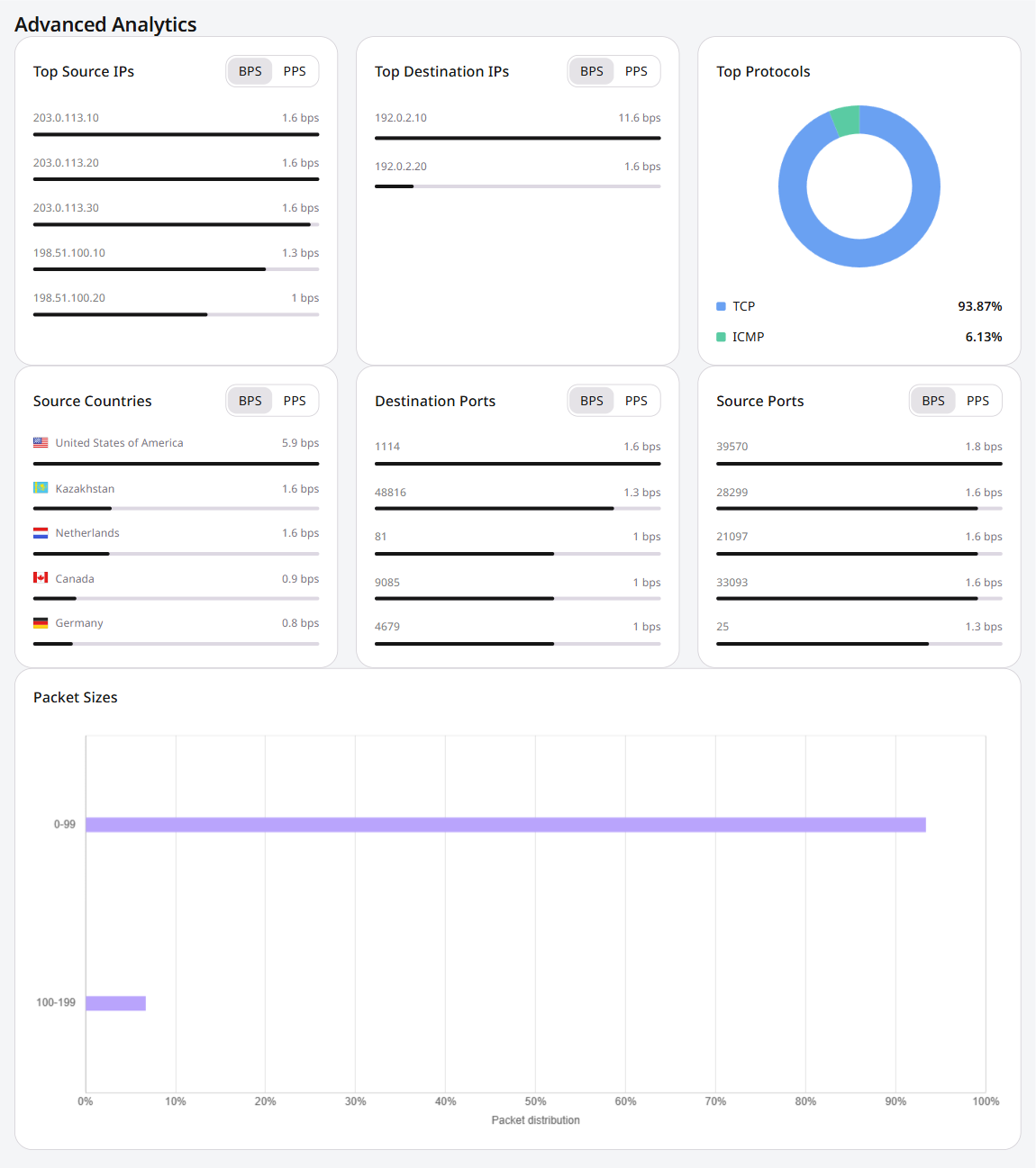
**Advanced Analytics** is on the same page. It breaks the selected window down by Top Source IPs, Top Destination IPs, Top Protocols, Source Countries, Destination Ports, Source Ports, and Packet Sizes.
Most of those views switch between bits per second (BPS) and packets per second (PPS). Top Protocols and Packet Sizes do not have a BPS/PPS toggle.
* **Policy Overview** — traffic in the selected window grouped by the protection policy that processed it, so it is clear which policies were active.
* **Latest events** — a table of recent incidents that match the current filters. Open a row to continue the investigation, or use the [Events log](/ddos-protection/events-log) for a three-month history and per-incident detail.
* **Event Vectors** — the mix of event types in the window, which helps identify the dominant flood pattern.
## Advanced Analytics
**Advanced Analytics** is on the same page. It breaks the selected window down by Top Source IPs, Top Destination IPs, Top Protocols, Source Countries, Destination Ports, Source Ports, and Packet Sizes.
Most of those views switch between bits per second (BPS) and packets per second (PPS). Top Protocols and Packet Sizes do not have a BPS/PPS toggle.