> ## Documentation Index
> Fetch the complete documentation index at: https://docs.gcore.com/llms.txt
> Use this file to discover all available pages before exploring further.
# Query a deployed model
Gcore generates an HTTPS endpoint for each deployment that accepts OpenAI-compatible API requests. This article covers locating the endpoint and sending inference requests using the Chat Completions API.
## Endpoint URL
The endpoint URL is available on the **Overview** tab of the deployment detail page under **Everywhere Inference > Deployments**.
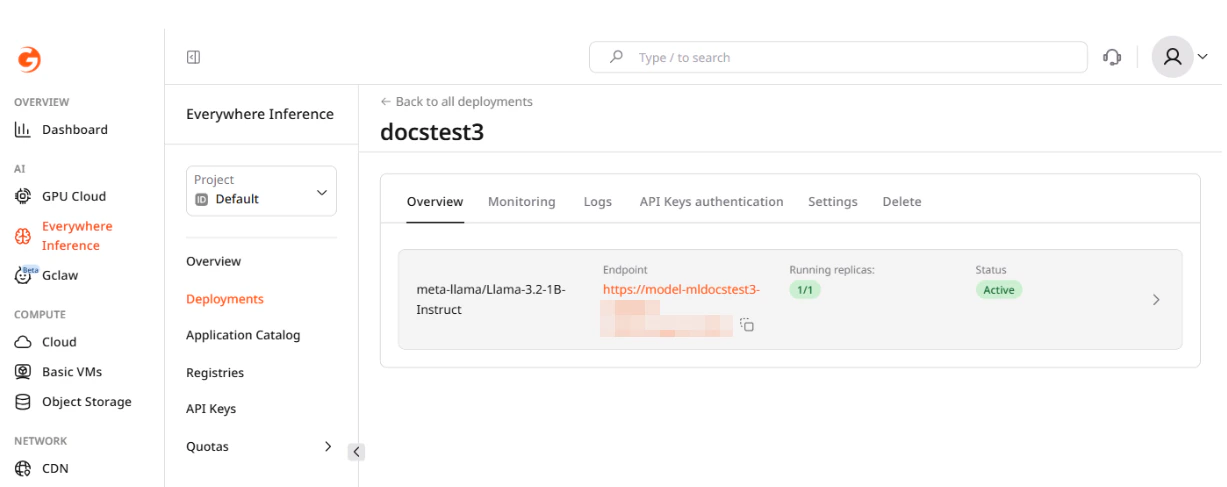 The URL follows this pattern:
```
https://model---.ai.gcore.dev/
```
Deployment names are alphanumeric without hyphens. A name containing hyphens causes a 400 error on creation.
## Chat completions
The endpoint implements the OpenAI Chat Completions API at `/v1/chat/completions`. The `model` field must match the identifier returned by `/v1/models` — use the exact string, including the organization prefix (e.g., `meta-llama/Llama-3.2-1B-Instruct`).
By default, API key authentication is disabled and the `api_key` / `apiKey` field is not validated — pass any non-empty string. When authentication is enabled on the deployment, include the key in the `X-API-Key` header on every request. See [Inference deployment with API key authentication](/edge-ai/everywhere-inference/api-keys/create-inference-deployment-with-auth) for details.
```bash curl theme={null}
curl -X POST "/v1/chat/completions" \
-H "Content-Type: application/json" \
-d '{
"model": "",
"messages": [
{"role": "user", "content": "Explain what a large language model is in two sentences."}
],
"max_tokens": 200
}'
```
```python Python theme={null}
from openai import OpenAI
client = OpenAI(
base_url="/v1",
api_key="none", # Not validated unless API key auth is enabled
)
response = client.chat.completions.create(
model="",
messages=[
{"role": "user", "content": "Explain what a large language model is in two sentences."}
],
max_tokens=200,
)
print(response.choices[0].message.content)
```
```javascript JavaScript theme={null}
import OpenAI from "openai";
const client = new OpenAI({
baseURL: "/v1",
apiKey: "none", // Not validated unless API key auth is enabled
});
const response = await client.chat.completions.create({
model: "",
messages: [
{ role: "user", content: "Explain what a large language model is in two sentences." },
],
max_tokens: 200,
});
console.log(response.choices[0].message.content);
```
## Multi-turn conversation
Each request is stateless — the model has no memory of previous calls. To maintain context, pass the full conversation history in the `messages` array on every request.
The `system` role sets the model's overall behavior and is placed first in the array. It is optional but recommended for chat applications.
As the conversation grows, the combined token count of all messages plus the generated reply must stay within the model's context window. If the responses degrade or the request fails with a context length error, trim the oldest user/assistant exchanges from the history while keeping the `system` message.
```bash curl theme={null}
curl -X POST "/v1/chat/completions" \
-H "Content-Type: application/json" \
-d '{
"model": "",
"messages": [
{"role": "system", "content": "You are a helpful assistant."},
{"role": "user", "content": "What is the capital of France?"},
{"role": "assistant", "content": "The capital of France is Paris."},
{"role": "user", "content": "What is its population?"}
],
"max_tokens": 100
}'
```
```python Python theme={null}
from openai import OpenAI
client = OpenAI(
base_url="/v1",
api_key="none",
)
messages = [
{"role": "system", "content": "You are a helpful assistant."},
{"role": "user", "content": "What is the capital of France?"},
{"role": "assistant", "content": "The capital of France is Paris."},
{"role": "user", "content": "What is its population?"},
]
response = client.chat.completions.create(
model="",
messages=messages,
max_tokens=100,
)
print(response.choices[0].message.content)
```
```javascript JavaScript theme={null}
import OpenAI from "openai";
const client = new OpenAI({
baseURL: "/v1",
apiKey: "none",
});
const messages = [
{ role: "system", content: "You are a helpful assistant." },
{ role: "user", content: "What is the capital of France?" },
{ role: "assistant", content: "The capital of France is Paris." },
{ role: "user", content: "What is its population?" },
];
const response = await client.chat.completions.create({
model: "",
messages,
max_tokens: 100,
});
console.log(response.choices[0].message.content);
```
## Streaming responses
With `stream: true`, the server returns the response as server-sent events (SSE). Each event is formatted as `data: {...}` followed by a blank line; the sequence ends with `data: [DONE]`.
The generated text arrives in `choices[0].delta.content` — this field is `null` on the first and last chunks. Streaming reduces time-to-first-token latency and suits interactive chat UIs.
```bash curl theme={null}
curl -X POST "/v1/chat/completions" \
-H "Content-Type: application/json" \
-d '{
"model": "",
"messages": [{"role": "user", "content": "Write a short poem about cloud computing."}],
"max_tokens": 150,
"stream": true
}'
```
```python Python theme={null}
from openai import OpenAI
client = OpenAI(
base_url="/v1",
api_key="none",
)
stream = client.chat.completions.create(
model="",
messages=[{"role": "user", "content": "Write a short poem about cloud computing."}],
max_tokens=150,
stream=True,
)
for chunk in stream:
if chunk.choices[0].delta.content:
print(chunk.choices[0].delta.content, end="", flush=True)
```
```javascript JavaScript theme={null}
import OpenAI from "openai";
const client = new OpenAI({
baseURL: "/v1",
apiKey: "none",
});
const stream = await client.chat.completions.create({
model: "",
messages: [{ role: "user", content: "Write a short poem about cloud computing." }],
max_tokens: 150,
stream: true,
});
for await (const chunk of stream) {
const text = chunk.choices[0]?.delta?.content ?? "";
process.stdout.write(text);
}
```
## Available models
The `/v1/models` endpoint returns the model identifiers accepted by the deployment:
```bash curl theme={null}
curl "/v1/models"
```
```python Python theme={null}
from openai import OpenAI
client = OpenAI(base_url="/v1", api_key="none")
models = client.models.list()
for model in models.data:
print(model.id)
```
```javascript JavaScript theme={null}
import OpenAI from "openai";
const client = new OpenAI({ baseURL: "/v1", apiKey: "none" });
const models = await client.models.list();
models.data.forEach((m) => console.log(m.id));
```
The `id` field in the response is the value to pass as `model` in chat completion requests.
## Key parameters
| **Parameter** | **Type** | **Description** |
| ------------- | --------------- | -------------------------------------------------------------------------------------------- |
| `model` | string | Model identifier. Use the `id` value from the `/v1/models` response. |
| `messages` | array | Conversation history. Each item has `role` (`system`, `user`, or `assistant`) and `content`. |
| `max_tokens` | integer | Maximum number of tokens to generate. |
| `temperature` | float | Randomness of output. Range 0–2. Lower values are more deterministic. Default: 1. |
| `top_p` | float | Nucleus sampling threshold. Range 0–1. Default: 1. |
| `stream` | boolean | If `true`, responses are sent token by token as server-sent events. Default: `false`. |
| `stop` | string or array | One or more sequences where generation stops. |
## Endpoint authentication
By default, the endpoint is publicly accessible. To restrict access, enable API key authentication as described in [Inference deployment with API key authentication](/edge-ai/everywhere-inference/api-keys/create-inference-deployment-with-auth).
The URL follows this pattern:
```
https://model---.ai.gcore.dev/
```
Deployment names are alphanumeric without hyphens. A name containing hyphens causes a 400 error on creation.
## Chat completions
The endpoint implements the OpenAI Chat Completions API at `/v1/chat/completions`. The `model` field must match the identifier returned by `/v1/models` — use the exact string, including the organization prefix (e.g., `meta-llama/Llama-3.2-1B-Instruct`).
By default, API key authentication is disabled and the `api_key` / `apiKey` field is not validated — pass any non-empty string. When authentication is enabled on the deployment, include the key in the `X-API-Key` header on every request. See [Inference deployment with API key authentication](/edge-ai/everywhere-inference/api-keys/create-inference-deployment-with-auth) for details.
```bash curl theme={null}
curl -X POST "/v1/chat/completions" \
-H "Content-Type: application/json" \
-d '{
"model": "",
"messages": [
{"role": "user", "content": "Explain what a large language model is in two sentences."}
],
"max_tokens": 200
}'
```
```python Python theme={null}
from openai import OpenAI
client = OpenAI(
base_url="/v1",
api_key="none", # Not validated unless API key auth is enabled
)
response = client.chat.completions.create(
model="",
messages=[
{"role": "user", "content": "Explain what a large language model is in two sentences."}
],
max_tokens=200,
)
print(response.choices[0].message.content)
```
```javascript JavaScript theme={null}
import OpenAI from "openai";
const client = new OpenAI({
baseURL: "/v1",
apiKey: "none", // Not validated unless API key auth is enabled
});
const response = await client.chat.completions.create({
model: "",
messages: [
{ role: "user", content: "Explain what a large language model is in two sentences." },
],
max_tokens: 200,
});
console.log(response.choices[0].message.content);
```
## Multi-turn conversation
Each request is stateless — the model has no memory of previous calls. To maintain context, pass the full conversation history in the `messages` array on every request.
The `system` role sets the model's overall behavior and is placed first in the array. It is optional but recommended for chat applications.
As the conversation grows, the combined token count of all messages plus the generated reply must stay within the model's context window. If the responses degrade or the request fails with a context length error, trim the oldest user/assistant exchanges from the history while keeping the `system` message.
```bash curl theme={null}
curl -X POST "/v1/chat/completions" \
-H "Content-Type: application/json" \
-d '{
"model": "",
"messages": [
{"role": "system", "content": "You are a helpful assistant."},
{"role": "user", "content": "What is the capital of France?"},
{"role": "assistant", "content": "The capital of France is Paris."},
{"role": "user", "content": "What is its population?"}
],
"max_tokens": 100
}'
```
```python Python theme={null}
from openai import OpenAI
client = OpenAI(
base_url="/v1",
api_key="none",
)
messages = [
{"role": "system", "content": "You are a helpful assistant."},
{"role": "user", "content": "What is the capital of France?"},
{"role": "assistant", "content": "The capital of France is Paris."},
{"role": "user", "content": "What is its population?"},
]
response = client.chat.completions.create(
model="",
messages=messages,
max_tokens=100,
)
print(response.choices[0].message.content)
```
```javascript JavaScript theme={null}
import OpenAI from "openai";
const client = new OpenAI({
baseURL: "/v1",
apiKey: "none",
});
const messages = [
{ role: "system", content: "You are a helpful assistant." },
{ role: "user", content: "What is the capital of France?" },
{ role: "assistant", content: "The capital of France is Paris." },
{ role: "user", content: "What is its population?" },
];
const response = await client.chat.completions.create({
model: "",
messages,
max_tokens: 100,
});
console.log(response.choices[0].message.content);
```
## Streaming responses
With `stream: true`, the server returns the response as server-sent events (SSE). Each event is formatted as `data: {...}` followed by a blank line; the sequence ends with `data: [DONE]`.
The generated text arrives in `choices[0].delta.content` — this field is `null` on the first and last chunks. Streaming reduces time-to-first-token latency and suits interactive chat UIs.
```bash curl theme={null}
curl -X POST "/v1/chat/completions" \
-H "Content-Type: application/json" \
-d '{
"model": "",
"messages": [{"role": "user", "content": "Write a short poem about cloud computing."}],
"max_tokens": 150,
"stream": true
}'
```
```python Python theme={null}
from openai import OpenAI
client = OpenAI(
base_url="/v1",
api_key="none",
)
stream = client.chat.completions.create(
model="",
messages=[{"role": "user", "content": "Write a short poem about cloud computing."}],
max_tokens=150,
stream=True,
)
for chunk in stream:
if chunk.choices[0].delta.content:
print(chunk.choices[0].delta.content, end="", flush=True)
```
```javascript JavaScript theme={null}
import OpenAI from "openai";
const client = new OpenAI({
baseURL: "/v1",
apiKey: "none",
});
const stream = await client.chat.completions.create({
model: "",
messages: [{ role: "user", content: "Write a short poem about cloud computing." }],
max_tokens: 150,
stream: true,
});
for await (const chunk of stream) {
const text = chunk.choices[0]?.delta?.content ?? "";
process.stdout.write(text);
}
```
## Available models
The `/v1/models` endpoint returns the model identifiers accepted by the deployment:
```bash curl theme={null}
curl "/v1/models"
```
```python Python theme={null}
from openai import OpenAI
client = OpenAI(base_url="/v1", api_key="none")
models = client.models.list()
for model in models.data:
print(model.id)
```
```javascript JavaScript theme={null}
import OpenAI from "openai";
const client = new OpenAI({ baseURL: "/v1", apiKey: "none" });
const models = await client.models.list();
models.data.forEach((m) => console.log(m.id));
```
The `id` field in the response is the value to pass as `model` in chat completion requests.
## Key parameters
| **Parameter** | **Type** | **Description** |
| ------------- | --------------- | -------------------------------------------------------------------------------------------- |
| `model` | string | Model identifier. Use the `id` value from the `/v1/models` response. |
| `messages` | array | Conversation history. Each item has `role` (`system`, `user`, or `assistant`) and `content`. |
| `max_tokens` | integer | Maximum number of tokens to generate. |
| `temperature` | float | Randomness of output. Range 0–2. Lower values are more deterministic. Default: 1. |
| `top_p` | float | Nucleus sampling threshold. Range 0–1. Default: 1. |
| `stream` | boolean | If `true`, responses are sent token by token as server-sent events. Default: `false`. |
| `stop` | string or array | One or more sequences where generation stops. |
## Endpoint authentication
By default, the endpoint is publicly accessible. To restrict access, enable API key authentication as described in [Inference deployment with API key authentication](/edge-ai/everywhere-inference/api-keys/create-inference-deployment-with-auth).