> ## Documentation Index
> Fetch the complete documentation index at: https://docs.gcore.com/llms.txt
> Use this file to discover all available pages before exploring further.
# Allocate an IPv6 address in VMmanager 6
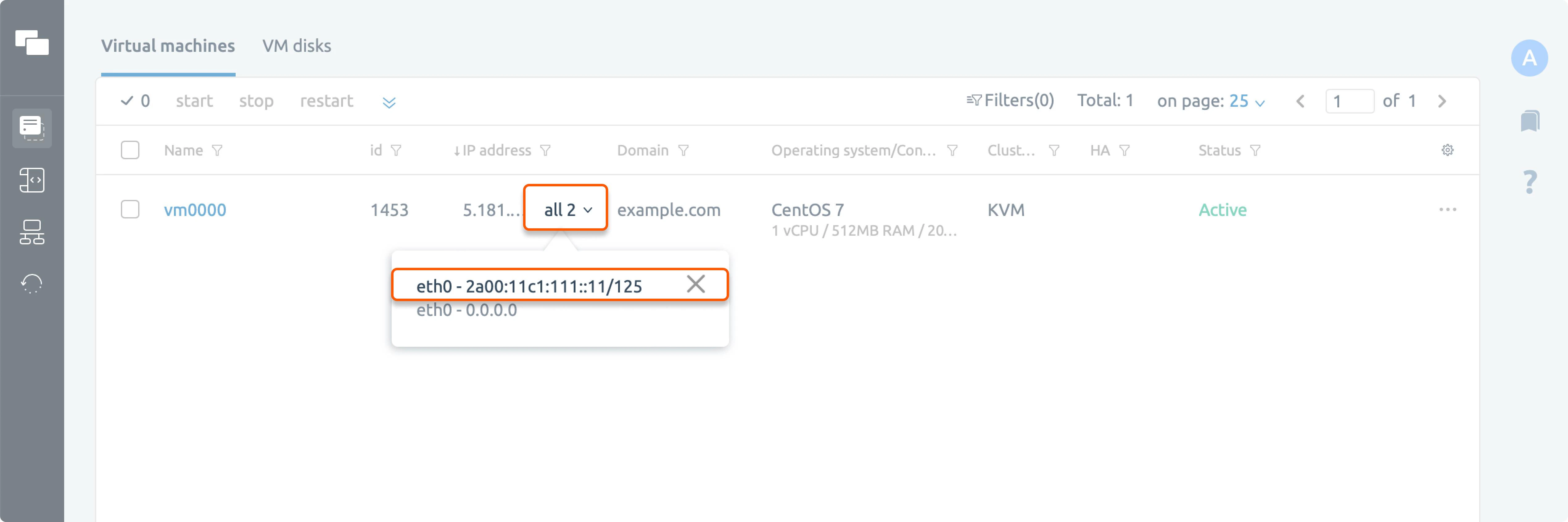
After activation, every Virtual Server is allocated a separate IPv6 subnet, and the first IP address of the subnet is automatically assigned to its interface.
To find the IP address, go to the **Virtual machines** tab and expand the **all 2** menu in the **IP address** column.
 If you want to change the IPv6 address, you can do so manually in the OS settings.
For more details, contact [our support team](/hosting/contact-our-technical-support).
If you want to change the IPv6 address, you can do so manually in the OS settings.
For more details, contact [our support team](/hosting/contact-our-technical-support).