> ## Documentation Index
> Fetch the complete documentation index at: https://docs.gcore.com/llms.txt
> Use this file to discover all available pages before exploring further.
# CDN applications
> Find a customer CDN application, check its status, and start, stop, or upgrade it.
CDN applications run inside the CDN and extend what a CDN resource can do. The **Applications** page lists the CDN applications customers have created.
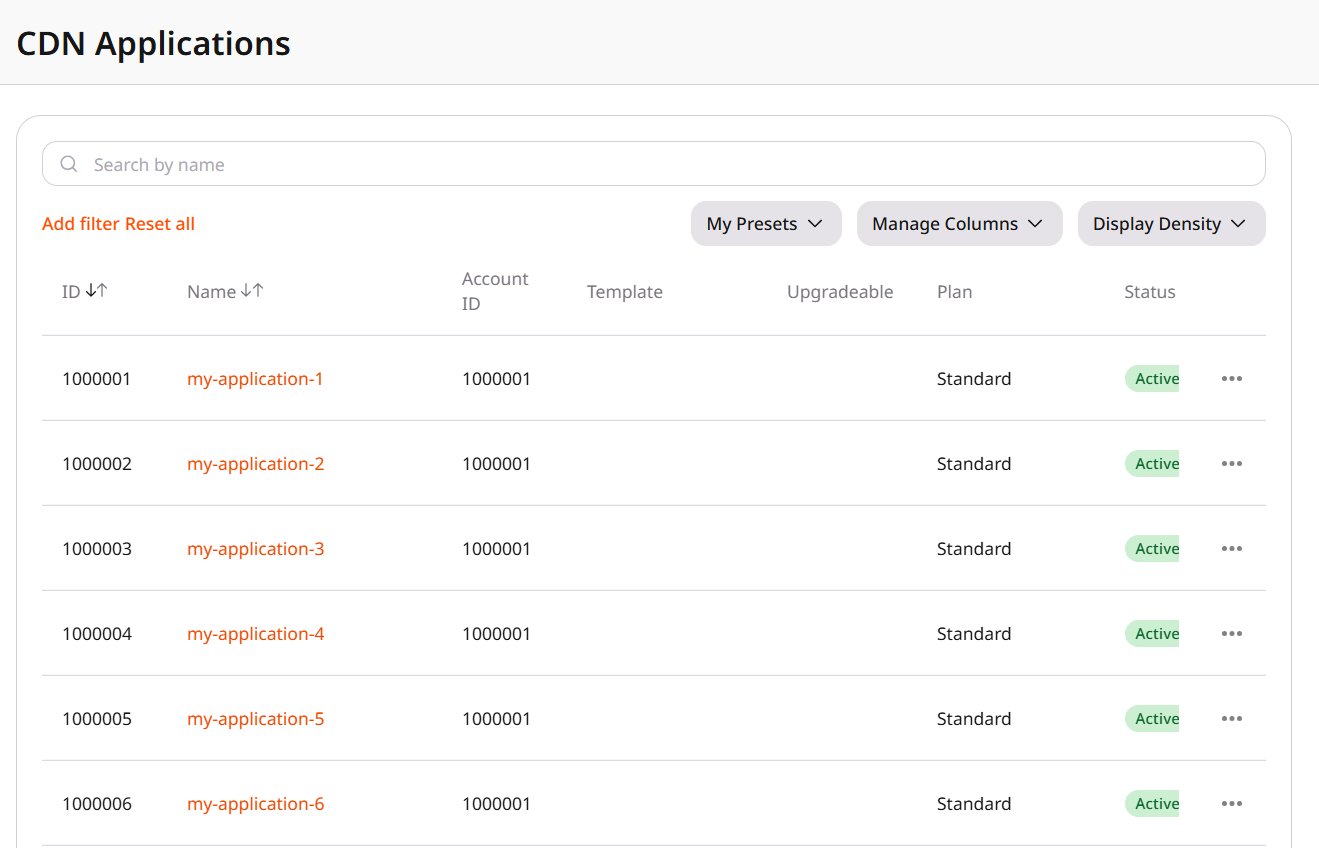 Find an application by name, or narrow the list by:
* **Account ID** is the customer account where the application was created.
* **Status** is **Active** when the application is running, **Disabled** when it is stopped, or **Blocked**.
* **Template** is the template the application was created from. An empty value means the application was created without a template.
* **Binary ID** separates versions built from the same template.
* **Plan** is the subscription plan the application is billed under.
**Reset all** clears the filters. The current filters and columns can be saved as a preset.
The application **ID** is the value to quote in a support request. **Name** is the name set in the Customer Portal. **Upgradeable** shows **Outdated** when the application was built from a template and that template now has a newer binary. **Reseller**, in **Manage Columns**, is the reseller account associated with the application. A description entered in the Customer Portal is stored with the application.
A stop or a start is shown in the Customer Portal, and the customer can stop or start the application there.
The actions on the row manage that application:
* **Stop** takes an **Active** application out of service.
* **Start** runs a **Disabled** application. On a **Blocked** application, **Start** sets the status back to **Active**.
* **Block** sets the status to **Blocked**.
* **Upgrade binary version** replaces an **Outdated** binary with the newest template binary, including the template changes made since that binary was built.
* **View** opens the application.
* **Delete** removes the application from the Customer Portal. Disconnect the application from its CDN resource first. The deletion does not proceed while the application stays connected, and the removal is permanent.
Find an application by name, or narrow the list by:
* **Account ID** is the customer account where the application was created.
* **Status** is **Active** when the application is running, **Disabled** when it is stopped, or **Blocked**.
* **Template** is the template the application was created from. An empty value means the application was created without a template.
* **Binary ID** separates versions built from the same template.
* **Plan** is the subscription plan the application is billed under.
**Reset all** clears the filters. The current filters and columns can be saved as a preset.
The application **ID** is the value to quote in a support request. **Name** is the name set in the Customer Portal. **Upgradeable** shows **Outdated** when the application was built from a template and that template now has a newer binary. **Reseller**, in **Manage Columns**, is the reseller account associated with the application. A description entered in the Customer Portal is stored with the application.
A stop or a start is shown in the Customer Portal, and the customer can stop or start the application there.
The actions on the row manage that application:
* **Stop** takes an **Active** application out of service.
* **Start** runs a **Disabled** application. On a **Blocked** application, **Start** sets the status back to **Active**.
* **Block** sets the status to **Blocked**.
* **Upgrade binary version** replaces an **Outdated** binary with the newest template binary, including the template changes made since that binary was built.
* **View** opens the application.
* **Delete** removes the application from the Customer Portal. Disconnect the application from its CDN resource first. The deletion does not proceed while the application stays connected, and the removal is permanent.