> ## Documentation Index
> Fetch the complete documentation index at: https://docs.gcore.com/llms.txt
> Use this file to discover all available pages before exploring further.
# Streaming features and trial limits
> What a reseller can review and change on a customer Streaming account.
On a Streaming account, a reseller checks the service status and the trial quotas for that customer, and turns individual capabilities on or off. Status and trial limits can only be reviewed here. The feature switches can be changed.
The **Edit** action on a [Streaming account](/reseller-support/streaming/accounts) opens **Edit account**.
## Status and trial limits
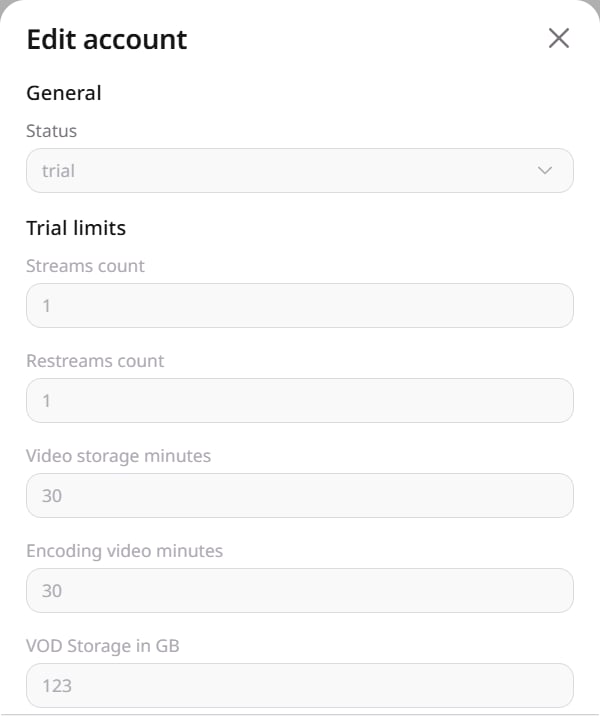 **Status** is the Streaming service state of the account. On a **Trial** account, **Trial limits** are the quotas for that trial. Both are shown and cannot be edited here.
Two quotas limit how many operations can run at the same time. **Streams count** is how many live streams can be active at once. **Restreams count** is how many [restreams](/streaming/live-streaming/create-and-configure-a-restream-to-social-media) can forward a live stream at once.
Storage and transcoding use different units. **Video storage minutes** counts the duration of uploaded video, and deleting a video returns minutes up to this quota. **VOD Storage in GB** is the disk space those files and their transcoded renditions occupy. **Encoding video minutes** is transcoding time for live streams and video on demand, and used minutes are not returned.
## Streaming features
**Status** is the Streaming service state of the account. On a **Trial** account, **Trial limits** are the quotas for that trial. Both are shown and cannot be edited here.
Two quotas limit how many operations can run at the same time. **Streams count** is how many live streams can be active at once. **Restreams count** is how many [restreams](/streaming/live-streaming/create-and-configure-a-restream-to-social-media) can forward a live stream at once.
Storage and transcoding use different units. **Video storage minutes** counts the duration of uploaded video, and deleting a video returns minutes up to this quota. **VOD Storage in GB** is the disk space those files and their transcoded renditions occupy. **Encoding video minutes** is transcoding time for live streams and video on demand, and used minutes are not returned.
## Streaming features
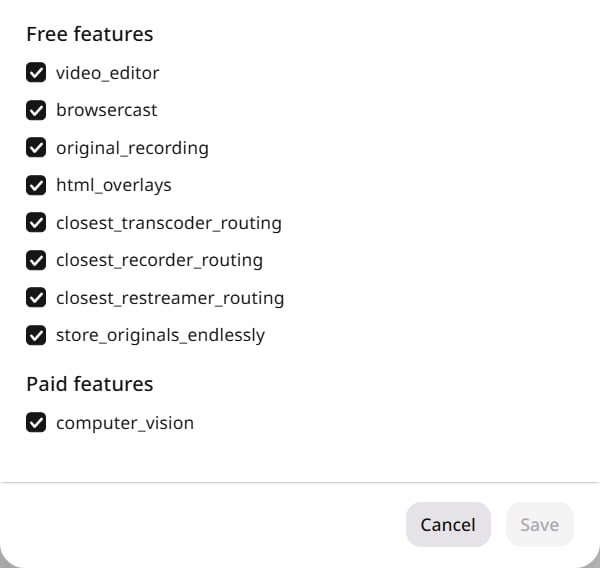 Some switches make a capability available that the customer then uses in Streaming. Others change where Streaming runs transcoding, recording, and restreaming for that account.
* **html\_overlays** makes [HTML overlays](/streaming/live-streaming/insert-html-overlays-in-live-streams) available: graphics composited into the live stream. The customer then enables overlays on a stream and adds the widgets.
* **original\_recording** makes a non-transcoded MP4 of a live recording available after the customer starts the recording. That file is deleted after 7 days.
* **browsercast** makes broadcasting from a camera or the screen available in the browser, without separate broadcast software.
* **computer\_vision**, under **Paid features**, gives the account access to AI checks of video for nudity, offensive language, and violence.
The customer does not turn the routing switches on inside a stream.
* **closest\_transcoder\_routing** runs transcoding in the same region as the ingest server instead of the account's default transcoding region.
* **closest\_recorder\_routing** runs recording in the ingest region.
* **closest\_restreamer\_routing** runs restreaming in the ingest region, which shortens the path from ingest to the restream.
Turn a feature on or off, then click **Save**. **Cancel** closes the dialog without saving.
Some switches make a capability available that the customer then uses in Streaming. Others change where Streaming runs transcoding, recording, and restreaming for that account.
* **html\_overlays** makes [HTML overlays](/streaming/live-streaming/insert-html-overlays-in-live-streams) available: graphics composited into the live stream. The customer then enables overlays on a stream and adds the widgets.
* **original\_recording** makes a non-transcoded MP4 of a live recording available after the customer starts the recording. That file is deleted after 7 days.
* **browsercast** makes broadcasting from a camera or the screen available in the browser, without separate broadcast software.
* **computer\_vision**, under **Paid features**, gives the account access to AI checks of video for nudity, offensive language, and violence.
The customer does not turn the routing switches on inside a stream.
* **closest\_transcoder\_routing** runs transcoding in the same region as the ingest server instead of the account's default transcoding region.
* **closest\_recorder\_routing** runs recording in the ingest region.
* **closest\_restreamer\_routing** runs restreaming in the ingest region, which shortens the path from ingest to the restream.
Turn a feature on or off, then click **Save**. **Cancel** closes the dialog without saving.