> ## Documentation Index
> Fetch the complete documentation index at: https://docs.gcore.com/llms.txt
> Use this file to discover all available pages before exploring further.
# Generate temporary links to files with AWS CLI and S3cmd
Presigned URLs provide temporary, credential-free access to private files in Gcore Object Storage. The file owner generates a URL with a configurable expiry time — anyone who receives it can download the file during the URL's lifetime without storage credentials.
Only those with valid [access keys](/storage/create-an-s3-or-sftp-storage#s3) (Access key and Secret key) can generate presigned URLs.
## Presigned URL workflow
The storage owner sets an expiry time and generates a presigned URL.
The owner sends the URL to users who need temporary access to the file.
Recipients receive a URL in the following format:
```text theme={null}
https:///bucket/image.jpg
?X-Amz-Algorithm=AWS4-HMAC-SHA256
&X-Amz-Credential=...
&X-Amz-Date=...
&X-Amz-Expires=3600
&X-Amz-SignedHeaders=host
&X-Amz-Signature=...
```
| Parameter | Description |
| ------------------------------------- | ----------------------------------------------------------- |
| `https:///bucket/image.jpg` | Path to the file in the bucket. |
| `X-Amz-Algorithm=AWS4-HMAC-SHA256` | Encryption algorithm used for the link signature. |
| `X-Amz-Credential=...` | Additional info about the request (AWS region and time). |
| `X-Amz-Date=...` | Timestamp of the link creation (format `YYYYMMDDTHHmmssZ`). |
| `X-Amz-Expires=3600` | Link lifespan in seconds. |
| `X-Amz-SignedHeaders=host` | HTTP headers included in the signature. |
| `X-Amz-Signature=...` | Signature that authorizes access to the file. |
During the link's lifespan, anyone with the URL can view and download the file.
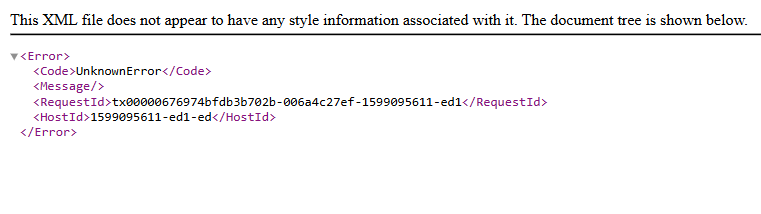
When the link expires, the file becomes inaccessible. Clicking the link returns an `UnknownError` response:
 To restrict access by IP address, add an [IP policy](/storage/manage-object-storage/configure-aws-sli-s3cmd-and-aws-javascript-sdk/configure-access-control-on-s3-storage-with-aws-cli-and-s3cmd#ip-based-access-via-policy) to the bucket.
## Presigned URL generation
AWS CLI and S3cmd both support presigned URL generation.
### AWS CLI
Run the following command, replacing the placeholder values:
```sh theme={null}
aws s3 presign s3://example-bucket/image.jpg --expires-in 60480 --endpoint-url https://
```
| Parameter | Description |
| -------------------- | ----------------------------------------------------------------------------------------------------------- |
| `example-bucket` | The name of the bucket that contains the file. |
| `image.jpg` | The file to share. |
| `60480` | Link lifespan in seconds; the maximum is 604800 (7 days). |
| `` | The storage hostname from the **Details** section in the [Gcore Customer Portal](https://portal.gcore.com). |
The command outputs a presigned URL. Copy and send it to the intended recipients.
### S3cmd
The S3cmd `signurl` command takes a bucket path and an expiry timestamp rather than a duration in seconds.
Run the following command, replacing the placeholder values:
```sh theme={null}
s3cmd signurl s3://example-bucket/image.jpg 1657457538
```
| Parameter | Description |
| ---------------- | ---------------------------------------------------------------------------------------------------------------------------------------- |
| `example-bucket` | The name of the bucket that contains the file. |
| `image.jpg` | The file to share. |
| `1657457538` | Link expiry time as a Unix timestamp; use a [converter](https://epochconverter.com) to convert a date and time to Unix timestamp format. |
Alternatively, set the expiry using a shell expression — this example sets a 7-day lifespan:
```sh theme={null}
s3cmd signurl s3://example-bucket/image.jpg $(echo "`date +%s` + 3600 * 24 * 7" | bc)
```
The shell expression computes a Unix timestamp 7 days from the current time. The command outputs a presigned URL — copy and send it to the intended recipients.
To restrict access by IP address, add an [IP policy](/storage/manage-object-storage/configure-aws-sli-s3cmd-and-aws-javascript-sdk/configure-access-control-on-s3-storage-with-aws-cli-and-s3cmd#ip-based-access-via-policy) to the bucket.
## Presigned URL generation
AWS CLI and S3cmd both support presigned URL generation.
### AWS CLI
Run the following command, replacing the placeholder values:
```sh theme={null}
aws s3 presign s3://example-bucket/image.jpg --expires-in 60480 --endpoint-url https://
```
| Parameter | Description |
| -------------------- | ----------------------------------------------------------------------------------------------------------- |
| `example-bucket` | The name of the bucket that contains the file. |
| `image.jpg` | The file to share. |
| `60480` | Link lifespan in seconds; the maximum is 604800 (7 days). |
| `` | The storage hostname from the **Details** section in the [Gcore Customer Portal](https://portal.gcore.com). |
The command outputs a presigned URL. Copy and send it to the intended recipients.
### S3cmd
The S3cmd `signurl` command takes a bucket path and an expiry timestamp rather than a duration in seconds.
Run the following command, replacing the placeholder values:
```sh theme={null}
s3cmd signurl s3://example-bucket/image.jpg 1657457538
```
| Parameter | Description |
| ---------------- | ---------------------------------------------------------------------------------------------------------------------------------------- |
| `example-bucket` | The name of the bucket that contains the file. |
| `image.jpg` | The file to share. |
| `1657457538` | Link expiry time as a Unix timestamp; use a [converter](https://epochconverter.com) to convert a date and time to Unix timestamp format. |
Alternatively, set the expiry using a shell expression — this example sets a 7-day lifespan:
```sh theme={null}
s3cmd signurl s3://example-bucket/image.jpg $(echo "`date +%s` + 3600 * 24 * 7" | bc)
```
The shell expression computes a Unix timestamp 7 days from the current time. The command outputs a presigned URL — copy and send it to the intended recipients.