> ## Documentation Index
> Fetch the complete documentation index at: https://docs.gcore.com/llms.txt
> Use this file to discover all available pages before exploring further.

# Add token auto-refresh to a video player

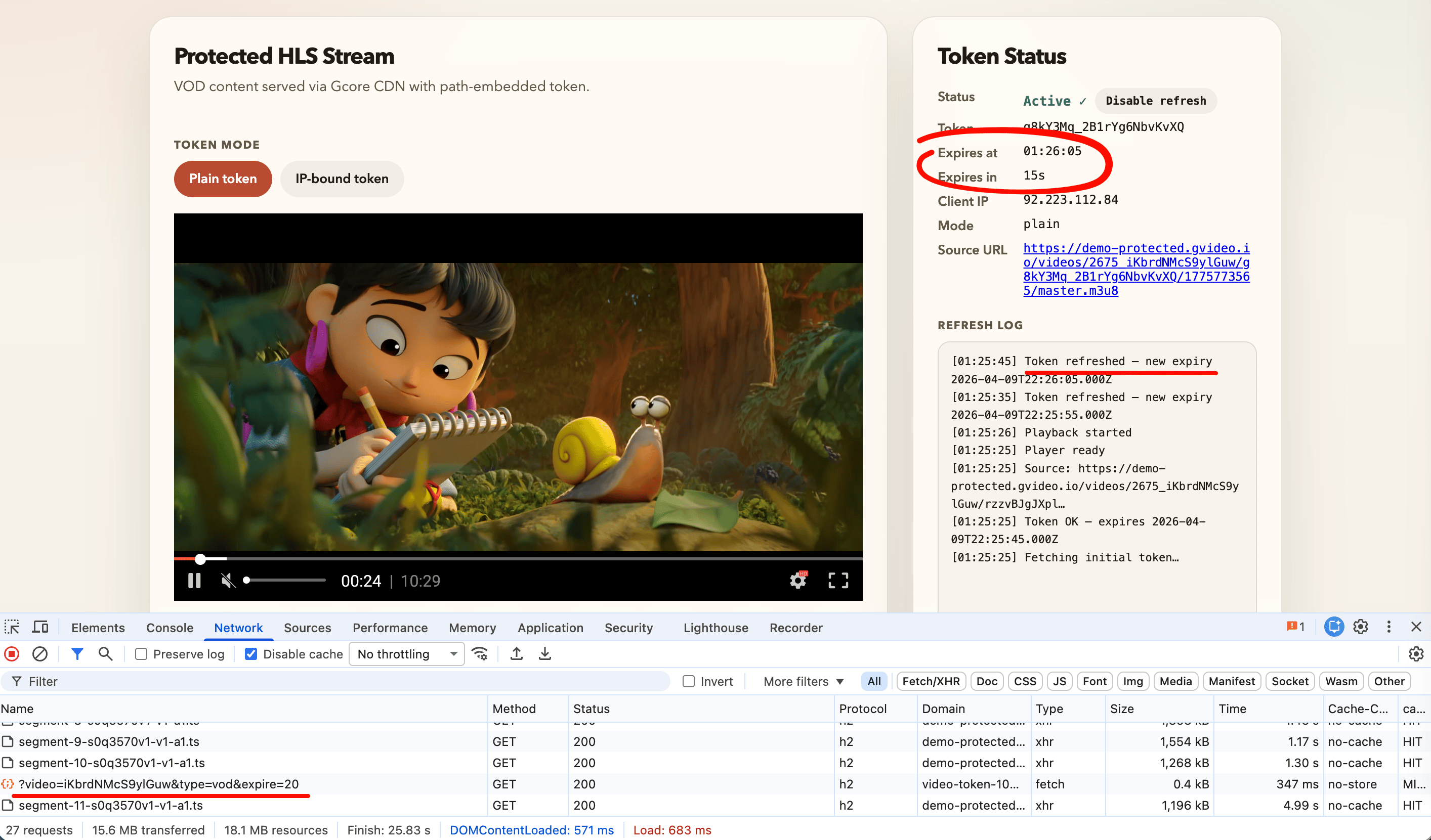
The examples below use the [demo token endpoint](/streaming/interaction-with-cdn/token-api-fastedge#demo-endpoint). Replace `TOKEN_API_URL` with an authenticated backend endpoint before deploying to production. The [live demo](https://g-core.github.io/gcore-videoplayer-js/example/protected-content.html) uses the Gcore Video Player tab below and shows token status and refresh log in real time.

<Frame>
  <img src="https://mintcdn.com/gcore/mB9xUQPpVbdf6kcA/images/docs/streaming/interaction-with-cdn/token-auto-refresh/cdn-token-demo.png?fit=max&auto=format&n=mB9xUQPpVbdf6kcA&q=85&s=80616d5cbeb774102a12e36efff3288d" alt="Demo player showing active token status and refresh log with CDN segment requests in devtools" width="2828" height="1661" data-path="images/docs/streaming/interaction-with-cdn/token-auto-refresh/cdn-token-demo.png" />
</Frame>

<Tabs>
  <Tab title="Gcore Video Player">
    `TokenRefreshPlugin` handles token rotation without a custom URL loader or request interceptor. The plugin reads the initial token from the source URL, rewrites every outgoing request, and calls `getToken` automatically before expiry.

    The package is on GitHub at [github.com/G-Core/gcore-videoplayer-js](https://github.com/G-Core/gcore-videoplayer-js).

    ```html theme={null}
    <!DOCTYPE html>
    <html lang="en">
    <head>
      <meta charset="UTF-8" />
      <meta name="viewport" content="width=device-width, initial-scale=1.0" />
      <link rel="stylesheet" href="https://player.gvideo.co/v2/assets/latest/index.css" />
    </head>
    <body>
      <div id="player" style="width:854px; height:480px;"></div>

      <script type="module">
        import {
          Player,
          MediaControl,
          QualityLevels,
          Spinner,
          ErrorScreen,
          TokenRefreshPlugin,
        } from 'https://player.gvideo.co/v2/assets/latest/index.js'

        // Replace with your authenticated backend endpoint.
        // Must return: { token, token_ip, client_ip, expires, url, url_ip }
        const TOKEN_API_URL =
          'https://video-token-102748.fastedge.app/?video=iKbrdNMcS9ylGuw&type=vod&expire=20'

        async function getToken() {
          const res = await fetch(TOKEN_API_URL)
          if (!res.ok) throw new Error(`Token API returned ${res.status}`)
          return res.json()
        }

        // Register TokenRefreshPlugin BEFORE other plugins.
        if (!Player.corePlugins.some(p => p.prototype?.name === 'token_refresh')) {
          Player.registerPlugin(TokenRefreshPlugin)
        }
        if (!Player.corePlugins.some(p => p.prototype?.name === 'media_control')) {
          Player.registerPlugin(MediaControl)
          Player.registerPlugin(QualityLevels)
          Player.registerPlugin(Spinner)
          Player.registerPlugin(ErrorScreen)
        }

        // Fetch initial token BEFORE constructing the Player.
        // The source URL must contain a valid {token}/{expires} path on startup.
        const tokenData = await getToken()

        const player = new Player({
          sources: [{
            // Use tokenData.url_ip (and ipBound: true) for IP-bound tokens.
            source: tokenData.url,
            mimeType: 'application/x-mpegURL',
          }],
          playbackType: 'vod',    // 'vod' | 'live'

          tokenRefresh: {
            getToken,
            ipBound: false,             // true → use url_ip / token_ip
            refreshLeadSeconds: 10,     // fetch replacement token this many seconds before expiry
            onTokenRefreshed(data) {
              console.log('Token refreshed — next expiry:', new Date(data.expires * 1000))
            },
          },
        })

        // attachTo() must be the last step — it triggers plugin initialization.
        player.attachTo(document.getElementById('player'))
      </script>
    </body>
    </html>
    ```
  </Tab>

  <Tab title="hls.js">
    For React, Vue, Angular, or any setup using [hls.js](https://github.com/video-dev/hls.js) directly, configure a custom URL-rewriting loader and a refresh timer.

    `TokenRewriteLoader` extends the default hls.js XHR loader and rewrites the `{token}/{expires}` path segments in every request before the connection opens. A chained `setTimeout` scheduler fetches a fresh token before expiry.

    ```html theme={null}
    <!DOCTYPE html>
    <html lang="en">
    <head>
      <meta charset="UTF-8" />
      <meta name="viewport" content="width=device-width, initial-scale=1.0" />
    </head>
    <body>
      <video id="video" controls style="width:854px; height:480px; background:#000;"></video>

      <script src="https://cdn.jsdelivr.net/npm/hls.js@latest/dist/hls.min.js"></script>
      <script>
        // Replace with your authenticated backend endpoint.
        // Must return: { token, token_ip, client_ip, expires, url, url_ip }
        const TOKEN_API_URL =
          'https://video-token-102748.fastedge.app/?video=iKbrdNMcS9ylGuw&type=vod&expire=20'

        // Shared state — loader closure reads the latest value after each refresh.
        const tokenState = { token: '', expires: 0 }

        async function fetchToken() {
          const res = await fetch(TOKEN_API_URL)
          if (!res.ok) throw new Error(`Token API returned ${res.status}`)
          return res.json()
        }

        // Matches the {token}/{expires} pair embedded in Gcore CDN URLs.
        const TOKEN_RE = /\/([A-Za-z0-9_-]{6,})\/(1\d{9,})\//

        function rewriteUrl(url) {
          return url.replace(TOKEN_RE, `/${tokenState.token}/${tokenState.expires}/`)
        }

        class TokenRewriteLoader extends Hls.DefaultConfig.loader {
          load(context, config, callbacks) {
            context.url = rewriteUrl(context.url)
            super.load(context, config, callbacks)
          }
        }

        const LEAD_SECONDS = 10
        let refreshTimer = null

        function scheduleRefresh(expires) {
          clearTimeout(refreshTimer)
          const msUntilRefresh = Math.max(1000, (expires - Date.now() / 1000 - LEAD_SECONDS) * 1000)
          refreshTimer = setTimeout(doRefresh, msUntilRefresh)
        }

        async function doRefresh() {
          try {
            const data = await fetchToken()
            // Use data.token_ip for IP-bound mode.
            tokenState.token   = data.token
            tokenState.expires = data.expires
            console.log('Token refreshed — next expiry:', new Date(data.expires * 1000))
            scheduleRefresh(data.expires)
          } catch (err) {
            console.error('Token refresh failed:', err)
            setTimeout(doRefresh, 5000)
          }
        }

        async function init() {
          const data = await fetchToken()

          // Seed state BEFORE loadSource() so the first request is rewritten correctly.
          tokenState.token   = data.token    // or data.token_ip for IP-bound
          tokenState.expires = data.expires

          const hls = new Hls({ loader: TokenRewriteLoader })
          hls.loadSource(data.url)
          hls.attachMedia(document.getElementById('video'))

          scheduleRefresh(data.expires)
        }

        init().catch(err => console.error('Player init failed:', err))
      </script>
    </body>
    </html>
    ```
  </Tab>

  <Tab title="dash.js">
    For MPEG-DASH streams, [dash.js](https://github.com/Dash-IF/dash.js) provides a `RequestModifier` extension. The same token-rewriting logic as hls.js applies — only the manifest suffix differs.

    The demo token API returns HLS URLs ending in `master.m3u8`. For DASH, replace that suffix with `index.mpd` — the token and expires values embedded in the path are the same for both formats.

    ```html theme={null}
    <!DOCTYPE html>
    <html lang="en">
    <head>
      <meta charset="UTF-8" />
      <meta name="viewport" content="width=device-width, initial-scale=1.0" />
    </head>
    <body>
      <video id="video" controls style="width:854px; height:480px; background:#000;"></video>

      <script src="https://cdn.dashjs.org/latest/dash.all.min.js"></script>
      <script>
        // Replace with your authenticated backend endpoint.
        // Must return: { token, token_ip, client_ip, expires, url, url_ip }
        const TOKEN_API_URL =
          'https://video-token-102748.fastedge.app/?video=iKbrdNMcS9ylGuw&type=vod&expire=20'

        const tokenState = { token: '', expires: 0 }

        async function fetchToken() {
          const res = await fetch(TOKEN_API_URL)
          if (!res.ok) throw new Error(`Token API returned ${res.status}`)
          return res.json()
        }

        const TOKEN_RE = /\/([A-Za-z0-9_-]{6,})\/(1\d{9,})\//

        function rewriteUrl(url) {
          return url.replace(TOKEN_RE, `/${tokenState.token}/${tokenState.expires}/`)
        }

        const LEAD_SECONDS = 10
        let refreshTimer = null

        function scheduleRefresh(expires) {
          clearTimeout(refreshTimer)
          const msUntilRefresh = Math.max(1000, (expires - Date.now() / 1000 - LEAD_SECONDS) * 1000)
          refreshTimer = setTimeout(doRefresh, msUntilRefresh)
        }

        async function doRefresh() {
          try {
            const data = await fetchToken()
            // Use data.token_ip for IP-bound mode.
            tokenState.token   = data.token
            tokenState.expires = data.expires
            console.log('Token refreshed — next expiry:', new Date(data.expires * 1000))
            scheduleRefresh(data.expires)
          } catch (err) {
            console.error('Token refresh failed:', err)
            setTimeout(doRefresh, 5000)
          }
        }

        async function init() {
          const data = await fetchToken()

          // Seed state BEFORE initialize() so the first MPD request is rewritten.
          tokenState.token   = data.token    // or data.token_ip for IP-bound
          tokenState.expires = data.expires

          const player = dashjs.MediaPlayer().create()

          // Register RequestModifier BEFORE initialize() so it intercepts the first MPD fetch.
          player.extend('RequestModifier', function() {
            return {
              modifyRequest(config) {
                if (config.url) config.url = rewriteUrl(config.url)
                return config
              }
            }
          }, true)

          // Convert HLS URL to DASH by replacing the manifest suffix.
          const dashUrl = data.url.replace('master.m3u8', 'index.mpd')
          player.initialize(document.getElementById('video'), dashUrl, true)

          scheduleRefresh(data.expires)
        }

        init().catch(err => console.error('Player init failed:', err))
      </script>
    </body>
    </html>
    ```
  </Tab>
</Tabs>