> ## Documentation Index
> Fetch the complete documentation index at: https://docs.gcore.com/llms.txt
> Use this file to discover all available pages before exploring further.
# Protect content with video secure tokens
By default, videos are available by their links with no restrictions and can be placed on any website or in any mobile application. But in some cases, platform owners or rights holders need to ensure that video content does *not* offer public access, such as when a video is only for paid access, private access, temporary access, or access on a specific site.
## When to use secure tokens (and when NOT to)
**You need to control WHO can access your content:**
* **Paid content/Paywalls**: Only authenticated, paying users should access videos
* **Private videos**: Content for logged-in users only (educational platforms, corporate training)
* **Time-limited access**: Preview links that expire after X hours/days
* **Anti-hotlinking**: Prevent other websites from embedding your videos without permission
* **Per-user access control**: Generate unique tokens for each user with your backend
**Example use cases:**
* Online course platform: Students must log in to watch lessons
* VOD platform: Users pay subscription to access movies
* Event streaming: Generate one-time links for ticket holders
* Content preview: Share 24-hour preview links with partners
**You just need to control WHERE content is available:**
Use a **[Custom CDN resource](/streaming/interaction-with-cdn/custom-cdn-resource)** instead of secure tokens for these scenarios:
* **Geo-restrictions only**: Use Custom CDN resource with Country access policy
* Example: "Stream only available in Dominican Republic"
* This is simpler and doesn't require backend token generation
* See: [Custom CDN resource - Country access policy](/streaming/interaction-with-cdn/custom-cdn-resource#country-access-policy-geo-blocking)
* **Domain restrictions only**: Use Custom CDN resource with Referrer validation
* Example: "Video can only be embedded on yourdomain.com"
* No token generation needed
* See: [Custom CDN resource - Referrer access policy](/streaming/interaction-with-cdn/custom-cdn-resource#referrer-access-policy)
* **IP-based restrictions**: Use Custom CDN resource with IP access policy
* Example: "Stream only accessible from company IP ranges"
* See: [Custom CDN resource - IP access policy](/streaming/interaction-with-cdn/custom-cdn-resource#ip-access-policy)
* **Public content**: If your content is free and publicly accessible, you don't need any protection
* **Legal authorization**: If you're asking about copyright/broadcasting rights clearance, this is a legal question – contact [Gcore Support](mailto:support@gcore.com)
**Common confusion:**
* "Authorization to stream" (legal rights) ≠ Secure tokens (technical access control)
* Geo-blocking ≠ Secure tokens (different features, different purposes)
* **For location/domain/IP restrictions → Use [Custom CDN resource](/streaming/interaction-with-cdn/custom-cdn-resource)**
* **For user-based access control → Use Secure tokens (this page)**
**Important:** Secure tokens require backend development to generate tokens for each user/request. If you just need geo-blocking, domain restrictions, or IP-based access control, use a **[Custom CDN resource](/streaming/interaction-with-cdn/custom-cdn-resource)** with the appropriate security policies instead—it's much simpler and doesn't require any coding.
## What are protected temporary links?
When using this option, you add a special character set to every URL. Check out the examples below with the special characters highlighted in bold. At Gcore, we call these special characters *Secure Tokens*.
VOD:
* Public: [https://demo-public.gvideo.io/videos/2675\_pG8TfmKx2LU2qs/master.m3u8](https://demo-public.gvideo.io/videos/2675_pG8TfmKx2LU2qs/master.m3u8)
* Protected: [https://demo-protected.gvideo.io/videos/2675\_pG8TfmKx2LU2qs/rI1224fiE3USCa8qYnMuGQ/1861919999/master.m3u8](https://demo-protected.gvideo.io/videos/2675_pG8TfmKx2LU2qs/rI1224fiE3USCa8qYnMuGQ/1861919999/master.m3u8)
LIVE:
* Public: [https://demo-public.gvideo.io/cmaf/2675\_19146/master.m3u8](https://demo-public.gvideo.io/cmaf/2675_19146/master.m3u8)
* Protected: [https://demo-protected.gvideo.io/cmaf/2675\_19146/9y9nJqRofJQw-DbX2LDgYw/1861919999/master.m3u8](https://demo-protected.gvideo.io/cmaf/2675_19146/9y9nJqRofJQw-DbX2LDgYw/1861919999/master.m3u8)
In the protected URLs above, `1861919999` is the expiration timestamp in Unix time format, which corresponds to **Sunday, December 31, 2028 at 23:59:59 UTC**.
Unlike content with a public URL, which is available to any user, content with a protected temporary link verifies that the user has a special *hash key* that matches the generated token.
There are three possible scenarios:
* HTTP 2xx response code, if the hash key is valid and unexpired
* HTTP 403 Forbidden response, if the hash key is invalid
* HTTP 410 Gone response, if the hash key is valid but expired
Here is an example of what happens if we try to access the video when the token is expired:
```sh theme={null}
curl -I https://demo-protected.gvideo.io/videos/2675_pG8TfmKx2LU2qs/2oY5gKMSVBBX2x-VbzN03g/1755007200/master.m3u8
HTTP/2 410
date: Tue, 12 Aug 2025 15:15:18 GMT
content-type: text/html
content-length: 136
```
In this example, the expiration timestamp `1755007200` (Unix time) corresponds to **Sunday, June 12, 2025 at 12:00:00 UTC**, which has already passed when the request was made on August 12, 2025, resulting in a 410 Gone response.
**Important - Backend development required:**
These protected links and secure tokens **must be generated on your backend** (server-side). Here's what you need to do:
1. **Enable the feature in Gcore UI:** Activate secure tokens in your CDN resource settings (see [How to enable the secure token feature](#how-to-enable-the-secure-token-feature))
2. **Develop backend functionality:** You must implement the token generation logic in your backend application (see code examples below in [How to create protected links](#how-to-create-protected-links-with-the-secure-token))
3. **Generate URLs dynamically:** Your backend should generate signed URLs with tokens for each user/request
**Why backend development is required:**
* The secret key must be kept secure on your server—never exposed to clients
* Tokens should be generated per-user or per-request for security
* Your backend controls expiration times and access permissions
Gcore provides the CDN infrastructure and validates tokens, but **you are responsible for generating the signed URLs** in your application.
## Video secure token vs. generic CDN secure token
Gcore offers two types of secure tokens for content protection:
**What it is:**
* Simplified secure token implementation specifically for Video Streaming
* Optimized for HLS/DASH manifests and video chunks
* Supports both VOD and live streaming
* Includes MP4 direct download protection
**Best for:**
* Video Streaming platform content (this article)
* Live streams and VOD hosted on Gcore Streaming
* When you need relative path token validation for manifests and chunks
* Simple implementation for streaming use cases
**Implementation:**
* Follow this guide for token generation
* Tokens work with the streaming-specific URL format
* Support for both HLS/DASH and MP4 formats
**What it is:**
* Full-featured secure token for any CDN resource
* More configuration options and flexibility
* Works with any content type (not just video)
* Advanced features like custom token parameters
**Best for:**
* Custom CDN resources with non-streaming content
* When you need advanced token features
* Mixed content types (images, documents, downloads, etc.)
* Custom origin configurations
**Implementation:**
* See [CDN Secure Token documentation](/cdn/cdn-resource-options/security/use-a-secure-token/about-secure-token)
* More complex setup but more flexible
* Requires understanding of generic CDN resource configuration
### How to choose between them
| Use Case | Recommended Approach |
| ------------------------------------------------------- | ----------------------------------- |
| Protecting Video Streaming content (VOD/Live) | **Video secure token** (this guide) |
| Protecting custom CDN resource with video content | **Generic CDN secure token** |
| Protecting mixed content types (video + images + files) | **Generic CDN secure token** |
| Simplest implementation for streaming | **Video secure token** (this guide) |
| Need advanced token customization | **Generic CDN secure token** |
**Key difference:** Video secure token is a specialized implementation optimized for streaming workflows. If you're using Gcore Video Streaming platform, use this guide. If you're configuring a custom CDN resource, refer to the generic CDN secure token documentation.
## Prerequisites: Custom CDN resource required
**Important requirement:** Both **video secure tokens** and **generic CDN secure tokens** require a dedicated custom CDN resource to be created and configured.
* This is a **separate CDN product** that must be activated with a paid tariff
* Custom CDN resources are billed **per-GB** (not per-minute like standard streaming)
* You cannot enable secure tokens on the default `clientID.gvideo.io` subdomain
To set up a custom CDN resource for streaming, see the [Custom CDN resource](/streaming/interaction-with-cdn/custom-cdn-resource) guide.
## Multiple CDN resources for different policies
Your account can have several CDN resources leading to the same content (origin). These CDN resources can have different access policies. This allows you to combine:
* Open access on one CDN resource (e.g., `public.yourdomain.com`)
* Protected access on another CDN resource (e.g., `protected.yourdomain.com`)
* Geo-restricted access on a third resource (e.g., `us-only.yourdomain.com`)
**Example configurations:**
| CDN resource | Security policy | Use case |
| ---------------------------------- | ------------------------------- | -------------------------------------------- |
| `demo-protected.yourdomain.com` | Secure tokens (no IP binding) | Paid content accessible from any location |
| `demo-protected-ip.yourdomain.com` | Secure tokens (with IP binding) | Enhanced security with IP validation |
| `demo-geo.yourdomain.com` | Country access policy | Content available only in specific countries |
| `demo-public.yourdomain.com` | No restrictions | Free, public content |
## How to enable the secure token feature?
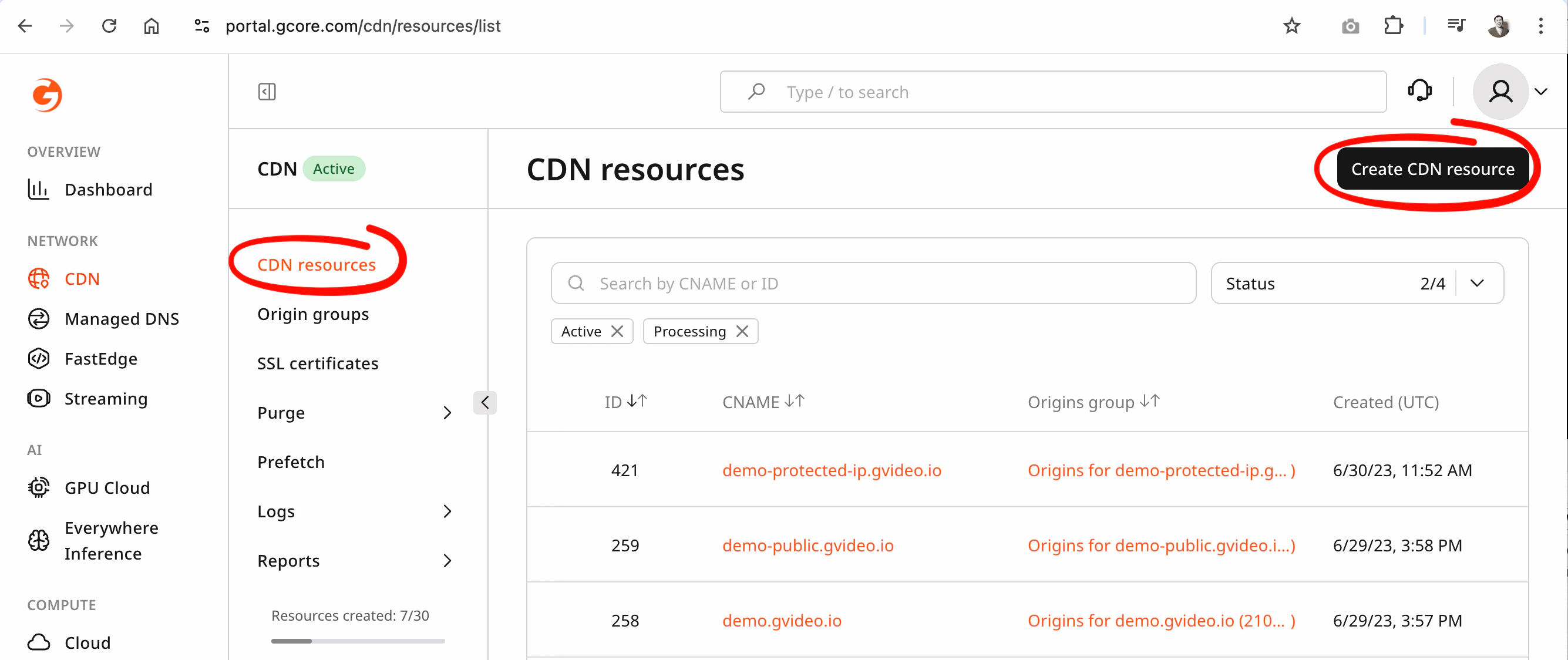
Secure token can be enabled **only on a custom CDN resource**. You cannot enable it on the default Video Streaming domain.
To enable secure token:
1. Activate the **CDN** product on a **paid tariff**
2. Create a new **custom CDN resource** for your streaming origin
3. Enable **secure token** in that custom CDN resource
4. Follow the [Custom CDN resource](/streaming/interaction-with-cdn/custom-cdn-resource) guide and contact [Gcore Support](mailto:support@gcore.com)
Support will help configure `Streaming Rules` to route your streaming content correctly.
 ## Secure token for HLS/DASH
Secure token – protected temporary links have the following format:
```sh theme={null}
https://domain.com/videos|cmaf|mpegts/{account_id}_{video_id}/{token}/{expiration}/manifest.m3u8
```
Where:
* `videos` – for VOD, `cmaf|mpegts` – for LIVE
* `{account_id}` is your account ID
* `{video_id}` is the identifier of the video or live stream
* `{token}` is the MD5 hash of the video and other attributes
* `{expiration}` is a Unix timestamp (in seconds) that defines until when the link remains valid
For Gcore Video on Demand (VOD) and Gcore Live Streaming, a relative path is used for all file types used to deliver video content, such as additional manifests, chunks, and MP4 renditions. Therefore, the path of the main manifest is taken as the basis and the following path is built relative to it.
Examples of templates of protected links for VOD:
* `https://domain.com/videos/{account_id}_{video_slug}/{token}/{expiration}/`**manifest.m3u8**
* `https://domain.com/videos/{account_id}_{video_slug}/{token}/{expiration}/`**segment-1-svod720n-v1-a1.ts**
* `https://domain.com/videos/{account_id}_{video_slug}/{token}/{expiration}/`**720.mp4**
Examples of templates of protected links for LIVE:
* `https://domain.com/cmaf/{account_id}_{stream_id}/{token}/{expiration}/`**master.m3u8**
* `https://domain.com/cmaf/{account_id}_{stream_id}/{token}/{expiration}/`**index.mpd**
* `https://domain.com/cmaf/{account_id}_{stream_id}/{token}/{expiration}/`**004chunk-stream4-10000000-05213.m4s?part=4**
## Advanced secure token for MP4
A regular secure token for HLS/DASH from above protects the entire video entity.
When distributing MP4 files separately from ABR, use an MP4 advanced secure token as an additional query parameter. This restricts access to the specific MP4 rendition and prevents unauthorized MP4 distribution.
Advanced secure token for MP4 cannot be combined with generic secure token for HLS/DASH. In case of combination the secure token for HLS/DASH will have priority to resolve an accees.
Advanced secure token for MP4 – protected temporary links have the following format:
```sh theme={null}
https://domain.com/videos/account_id_video_id/filename.mp4?md5={token}&expires={expiration}
```
Where:
* `{token}` is the MD5 hash of the MP4 file path and other options
* `{expiration}` is a Unix timestamp (in seconds) that defines until when the link remains valid
## A note on the expiration time
The expiration time must be at least equal to the duration of the original video or the expected duration of the live playback. When the signed URL expires, URLs will no longer be played, even if playback has already begun. Because video expiration time is integrated into the URL described above, new chunks will no longer be given by the relative path.
Your app also needs to handle cases where a user starts to play a video, then leaves your app for a long time, and then comes back later and tries to play the video again. You will probably need to detect this behavior and reacquire the new signed URL to make sure playback can start.
To handle both cases, ensure you set the expiration far enough into the future that users won't experience playback interruptions.
```sh theme={null}
expires = 1861919999 # Sunday, December 31, 2028 23:59:59 GMT
```
## Preventing link sharing with auto-refreshed tokens
Setting a long expiration solves the "session resumed after pause" problem, but it creates a different risk: a viewer can share the signed URL during a live event, and anyone with that link can watch for as long as the token remains valid.
The solution is to use short-lived tokens (60 seconds or less) and refresh them automatically in the player. Viewers on your platform get uninterrupted playback; anyone who copies the URL gets a 403/410 error within a minute.
See **[Auto-refresh secure tokens](/streaming/interaction-with-cdn/token-auto-refresh)** for step-by-step integration examples using the Gcore Video Player, hls.js, and dash.js — including a ready-to-deploy Gcore FastEdge token API written in Rust.
## How to create protected links with the secure token
### Create secure token for HLS/DASH
Pattern to generate token:
1. Tokens without user ip:
```
${account_id}_${video_id}_${secret}_${expires}_
```
2. Tokens with user ip:
```
${account_id}_${video_id}_${secret}_${expires}_${user_ip}
```
| Parameter | Required | Description |
| --------------- | -------- | ----------------------------------------------------------------------- |
| **account\_id** | yes | Your account ID |
| **video\_id** | yes | Video\_Slug or Stream\_ID identifier |
| **secret** | yes | Secret phrase |
| **expires** | yes | Expiration time (Unix timestamp, UTC) |
| **user\_ip** | optional | Client IP address. Required only if token was generated with IP binding |
```python theme={null}
import base64
from hashlib import md5
from time import time
def gethash(account_id, video_id, secret, expires):
hash_body = "%s_%s_%s_%s_" % (account_id, video_id, secret, expires) # set of unique parameters of video
hash_md5 = base64.b64encode( # get MD5 hash from parameters of video
md5(hash_body.encode()).digest()
).decode().replace("+", "-").replace("/", "_").replace("=", "") # preparation for use in URL
return hash_md5
account_id = "2675" # enter your account ID here
secret = "" # enter your secret key from CDN-resource here
#VOD
video_slug = "3dk4NsRt6vWsffEr" # enter your video's slug here
expires = int(time()) + 24*60*60 # 24 hours, unixtime in seconds
token = gethash(account_id, video_slug, secret, expires)
print(f"https://demo-protected.gvideo.io/videos/{account_id}_{video_slug}/{token}/{expires}/master.m3u8")
#LIVE
stream_id = "201693" # enter your live stream id here
expires = int(time()) + 24*60*60 # 24 hours, unixtime in seconds
token = gethash(account_id, stream_id, secret, expires)
print(f"https://demo-protected.gvideo.io/cmaf/{account_id}_{stream_id}/{token}/{expires}/master.m3u8")
```
```go theme={null}
package main
import (
"crypto/md5"
"encoding/base64"
"fmt"
"time"
)
func gethash(clientId string, videoId string, secret string, expires int64) string {
hashBody := fmt.Sprintf("%s_%s_%s_%d_", clientId, videoId, secret, expires) // set of unique parameters of video
md5sum := md5.Sum([]byte(hashBody)) // get MD5 hash from parameters of video
hashMd5 := base64.RawURLEncoding.EncodeToString(md5sum[:])
return hashMd5
}
func main() {
clientId := "2675" // enter your account ID here
secret := "" // enter your secret key from CDN-resource here
//VOD
videoSlug := "3dk4NsRt6vWsffEr" // enter your video's slug here
expires := time.Now().Unix() + 24*60*60 // now + 24 hours, unixtime in seconds
token := gethash(clientId, videoSlug, secret, expires)
fmt.Printf("https://demo-protected.gvideo.io/videos/%s_%s/%s/%d/master.m3u8 \n", clientId, videoSlug, token, expires)
//LIVE
streamId := "201693" // enter your live stream id here
expires = time.Now().Unix() + 24*60*60 // now + 24 hours, unixtime in seconds
token = gethash(clientId, streamId, secret, expires)
fmt.Printf("https://demo-protected.gvideo.io/cmaf/%s_%s/%s/%d/master.m3u8 \n", clientId, streamId, token, expires)
}
```
### Create advanced secure token for MP4
The MP4 advanced secure token is generated from the full MP4 URL. You can optionally bind [MP4 speed limit](/streaming/video-hosting/hls-and-mp4#mp4-dynamic-speed-limiting) to the token by including the `speed` and `buffer` parameters. This ensures that download rate limits cannot be bypassed – if a user tampers with these values, the request will return 403 Forbidden.
If no speed limit is required, set both `speed` and `buffer` to an empty string when generating the token.
Pattern to generate token:
1. Tokens without user ip:
```
${uri}_${secret}_${expires}_${speed}_${buffer}_
```
2. Tokens with user ip:
```
${uri}_${secret}_${expires}_${speed}_${buffer}_${user_ip}
```
| Parameter | Required | Description |
| ------------ | -------- | --------------------------------------------------------------------------- |
| **uri** | yes | Path from MP4 file URL |
| **secret** | yes | Secret phrase |
| **expires** | yes | Expiration time (Unix timestamp, UTC) |
| **speed** | optional | Download speed limit in bytes/sec. Use an empty string if not required |
| **buffer** | optional | Buffer size in bytes for rate limiting. Use an empty string if not required |
| **user\_ip** | optional | Client IP address. Required only if token was generated with IP binding |
Examples:
Secret: `MySecr3tStr1ng`
Without user ip:
```
string to sign: /videos/279481_1053391/qid2920v1_h264_4050_1080_1.mp4_MySecr3tStr1ng_1743167062___
url: http://gvideo.dev/videos/279481_1053391/qid2920v1_h264_4050_1080_1.mp4?md5=QX39c77lbQKvYgMMAvpyMQ&expires=1743167062
string to sign: /videos/279481_1053391/qid2920v1_h264_4050_1080_1.mp4_MySecr3tStr1ng_1743167062_1000k__
url: http://gvideo.dev/videos/279481_1053391/qid2920v1_h264_4050_1080_1.mp4?md5=UcB_lMku9m-MtxIEos_V-w&expires=1743167062&speed=1000k
string to sign: /videos/279481_1053391/qid2920v1_h264_4050_1080_1.mp4_MySecr3tStr1ng_1743167062_1000k_2000k_
url: http://gvideo.dev/videos/279481_1053391/qid2920v1_h264_4050_1080_1.mp4?md5=yGa6cK0jM4YvwaSUEPvwMA&expires=1743167062&speed=1000k&buffer=2000k
```
With user ip 1.2.3.4
```
string to sign: /videos/279481_1053391/qid2920v1_h264_4050_1080_1.mp4_MySecr3tStr1ng_1743167062___1.2.3.4
url: http://gvideo.dev/videos/279481_1053391/qid2920v1_h264_4050_1080_1.mp4?md5=SZMnuXQv-81sVqslGtXwlA&expires=1743167062
string to sign: /videos/279481_1053391/qid2920v1_h264_4050_1080_1.mp4_MySecr3tStr1ng_1743167062_1000k__1.2.3.4
url: http://gvideo.dev/videos/279481_1053391/qid2920v1_h264_4050_1080_1.mp4?md5=fhhV7JWE7c1HGjD7Vu5XsA&expires=1743167062&speed=1000k
string to sign: /videos/279481_1053391/qid2920v1_h264_4050_1080_1.mp4_MySecr3tStr1ng_1743167062_1000k_2000k_1.2.3.4
url: http://gvideo.dev/videos/279481_1053391/qid2920v1_h264_4050_1080_1.mp4?md5=by-olfoRZ3-Nntli7_2Ecw&expires=1743167062&speed=1000k&buffer=2000k
```
```python theme={null}
import base64
from hashlib import md5
from time import time
from datetime import datetime, timezone, timedelta
def gethash_mp4(uri, secret, expires, speed, buffer, ip):
hash_body = "%s_%s_%d_%s_%s_%s" % (uri, secret, expires, speed, buffer, ip) # set of unique parameters of video
hash_md5 = base64.b64encode( # get MD5 hash from parameters of video
md5(hash_body.encode()).digest()
).decode().replace("+", "-").replace("/", "_").replace("=", "") # preparation for use in URL
return hash_md5
secret = "" # enter your secret key from the CDN-resource
uri = "/videos/2675_pG8TfmKx2LU2qs/qid3570v1_h264_1800_720.mp4" # path of the MP4 file
# current time
time_now = datetime.now(timezone.utc)
expires = int(time()) + 24 * 60 * 60 # expiration = now + 24 hours, unixtime in seconds
expires_dt = datetime.fromtimestamp(expires, tz=timezone.utc)
time_format = "%Y-%m-%d %H:%M:%S %Z"
print("Now: ", int(time_now.timestamp()), time_now.strftime(time_format))
print("Expires: ", expires, expires_dt.strftime(time_format))
# MP4 protected (the CDN resource must be with deactivated option "Add a client's IP to the token")
token = gethash_mp4(uri, secret, expires, "", "", "")
print(f"https://demo-protected.gvideo.io{uri}?md5={token}&expires={expires}")
print(f"https://demo-protected.gvideo.io{uri}/download?md5={token}&expires={expires}")
print(f"https://demo-protected.gvideo.io{uri}/download=my-awesome-video?md5={token}&expires={expires}")
# MP4 with speed limit
speed = "1M"
token = gethash_mp4(uri, secret, expires, speed, "", "")
print(f"https://demo-protected.gvideo.io{uri}?md5={token}&expires={expires}&speed={speed}")
# MP4 with speed and buffer limit
speed = "500K"
buffer = "10M"
token = gethash_mp4(uri, secret, expires, speed, buffer, "")
print(f"https://demo-protected.gvideo.io{uri}?md5={token}&expires={expires}&speed={speed}&buffer={buffer}")
# MP4 protected with user's IP address (the CDN resource must be with activated option "Add a client's IP to the token")
ip = "92.223.112.84"
token = gethash_mp4(uri, secret, expires, "", "", ip)
print(f"https://demo-protected-ip.gvideo.io{uri}?md5={token}&expires={expires}")
print(f"https://demo-protected-ip.gvideo.io{uri}/download?md5={token}&expires={expires}")
print(f"https://demo-protected-ip.gvideo.io{uri}/download=my-awesome-video?md5={token}&expires={expires}")
# MP4 protected with user's IP address and speed limit
speed = "1000K"
token = gethash_mp4(uri, secret, expires, speed, "", ip)
print(f"https://demo-protected-ip.gvideo.io{uri}?md5={token}&expires={expires}&speed={speed}")
# MP4 protected with user's IP address, speed and buffer limit
speed = "500K"
buffer = "10M"
token = gethash_mp4(uri, secret, expires, speed, buffer, ip)
print(f"https://demo-protected-ip.gvideo.io{uri}?md5={token}&expires={expires}&speed={speed}&buffer={buffer}")
```
Python playground – [https://www.onlineide.pro/playground/share/d6126cff-e97f-456b-b667-6a95030563b4](https://www.onlineide.pro/playground/share/d6126cff-e97f-456b-b667-6a95030563b4)
```go theme={null}
package main
import (
"crypto/md5"
"encoding/base64"
"fmt"
"time"
)
func gethash_mp4(uri, secret string, expires int64, speed, buffer, ip string) string {
hashBody := fmt.Sprintf("%s_%s_%d_%s_%s_%s", uri, secret, expires, speed, buffer, ip)
md5sum := md5.Sum([]byte(hashBody))
hashMd5 := base64.RawURLEncoding.EncodeToString(md5sum[:])
return hashMd5
}
const time_format string = "2006-01-02 15:04"
func main() {
var token, speed, buffer string
secret := "" // enter your secret key from the CDN-resource
uri := "/videos/2675_pG8TfmKx2LU2qs/qid3570v1_h264_1800_720.mp4" // path of the MP4 file
//timeNow := time.Now().UTC()
timeNow, _ := time.Parse(time_format, "2025-09-16 23:00") // workaround for Go playground. As you know time.Now() doesn't work in goplay.tools, because playground runs in a deterministic sandboxed environment where system time is not exposed.
expires := timeNow.Add(24 * time.Hour).Unix() // expiration = now + 24 hours, unixtime in seconds
fmt.Println("Now: ", timeNow.Unix(), timeNow.UTC().Format(time_format))
fmt.Println("Expires: ", expires, time.Unix(expires, 0).UTC().Format(time_format))
// MP4 protected (the CDN resource must be with deactivated option "Add a client's IP to the token")
token = gethash_mp4(uri, secret, expires, "", "", "")
fmt.Printf("https://demo-protected.gvideo.io%s?md5=%s&expires=%d\n", uri, token, expires)
fmt.Printf("https://demo-protected.gvideo.io%s/download?md5=%s&expires=%d\n", uri, token, expires)
fmt.Printf("https://demo-protected.gvideo.io%s/download=my-awesome-video?md5=%s&expires=%d\n", uri, token, expires)
// MP4 with speed limit
speed = "1M"
token = gethash_mp4(uri, secret, expires, speed, "", "")
fmt.Printf("https://demo-protected.gvideo.io%s?md5=%s&expires=%d&speed=%s\n", uri, token, expires, speed)
// MP4 with speed and buffer limit
speed = "500K"
buffer = "10M"
token = gethash_mp4(uri, secret, expires, speed, buffer, "")
fmt.Printf("https://demo-protected.gvideo.io%s?md5=%s&expires=%d&speed=%s&buffer=%s\n", uri, token, expires, speed, buffer)
// MP4 protected with user's IP address (the CDN resource must be with activated option "Add a client's IP to the token")
ip := "92.223.112.84" //
token = gethash_mp4(uri, secret, expires, "", "", ip)
fmt.Printf("https://demo-protected-ip.gvideo.io%s?md5=%s&expires=%d\n", uri, token, expires)
fmt.Printf("https://demo-protected-ip.gvideo.io%s/download?md5=%s&expires=%d\n", uri, token, expires)
fmt.Printf("https://demo-protected-ip.gvideo.io%s/download=my-awesome-video?md5=%s&expires=%d\n", uri, token, expires)
// MP4 protected with user's IP address and speed limit
speed = "1000K"
token = gethash_mp4(uri, secret, expires, speed, "", ip)
fmt.Printf("https://demo-protected-ip.gvideo.io%s?md5=%s&expires=%d&speed=%s\n", uri, token, expires, speed)
// MP4 protected with user's IP address, speed and buffer limit
speed = "500K"
buffer = "10M"
token = gethash_mp4(uri, secret, expires, speed, buffer, ip)
fmt.Printf("https://demo-protected-ip.gvideo.io%s?md5=%s&expires=%d&speed=%s&buffer=%s\n", uri, token, expires, speed, buffer)
}
```
Go playground – [https://goplay.tools/snippet/iqktoxSaTh3](https://goplay.tools/snippet/iqktoxSaTh3)
## Additional protection layers
For additional protection beyond secure tokens, see the [Custom CDN resource](/streaming/interaction-with-cdn/custom-cdn-resource) guide, which covers:
* **Geo-blocking** (country-level access control)
* **Referrer validation** (domain-level embedding control)
* **IP allowlists/blocklists** (network-level access control)
* **Custom domain names** for branded delivery
These protection layers can be combined with secure tokens for defense-in-depth security.
## Secure token for HLS/DASH
Secure token – protected temporary links have the following format:
```sh theme={null}
https://domain.com/videos|cmaf|mpegts/{account_id}_{video_id}/{token}/{expiration}/manifest.m3u8
```
Where:
* `videos` – for VOD, `cmaf|mpegts` – for LIVE
* `{account_id}` is your account ID
* `{video_id}` is the identifier of the video or live stream
* `{token}` is the MD5 hash of the video and other attributes
* `{expiration}` is a Unix timestamp (in seconds) that defines until when the link remains valid
For Gcore Video on Demand (VOD) and Gcore Live Streaming, a relative path is used for all file types used to deliver video content, such as additional manifests, chunks, and MP4 renditions. Therefore, the path of the main manifest is taken as the basis and the following path is built relative to it.
Examples of templates of protected links for VOD:
* `https://domain.com/videos/{account_id}_{video_slug}/{token}/{expiration}/`**manifest.m3u8**
* `https://domain.com/videos/{account_id}_{video_slug}/{token}/{expiration}/`**segment-1-svod720n-v1-a1.ts**
* `https://domain.com/videos/{account_id}_{video_slug}/{token}/{expiration}/`**720.mp4**
Examples of templates of protected links for LIVE:
* `https://domain.com/cmaf/{account_id}_{stream_id}/{token}/{expiration}/`**master.m3u8**
* `https://domain.com/cmaf/{account_id}_{stream_id}/{token}/{expiration}/`**index.mpd**
* `https://domain.com/cmaf/{account_id}_{stream_id}/{token}/{expiration}/`**004chunk-stream4-10000000-05213.m4s?part=4**
## Advanced secure token for MP4
A regular secure token for HLS/DASH from above protects the entire video entity.
When distributing MP4 files separately from ABR, use an MP4 advanced secure token as an additional query parameter. This restricts access to the specific MP4 rendition and prevents unauthorized MP4 distribution.
Advanced secure token for MP4 cannot be combined with generic secure token for HLS/DASH. In case of combination the secure token for HLS/DASH will have priority to resolve an accees.
Advanced secure token for MP4 – protected temporary links have the following format:
```sh theme={null}
https://domain.com/videos/account_id_video_id/filename.mp4?md5={token}&expires={expiration}
```
Where:
* `{token}` is the MD5 hash of the MP4 file path and other options
* `{expiration}` is a Unix timestamp (in seconds) that defines until when the link remains valid
## A note on the expiration time
The expiration time must be at least equal to the duration of the original video or the expected duration of the live playback. When the signed URL expires, URLs will no longer be played, even if playback has already begun. Because video expiration time is integrated into the URL described above, new chunks will no longer be given by the relative path.
Your app also needs to handle cases where a user starts to play a video, then leaves your app for a long time, and then comes back later and tries to play the video again. You will probably need to detect this behavior and reacquire the new signed URL to make sure playback can start.
To handle both cases, ensure you set the expiration far enough into the future that users won't experience playback interruptions.
```sh theme={null}
expires = 1861919999 # Sunday, December 31, 2028 23:59:59 GMT
```
## Preventing link sharing with auto-refreshed tokens
Setting a long expiration solves the "session resumed after pause" problem, but it creates a different risk: a viewer can share the signed URL during a live event, and anyone with that link can watch for as long as the token remains valid.
The solution is to use short-lived tokens (60 seconds or less) and refresh them automatically in the player. Viewers on your platform get uninterrupted playback; anyone who copies the URL gets a 403/410 error within a minute.
See **[Auto-refresh secure tokens](/streaming/interaction-with-cdn/token-auto-refresh)** for step-by-step integration examples using the Gcore Video Player, hls.js, and dash.js — including a ready-to-deploy Gcore FastEdge token API written in Rust.
## How to create protected links with the secure token
### Create secure token for HLS/DASH
Pattern to generate token:
1. Tokens without user ip:
```
${account_id}_${video_id}_${secret}_${expires}_
```
2. Tokens with user ip:
```
${account_id}_${video_id}_${secret}_${expires}_${user_ip}
```
| Parameter | Required | Description |
| --------------- | -------- | ----------------------------------------------------------------------- |
| **account\_id** | yes | Your account ID |
| **video\_id** | yes | Video\_Slug or Stream\_ID identifier |
| **secret** | yes | Secret phrase |
| **expires** | yes | Expiration time (Unix timestamp, UTC) |
| **user\_ip** | optional | Client IP address. Required only if token was generated with IP binding |
```python theme={null}
import base64
from hashlib import md5
from time import time
def gethash(account_id, video_id, secret, expires):
hash_body = "%s_%s_%s_%s_" % (account_id, video_id, secret, expires) # set of unique parameters of video
hash_md5 = base64.b64encode( # get MD5 hash from parameters of video
md5(hash_body.encode()).digest()
).decode().replace("+", "-").replace("/", "_").replace("=", "") # preparation for use in URL
return hash_md5
account_id = "2675" # enter your account ID here
secret = "" # enter your secret key from CDN-resource here
#VOD
video_slug = "3dk4NsRt6vWsffEr" # enter your video's slug here
expires = int(time()) + 24*60*60 # 24 hours, unixtime in seconds
token = gethash(account_id, video_slug, secret, expires)
print(f"https://demo-protected.gvideo.io/videos/{account_id}_{video_slug}/{token}/{expires}/master.m3u8")
#LIVE
stream_id = "201693" # enter your live stream id here
expires = int(time()) + 24*60*60 # 24 hours, unixtime in seconds
token = gethash(account_id, stream_id, secret, expires)
print(f"https://demo-protected.gvideo.io/cmaf/{account_id}_{stream_id}/{token}/{expires}/master.m3u8")
```
```go theme={null}
package main
import (
"crypto/md5"
"encoding/base64"
"fmt"
"time"
)
func gethash(clientId string, videoId string, secret string, expires int64) string {
hashBody := fmt.Sprintf("%s_%s_%s_%d_", clientId, videoId, secret, expires) // set of unique parameters of video
md5sum := md5.Sum([]byte(hashBody)) // get MD5 hash from parameters of video
hashMd5 := base64.RawURLEncoding.EncodeToString(md5sum[:])
return hashMd5
}
func main() {
clientId := "2675" // enter your account ID here
secret := "" // enter your secret key from CDN-resource here
//VOD
videoSlug := "3dk4NsRt6vWsffEr" // enter your video's slug here
expires := time.Now().Unix() + 24*60*60 // now + 24 hours, unixtime in seconds
token := gethash(clientId, videoSlug, secret, expires)
fmt.Printf("https://demo-protected.gvideo.io/videos/%s_%s/%s/%d/master.m3u8 \n", clientId, videoSlug, token, expires)
//LIVE
streamId := "201693" // enter your live stream id here
expires = time.Now().Unix() + 24*60*60 // now + 24 hours, unixtime in seconds
token = gethash(clientId, streamId, secret, expires)
fmt.Printf("https://demo-protected.gvideo.io/cmaf/%s_%s/%s/%d/master.m3u8 \n", clientId, streamId, token, expires)
}
```
### Create advanced secure token for MP4
The MP4 advanced secure token is generated from the full MP4 URL. You can optionally bind [MP4 speed limit](/streaming/video-hosting/hls-and-mp4#mp4-dynamic-speed-limiting) to the token by including the `speed` and `buffer` parameters. This ensures that download rate limits cannot be bypassed – if a user tampers with these values, the request will return 403 Forbidden.
If no speed limit is required, set both `speed` and `buffer` to an empty string when generating the token.
Pattern to generate token:
1. Tokens without user ip:
```
${uri}_${secret}_${expires}_${speed}_${buffer}_
```
2. Tokens with user ip:
```
${uri}_${secret}_${expires}_${speed}_${buffer}_${user_ip}
```
| Parameter | Required | Description |
| ------------ | -------- | --------------------------------------------------------------------------- |
| **uri** | yes | Path from MP4 file URL |
| **secret** | yes | Secret phrase |
| **expires** | yes | Expiration time (Unix timestamp, UTC) |
| **speed** | optional | Download speed limit in bytes/sec. Use an empty string if not required |
| **buffer** | optional | Buffer size in bytes for rate limiting. Use an empty string if not required |
| **user\_ip** | optional | Client IP address. Required only if token was generated with IP binding |
Examples:
Secret: `MySecr3tStr1ng`
Without user ip:
```
string to sign: /videos/279481_1053391/qid2920v1_h264_4050_1080_1.mp4_MySecr3tStr1ng_1743167062___
url: http://gvideo.dev/videos/279481_1053391/qid2920v1_h264_4050_1080_1.mp4?md5=QX39c77lbQKvYgMMAvpyMQ&expires=1743167062
string to sign: /videos/279481_1053391/qid2920v1_h264_4050_1080_1.mp4_MySecr3tStr1ng_1743167062_1000k__
url: http://gvideo.dev/videos/279481_1053391/qid2920v1_h264_4050_1080_1.mp4?md5=UcB_lMku9m-MtxIEos_V-w&expires=1743167062&speed=1000k
string to sign: /videos/279481_1053391/qid2920v1_h264_4050_1080_1.mp4_MySecr3tStr1ng_1743167062_1000k_2000k_
url: http://gvideo.dev/videos/279481_1053391/qid2920v1_h264_4050_1080_1.mp4?md5=yGa6cK0jM4YvwaSUEPvwMA&expires=1743167062&speed=1000k&buffer=2000k
```
With user ip 1.2.3.4
```
string to sign: /videos/279481_1053391/qid2920v1_h264_4050_1080_1.mp4_MySecr3tStr1ng_1743167062___1.2.3.4
url: http://gvideo.dev/videos/279481_1053391/qid2920v1_h264_4050_1080_1.mp4?md5=SZMnuXQv-81sVqslGtXwlA&expires=1743167062
string to sign: /videos/279481_1053391/qid2920v1_h264_4050_1080_1.mp4_MySecr3tStr1ng_1743167062_1000k__1.2.3.4
url: http://gvideo.dev/videos/279481_1053391/qid2920v1_h264_4050_1080_1.mp4?md5=fhhV7JWE7c1HGjD7Vu5XsA&expires=1743167062&speed=1000k
string to sign: /videos/279481_1053391/qid2920v1_h264_4050_1080_1.mp4_MySecr3tStr1ng_1743167062_1000k_2000k_1.2.3.4
url: http://gvideo.dev/videos/279481_1053391/qid2920v1_h264_4050_1080_1.mp4?md5=by-olfoRZ3-Nntli7_2Ecw&expires=1743167062&speed=1000k&buffer=2000k
```
```python theme={null}
import base64
from hashlib import md5
from time import time
from datetime import datetime, timezone, timedelta
def gethash_mp4(uri, secret, expires, speed, buffer, ip):
hash_body = "%s_%s_%d_%s_%s_%s" % (uri, secret, expires, speed, buffer, ip) # set of unique parameters of video
hash_md5 = base64.b64encode( # get MD5 hash from parameters of video
md5(hash_body.encode()).digest()
).decode().replace("+", "-").replace("/", "_").replace("=", "") # preparation for use in URL
return hash_md5
secret = "" # enter your secret key from the CDN-resource
uri = "/videos/2675_pG8TfmKx2LU2qs/qid3570v1_h264_1800_720.mp4" # path of the MP4 file
# current time
time_now = datetime.now(timezone.utc)
expires = int(time()) + 24 * 60 * 60 # expiration = now + 24 hours, unixtime in seconds
expires_dt = datetime.fromtimestamp(expires, tz=timezone.utc)
time_format = "%Y-%m-%d %H:%M:%S %Z"
print("Now: ", int(time_now.timestamp()), time_now.strftime(time_format))
print("Expires: ", expires, expires_dt.strftime(time_format))
# MP4 protected (the CDN resource must be with deactivated option "Add a client's IP to the token")
token = gethash_mp4(uri, secret, expires, "", "", "")
print(f"https://demo-protected.gvideo.io{uri}?md5={token}&expires={expires}")
print(f"https://demo-protected.gvideo.io{uri}/download?md5={token}&expires={expires}")
print(f"https://demo-protected.gvideo.io{uri}/download=my-awesome-video?md5={token}&expires={expires}")
# MP4 with speed limit
speed = "1M"
token = gethash_mp4(uri, secret, expires, speed, "", "")
print(f"https://demo-protected.gvideo.io{uri}?md5={token}&expires={expires}&speed={speed}")
# MP4 with speed and buffer limit
speed = "500K"
buffer = "10M"
token = gethash_mp4(uri, secret, expires, speed, buffer, "")
print(f"https://demo-protected.gvideo.io{uri}?md5={token}&expires={expires}&speed={speed}&buffer={buffer}")
# MP4 protected with user's IP address (the CDN resource must be with activated option "Add a client's IP to the token")
ip = "92.223.112.84"
token = gethash_mp4(uri, secret, expires, "", "", ip)
print(f"https://demo-protected-ip.gvideo.io{uri}?md5={token}&expires={expires}")
print(f"https://demo-protected-ip.gvideo.io{uri}/download?md5={token}&expires={expires}")
print(f"https://demo-protected-ip.gvideo.io{uri}/download=my-awesome-video?md5={token}&expires={expires}")
# MP4 protected with user's IP address and speed limit
speed = "1000K"
token = gethash_mp4(uri, secret, expires, speed, "", ip)
print(f"https://demo-protected-ip.gvideo.io{uri}?md5={token}&expires={expires}&speed={speed}")
# MP4 protected with user's IP address, speed and buffer limit
speed = "500K"
buffer = "10M"
token = gethash_mp4(uri, secret, expires, speed, buffer, ip)
print(f"https://demo-protected-ip.gvideo.io{uri}?md5={token}&expires={expires}&speed={speed}&buffer={buffer}")
```
Python playground – [https://www.onlineide.pro/playground/share/d6126cff-e97f-456b-b667-6a95030563b4](https://www.onlineide.pro/playground/share/d6126cff-e97f-456b-b667-6a95030563b4)
```go theme={null}
package main
import (
"crypto/md5"
"encoding/base64"
"fmt"
"time"
)
func gethash_mp4(uri, secret string, expires int64, speed, buffer, ip string) string {
hashBody := fmt.Sprintf("%s_%s_%d_%s_%s_%s", uri, secret, expires, speed, buffer, ip)
md5sum := md5.Sum([]byte(hashBody))
hashMd5 := base64.RawURLEncoding.EncodeToString(md5sum[:])
return hashMd5
}
const time_format string = "2006-01-02 15:04"
func main() {
var token, speed, buffer string
secret := "" // enter your secret key from the CDN-resource
uri := "/videos/2675_pG8TfmKx2LU2qs/qid3570v1_h264_1800_720.mp4" // path of the MP4 file
//timeNow := time.Now().UTC()
timeNow, _ := time.Parse(time_format, "2025-09-16 23:00") // workaround for Go playground. As you know time.Now() doesn't work in goplay.tools, because playground runs in a deterministic sandboxed environment where system time is not exposed.
expires := timeNow.Add(24 * time.Hour).Unix() // expiration = now + 24 hours, unixtime in seconds
fmt.Println("Now: ", timeNow.Unix(), timeNow.UTC().Format(time_format))
fmt.Println("Expires: ", expires, time.Unix(expires, 0).UTC().Format(time_format))
// MP4 protected (the CDN resource must be with deactivated option "Add a client's IP to the token")
token = gethash_mp4(uri, secret, expires, "", "", "")
fmt.Printf("https://demo-protected.gvideo.io%s?md5=%s&expires=%d\n", uri, token, expires)
fmt.Printf("https://demo-protected.gvideo.io%s/download?md5=%s&expires=%d\n", uri, token, expires)
fmt.Printf("https://demo-protected.gvideo.io%s/download=my-awesome-video?md5=%s&expires=%d\n", uri, token, expires)
// MP4 with speed limit
speed = "1M"
token = gethash_mp4(uri, secret, expires, speed, "", "")
fmt.Printf("https://demo-protected.gvideo.io%s?md5=%s&expires=%d&speed=%s\n", uri, token, expires, speed)
// MP4 with speed and buffer limit
speed = "500K"
buffer = "10M"
token = gethash_mp4(uri, secret, expires, speed, buffer, "")
fmt.Printf("https://demo-protected.gvideo.io%s?md5=%s&expires=%d&speed=%s&buffer=%s\n", uri, token, expires, speed, buffer)
// MP4 protected with user's IP address (the CDN resource must be with activated option "Add a client's IP to the token")
ip := "92.223.112.84" //
token = gethash_mp4(uri, secret, expires, "", "", ip)
fmt.Printf("https://demo-protected-ip.gvideo.io%s?md5=%s&expires=%d\n", uri, token, expires)
fmt.Printf("https://demo-protected-ip.gvideo.io%s/download?md5=%s&expires=%d\n", uri, token, expires)
fmt.Printf("https://demo-protected-ip.gvideo.io%s/download=my-awesome-video?md5=%s&expires=%d\n", uri, token, expires)
// MP4 protected with user's IP address and speed limit
speed = "1000K"
token = gethash_mp4(uri, secret, expires, speed, "", ip)
fmt.Printf("https://demo-protected-ip.gvideo.io%s?md5=%s&expires=%d&speed=%s\n", uri, token, expires, speed)
// MP4 protected with user's IP address, speed and buffer limit
speed = "500K"
buffer = "10M"
token = gethash_mp4(uri, secret, expires, speed, buffer, ip)
fmt.Printf("https://demo-protected-ip.gvideo.io%s?md5=%s&expires=%d&speed=%s&buffer=%s\n", uri, token, expires, speed, buffer)
}
```
Go playground – [https://goplay.tools/snippet/iqktoxSaTh3](https://goplay.tools/snippet/iqktoxSaTh3)
## Additional protection layers
For additional protection beyond secure tokens, see the [Custom CDN resource](/streaming/interaction-with-cdn/custom-cdn-resource) guide, which covers:
* **Geo-blocking** (country-level access control)
* **Referrer validation** (domain-level embedding control)
* **IP allowlists/blocklists** (network-level access control)
* **Custom domain names** for branded delivery
These protection layers can be combined with secure tokens for defense-in-depth security.