There are two ways to access custom response pages: at the **domain** level and at the **account** level. The key difference is that at the domain level, you can only switch between page sets, and it's not possible to add, modify, or delete pages there.
**Info**
For guidelines on how to create custom response pages, check out [Create custom response pages](/waap/response-pages/create-custom-response-pages) guide.
## Manage custom response pages at the account level
Custom response pages that are available at the account level relate to all domains in your account. This means that you can modify pages or page sets, and the changes will be inherited by all domains where those pages are active.
To view page sets, open the **WAAP** page and navigate to **Response Pages**. You'll be directed to the page with all relevant settings.
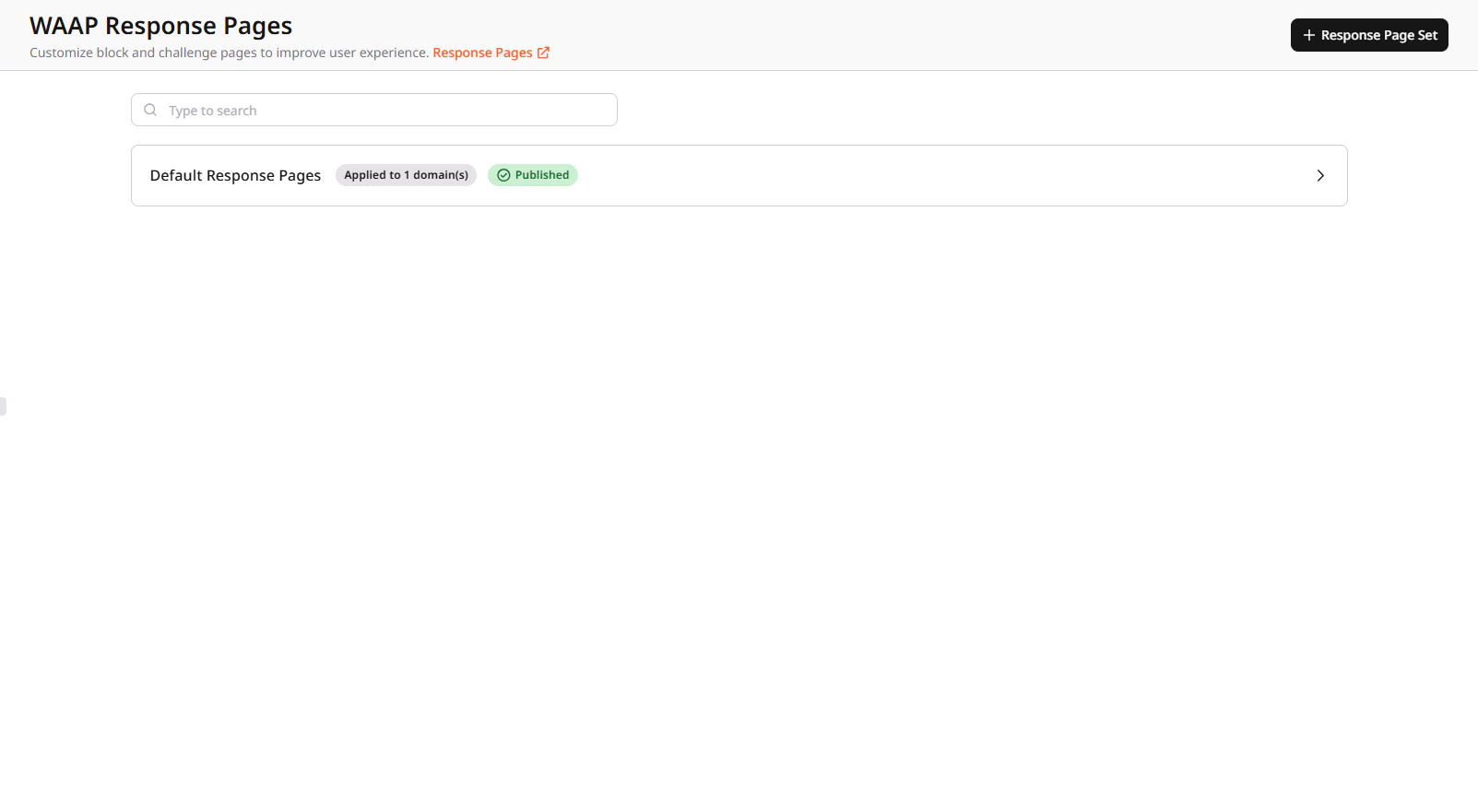
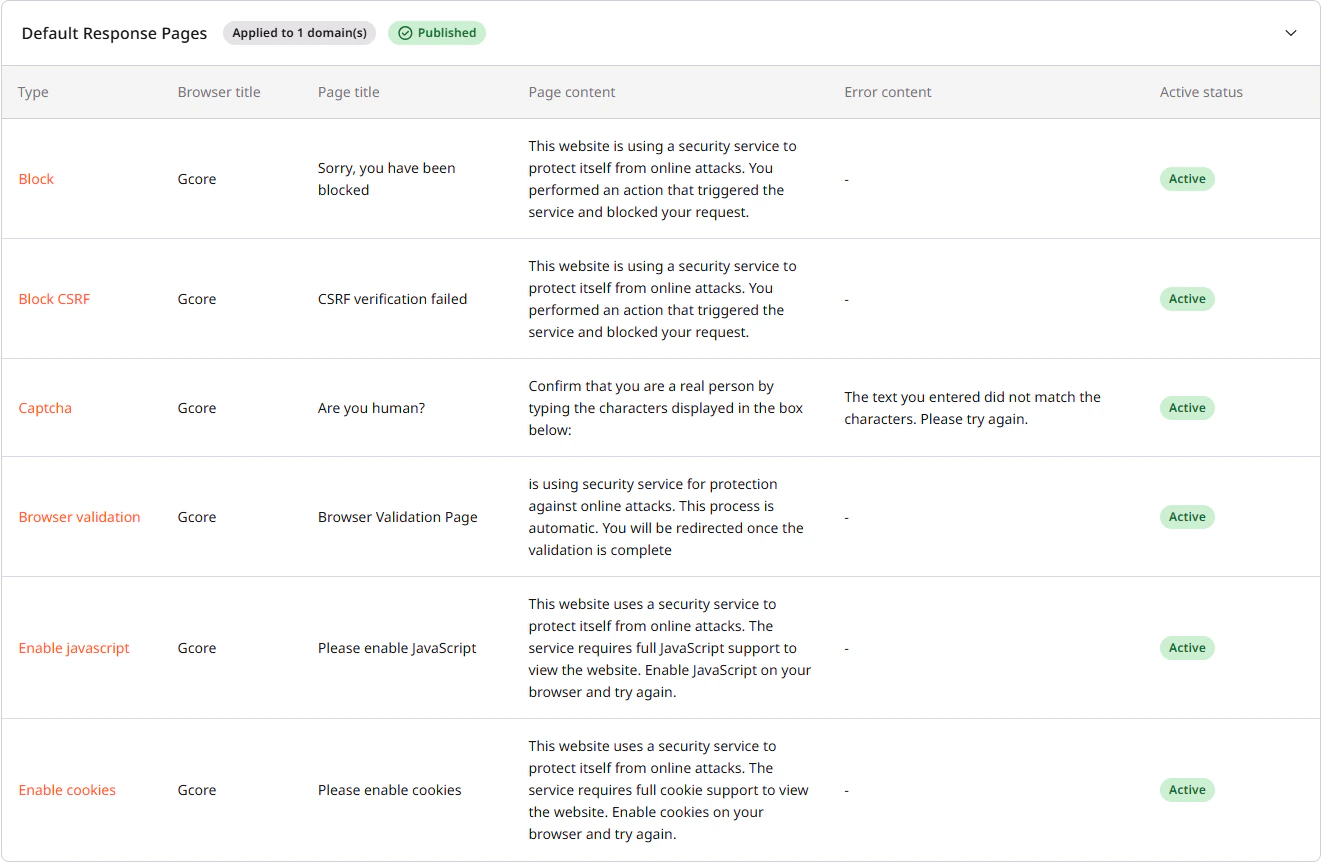
Here you can view [default response pages](/waap/response-pages#types-of-response-pages) as well as add, customize, or delete your own custom page sets, which are based on the default ones.
Each custom response page can have one of the following statuses:
* **Active** : A page appears on your domain and is visible to users.
* **Inactive** : A page is created but not publicly available.
A page set statuses can be:
* **Unpublished** : A page set can get this status after creation. After a short period, it should change to **Published**.
* **Published** : A page set is ready to use. This means that all pages inside it are in the **Active** status.
## Manage custom response pages at the domain level
A domain can have only one active page set at a time.
To view or change page sets:
1. In the [Gcore Customer Portal](https://portal.gcore.com/accounts/reports/dashboard), navigate to **WAAP** > **Domains**.
2. Find the needed domain and click its name to open it. You'll be directed to the **Overview** page.
3. In the sidebar, click **Response Pages**. On this page, you'll see all response pages that are currently applied to your domain.
4. (Optional) To change a page set, click **Set as active** next to the desired page set.
**Info**
If your domain has no active page sets, the [default response pages](/waap/response-pages#types-of-response-pages) will be used instead.
## Update a page set
You can apply the following actions to the whole set with your custom response pages: select domains where this page set will be applied, add a new page to the page set, edit one of the existing pages, or delete the page set altogether.
Updating custom response pages is only possible on the account level.
The process of adding, editing, and removing pages in an existing set are the same as for individual pages:
* [Create custom response pages](/waap/response-pages/create-custom-response-pages)
* [Update custom response pages](/waap/response-pages/manage-custom-response-pages#update-custom-response-pages)
### Add a page set to domains
**Info**
If you don't add customized pages to a domain, one of the [default response pages](/waap/response-pages#types-of-response-pages) will be used instead.
You can apply custom response pages to any domain of your choice. To add a page to a domain:
1. In the [Gcore Customer Portal](https://portal.gcore.com/accounts/reports/dashboard), navigate to **WAAP** > **Response Pages**. Here you'll see all default and custom response pages.
2. Find the page set that you want to modify, and click three-dot icon next to it.
3. Choose **Select domains**. Click the checkbox next to all domains you would like to apply this page set. If the list is extensive, search for desired domains.

4. Click **Save selection**.
5. Confirm your action by clicking **Confirm**. Any pages used on the domain will be replaced by this new page set.
### Update custom response pages
You can modify various aspects of custom response pages, such as images, tab titles, or error messages. However, changing the page type itself is not possible. For example, you can't convert a Captcha page into a Block page. If you need a different page type, you must create a new response page of the desired type.
**Info**
If you modify a created page in a page set, the changes will be reflected on all domains using that set.
To update an existing page:
1. In the [Gcore Customer Portal](https://portal.gcore.com/accounts/reports/dashboard), navigate to **WAAP** > **Response Pages**.
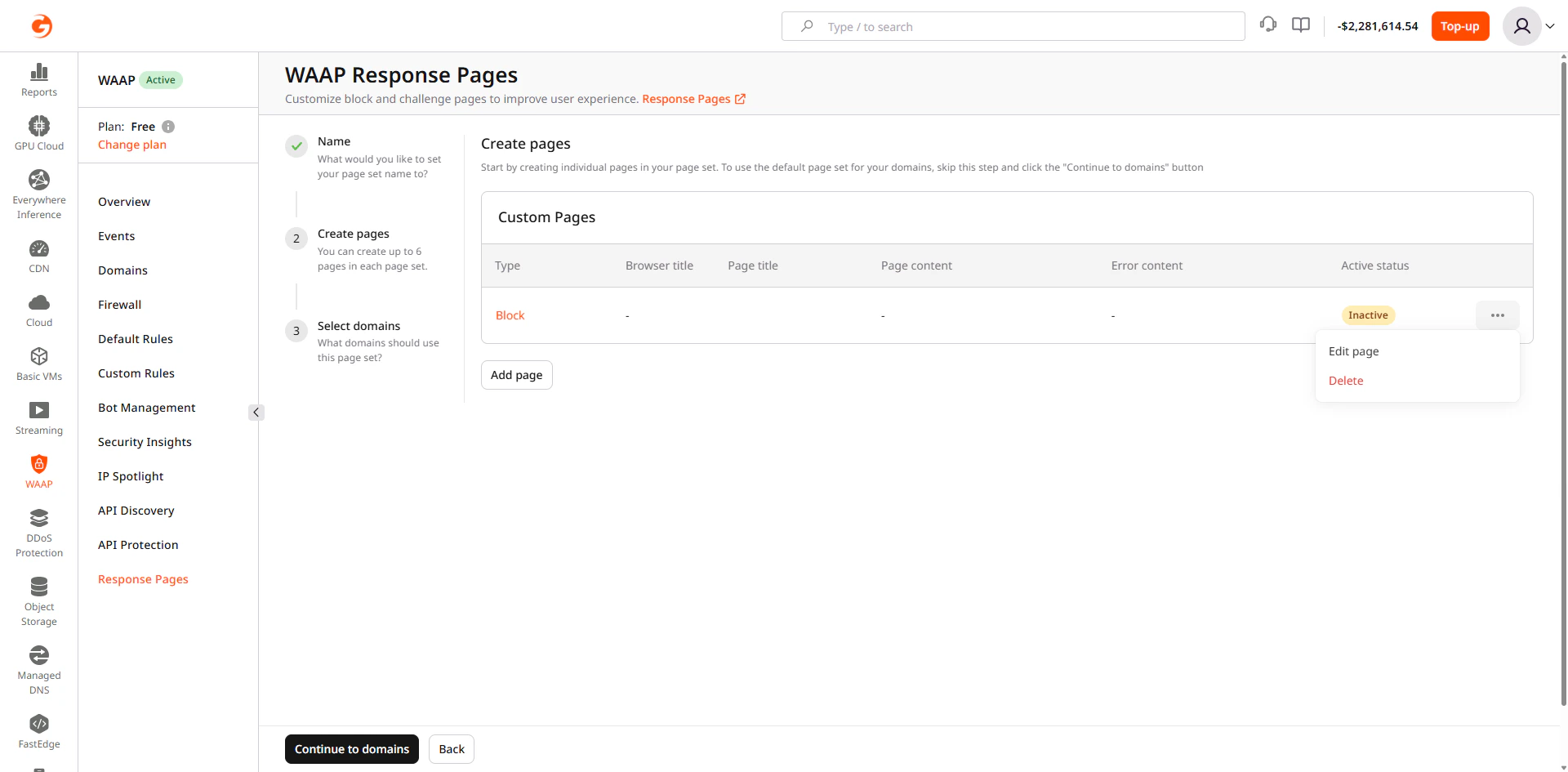
2. Find the page set that you want to modify and click the three-dot icon next to it.
3. Select **Edit page**.
 ## Delete custom response pages
After you delete a page set, any domains that are currently using it will automatically revert back to the default response ages. You can't restore deleted pages.
To delete a page:
1. In the [Gcore Customer Portal](https://portal.gcore.com/accounts/reports/dashboard), navigate to **WAAP** > **Response Pages**.
2. Find the page set that you want to modify and click the three-dot icon next to it.
3. Select **Delete**.
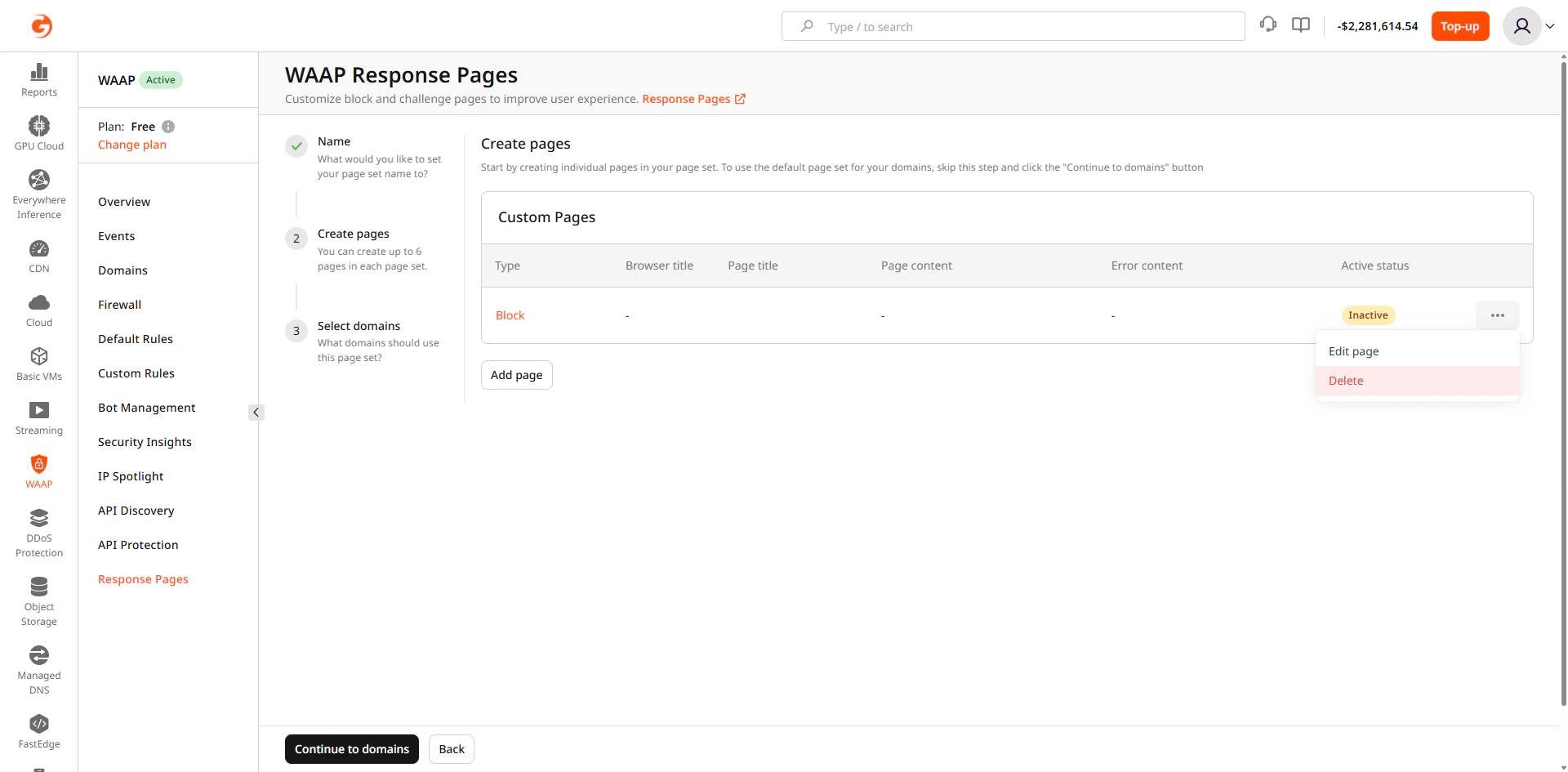
4. Click **Delete**.
Your page has been successfully removed and will no longer be displayed on any domains where it was previously used.
The [Custom Page Sets](/api-reference/waap#custom-page-sets) endpoints support partial updates — a single PATCH /waap/v1/custom-page-sets/{set_id} call can change the name, page content, domain assignments, or any combination. Response examples include only the fields used in each step.
An [API token](/account-settings/api-tokens) is required. To assign a page set to a domain, retrieve the WAAP domain ID via GET /waap/v1/domains.
```bash theme={null}
export GCORE_API_KEY="{YOUR_API_KEY}"
export WAAP_DOMAIN_ID="{YOUR_DOMAIN_ID}"
export PAGE_SET_ID="{YOUR_PAGE_SET_ID}"
```
## List page sets
Returns all page sets for the account, including their IDs, names, domain assignments, and page configurations. Use the `id` from the response in subsequent update and delete calls.
```python theme={null}
import gcore
import os
client = gcore.Gcore(api_key=os.environ["GCORE_API_KEY"])
page_sets = client.waap.custom_page_sets.list()
for ps in page_sets:
print(f"id={ps.id} name={ps.name!r}")
```
```go theme={null}
package main
import (
"context"
"fmt"
"os"
gcore "github.com/G-Core/gcore-go"
"github.com/G-Core/gcore-go/option"
"github.com/G-Core/gcore-go/waap"
)
func main() {
client := gcore.NewClient(option.WithAPIKey(os.Getenv("GCORE_API_KEY")))
page, err := client.Waap.CustomPageSets.List(context.Background(), waap.CustomPageSetListParams{})
if err != nil {
panic(err)
}
for _, ps := range page.Results {
fmt.Printf("id=%d name=%s\n", ps.ID, ps.Name)
}
}
```
```bash theme={null}
curl -X GET "https://api.gcore.com/waap/v1/custom-page-sets" \
-H "Authorization: APIKey ${GCORE_API_KEY}"
```
Response:
```json theme={null}
{
"limit": 100,
"offset": 0,
"count": 1,
"results": [
{
"id": 3321,
"name": "My custom pages",
"domains": [12345],
"block": {
"enabled": true,
"header": "Access Denied",
"title": "You have been blocked",
"text": "Your request was blocked by the security policy.",
"logo": null
},
"block_csrf": null,
"captcha": null,
"cookie_disabled": null,
"handshake": null,
"javascript_disabled": null
// ...
}
// ...
]
}
```
## Update page content
Update one or more pages within a page set. Returns HTTP 204 with no response body.
```python theme={null}
import gcore
import os
client = gcore.Gcore(api_key=os.environ["GCORE_API_KEY"])
set_id = int(os.environ["PAGE_SET_ID"])
client.waap.custom_page_sets.update(
set_id,
block={
"enabled": True,
"header": "Access Denied",
"title": "You have been blocked",
"text": "Your request was blocked by the security policy. Contact support if this is a mistake.",
},
)
print("Updated.")
```
```go theme={null}
package main
import (
"context"
"fmt"
"os"
"strconv"
gcore "github.com/G-Core/gcore-go"
"github.com/G-Core/gcore-go/option"
"github.com/G-Core/gcore-go/waap"
)
func main() {
client := gcore.NewClient(option.WithAPIKey(os.Getenv("GCORE_API_KEY")))
setID, _ := strconv.ParseInt(os.Getenv("PAGE_SET_ID"), 10, 64)
err := client.Waap.CustomPageSets.Update(context.Background(), setID, waap.CustomPageSetUpdateParams{
Block: waap.CustomPageSetUpdateParamsBlock{
Enabled: true,
Header: gcore.String("Access Denied"),
Title: gcore.String("You have been blocked"),
Text: gcore.String("Your request was blocked by the security policy. Contact support if this is a mistake."),
},
})
if err != nil {
panic(err)
}
fmt.Println("Updated.")
}
```
```bash theme={null}
curl -X PATCH "https://api.gcore.com/waap/v1/custom-page-sets/${PAGE_SET_ID}" \
-H "Authorization: APIKey ${GCORE_API_KEY}" \
-H "Content-Type: application/json" \
-d '{
"block": {
"enabled": true,
"header": "Access Denied",
"title": "You have been blocked",
"text": "Your request was blocked by the security policy. Contact support if this is a mistake."
}
}'
```
Returns HTTP 204 with no response body.
## Assign to domains
Controls which domains display a page set. The provided list replaces all existing assignments — to add a domain, include all currently assigned domains plus the new one. Pass an empty list to remove all assignments. A domain can have only one active page set at a time.
```python theme={null}
import gcore
import os
client = gcore.Gcore(api_key=os.environ["GCORE_API_KEY"])
set_id = int(os.environ["PAGE_SET_ID"])
domain_id = int(os.environ["WAAP_DOMAIN_ID"])
# Assign to a domain
client.waap.custom_page_sets.update(set_id, domains=[domain_id])
print(f"Assigned page set {set_id} to domain {domain_id}.")
# Remove all domain assignments
# client.waap.custom_page_sets.update(set_id, domains=[])
```
```go theme={null}
package main
import (
"context"
"fmt"
"os"
"strconv"
"github.com/G-Core/gcore-go/option"
gcore "github.com/G-Core/gcore-go"
"github.com/G-Core/gcore-go/waap"
)
func main() {
client := gcore.NewClient(option.WithAPIKey(os.Getenv("GCORE_API_KEY")))
setID, _ := strconv.ParseInt(os.Getenv("PAGE_SET_ID"), 10, 64)
domainID, _ := strconv.ParseInt(os.Getenv("WAAP_DOMAIN_ID"), 10, 64)
// Assign to a domain
err := client.Waap.CustomPageSets.Update(context.Background(), setID, waap.CustomPageSetUpdateParams{
Domains: []int64{domainID},
})
if err != nil {
panic(err)
}
fmt.Printf("Assigned page set %d to domain %d.\n", setID, domainID)
}
```
```bash theme={null}
# Assign to a domain
curl -X PATCH "https://api.gcore.com/waap/v1/custom-page-sets/${PAGE_SET_ID}" \
-H "Authorization: APIKey ${GCORE_API_KEY}" \
-H "Content-Type: application/json" \
-d '{"domains": ['"${WAAP_DOMAIN_ID}"']}'
# Remove all domain assignments
# curl -X PATCH "https://api.gcore.com/waap/v1/custom-page-sets/${PAGE_SET_ID}" \
# -H "Authorization: APIKey ${GCORE_API_KEY}" \
# -H "Content-Type: application/json" \
# -d '{"domains": []}'
```
Returns HTTP 204 with no response body.
## Delete a page set
Deletes a page set permanently. Domains that were using the set revert to the default Gcore response pages. Returns HTTP 204 with no response body.
```python theme={null}
import gcore
import os
client = gcore.Gcore(api_key=os.environ["GCORE_API_KEY"])
set_id = int(os.environ["PAGE_SET_ID"])
client.waap.custom_page_sets.delete(set_id)
print(f"Deleted page set {set_id}.")
```
```go theme={null}
package main
import (
"context"
"fmt"
"os"
"strconv"
"github.com/G-Core/gcore-go/option"
gcore "github.com/G-Core/gcore-go"
)
func main() {
client := gcore.NewClient(option.WithAPIKey(os.Getenv("GCORE_API_KEY")))
setID, _ := strconv.ParseInt(os.Getenv("PAGE_SET_ID"), 10, 64)
err := client.Waap.CustomPageSets.Delete(context.Background(), setID)
if err != nil {
panic(err)
}
fmt.Printf("Deleted page set %d.\n", setID)
}
```
```bash theme={null}
curl -X DELETE "https://api.gcore.com/waap/v1/custom-page-sets/${PAGE_SET_ID}" \
-H "Authorization: APIKey ${GCORE_API_KEY}"
```
Returns HTTP 204 with no response body.