Creating a namespace-scoped ServiceAccount with a dedicated kubeconfig grants limited cluster access without exposing admin credentials — kubectl and the cluster’s kubeconfig are required. Download the kubeconfig by clicking Kubernetes config on the cluster overview page in the Gcore Customer Portal.

Add users with limited rights

The following procedure creates a ServiceAccount in a dedicated namespace and generates a kubeconfig that authenticates as that ServiceAccount. 1. Create a namespace that will contain both the ServiceAccount and the resources it can access:
kubectl create ns test-namespace
2. Create a service account and a RoleBinding. Replace test-namespace, test-serviceaccount, and test-serviceaccount-rolebinding with the intended names:
cat <<EOF | kubectl apply -f -
apiVersion: v1
kind: ServiceAccount
metadata:
  name: test-serviceaccount
  namespace: test-namespace
---
apiVersion: rbac.authorization.k8s.io/v1
kind: RoleBinding
metadata:
  name: test-serviceaccount-rolebinding
  namespace: test-namespace
subjects:
- kind: ServiceAccount
  name: test-serviceaccount
  namespace: test-namespace
roleRef:
  kind: ClusterRole
  name: edit
  apiGroup: rbac.authorization.k8s.io
EOF
3. The ServiceAccount itself cannot be used directly for authentication. Create a token that will be embedded into the kubeconfig in the next step:
cat <<EOF | kubectl apply -f -
apiVersion: v1
kind: Secret
metadata:
  name: test-serviceaccount-token
  namespace: test-namespace
  annotations:
    kubernetes.io/service-account.name: test-serviceaccount
type: kubernetes.io/service-account-token
EOF
Retrieve the decoded token:
kubectl -n test-namespace get secret test-serviceaccount-token -o jsonpath="{.data.token}" | base64 -d
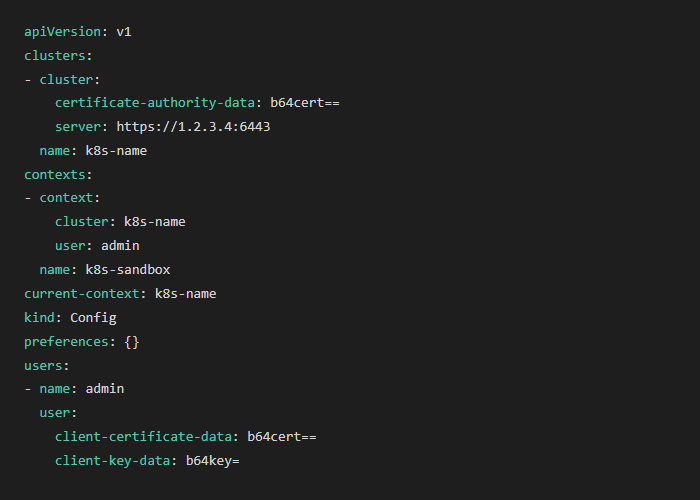
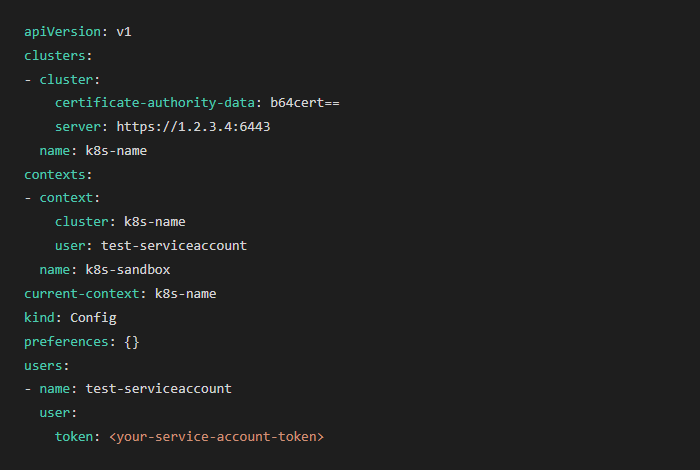
4. The token from the previous step authenticates the ServiceAccount. Copy the cluster kubeconfig to a new file (do not overwrite the admin kubeconfig), then update it as follows:
  • Replace client-certificate-data and client-key-data in users with token: <token-from-step-3>
  • Rename the user entry from admin to test-serviceaccount
  • Update the user reference in contexts to test-serviceaccount
Before:
Kubeconfig showing admin user with client-certificate-data and client-key-data credentials
After:
Kubeconfig showing test-serviceaccount user with token credential
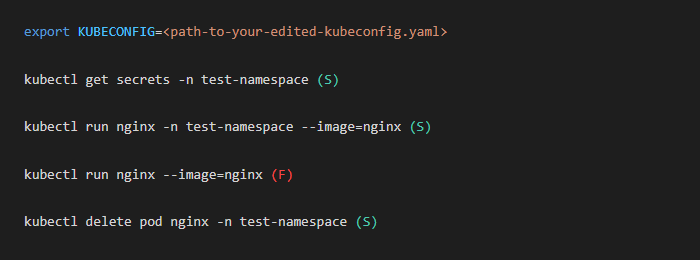
5. Switch kubectl to use the new kubeconfig and verify that the assigned permissions behave as expected:
export KUBECONFIG=<path-to-your-new-kubeconfig.yaml>
Test access across the assigned namespace and other namespaces. Operations in the assigned namespace should succeed (S) and operations in other namespaces should fail (F):
kubectl commands showing access test results: success in test-namespace and failure in default namespace
If access behaves as expected, the service account and kubeconfig are correctly configured.