An account password is changed on User settings while logged in to the Gcore Hosting Portal. A forgotten password is recovered by email.

Change a password

  1. Log in to the Hosting Portal.
  2. In the sidebar, open Client and select User settings.
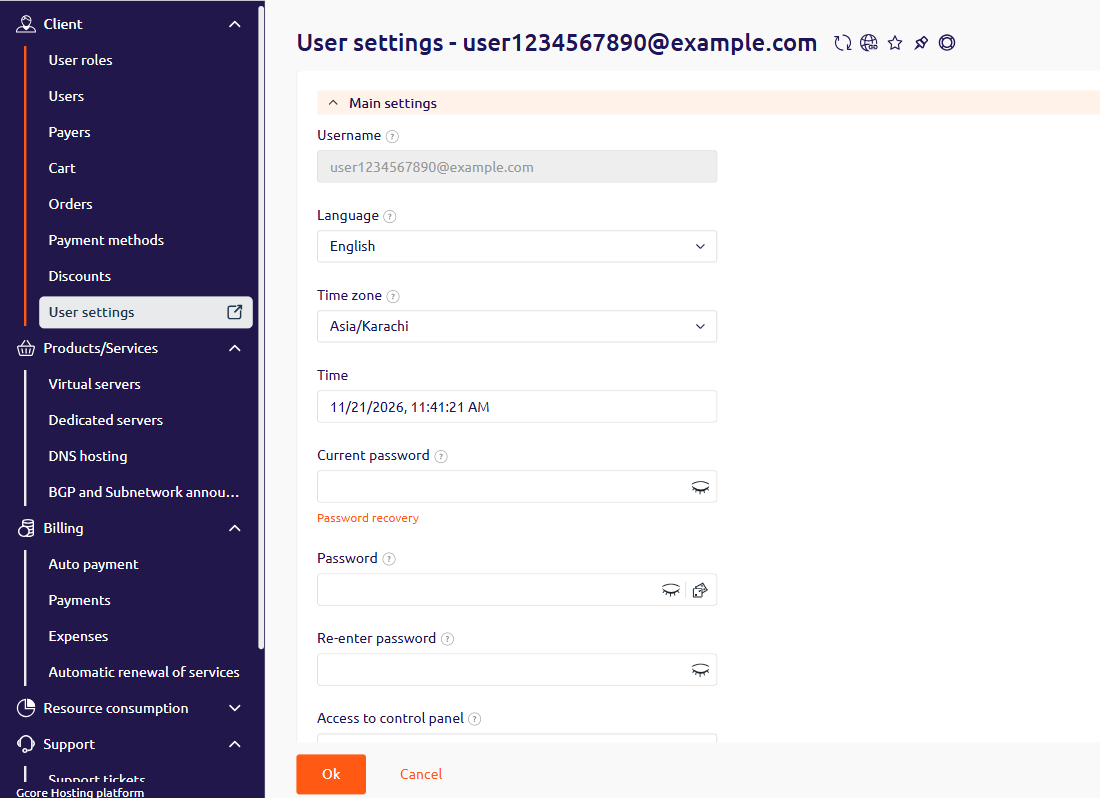
User settings with Current password, Password, and Re-enter password
  1. In Current password, enter the current password.
  2. In Password, enter the new password.
  3. In Re-enter password, enter the new password again.
  4. Click Ok.

Recover a forgotten password

Forgotten passwords can be reset by email verification. On User settings, Password recovery opens the recovery page. Enter the account email in Email and click Ok.
Password recovery page with the Email field
A recovery email arrives from billing@gcore.com with the subject Password Recovery. If it does not arrive within a few minutes, look in the spam folder. If the email is still missing, submit the request again on the recovery page. After three failed login attempts, the account is temporarily locked. To unlock it, contact support via chat on gcore.com.