

TOKEN_API_URL with an authenticated backend endpoint before deploying to production. The live demo uses the Gcore Video Player tab below and shows token status and refresh log in real time.
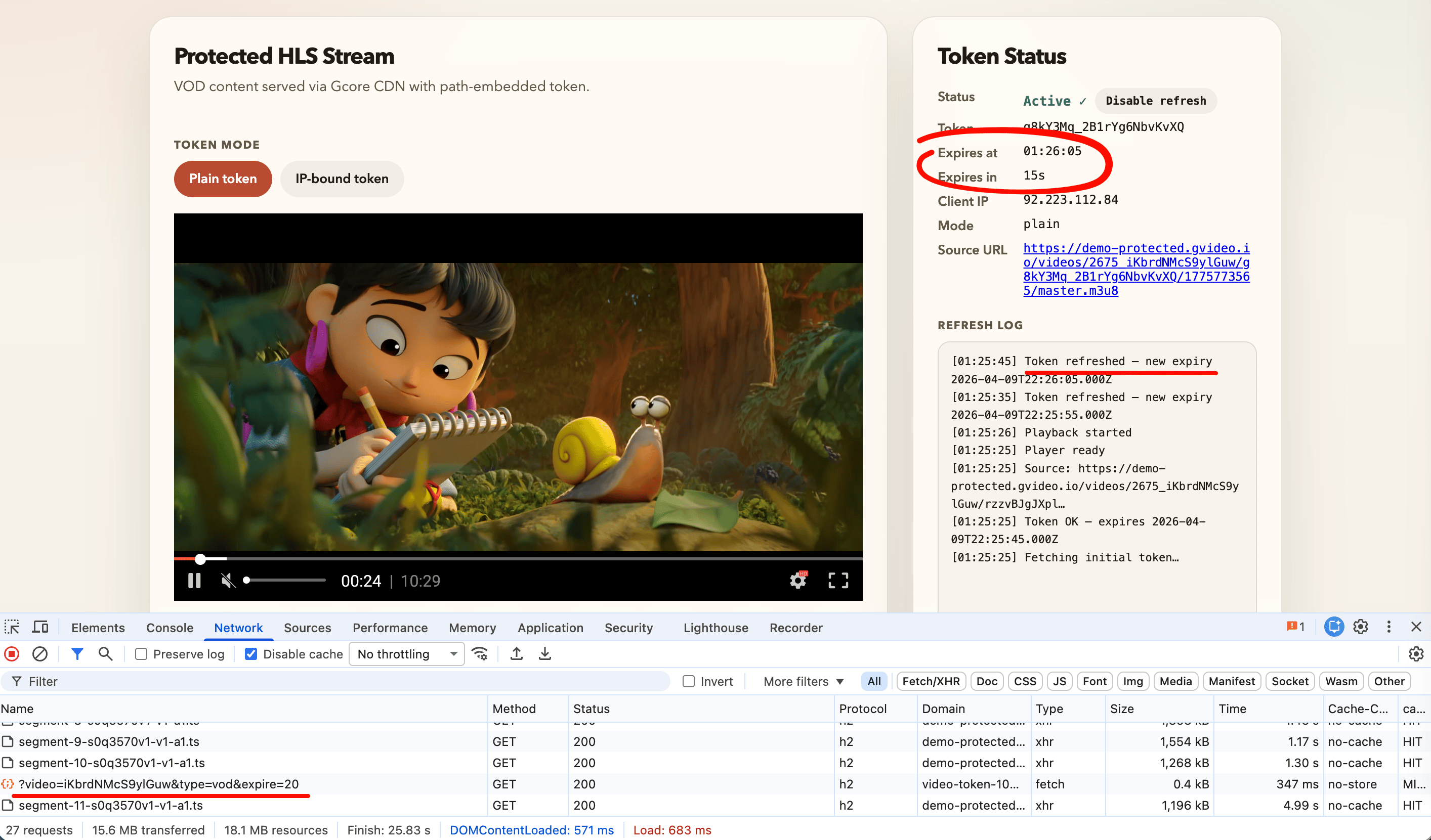
- Gcore Video Player
- hls.js
- dash.js
TokenRefreshPlugin handles token rotation without a custom URL loader or request interceptor. The plugin reads the initial token from the source URL, rewrites every outgoing request, and calls getToken automatically before expiry.The package is on GitHub at github.com/G-Core/gcore-videoplayer-js.<!DOCTYPE html>
<html lang="en">
<head>
<meta charset="UTF-8" />
<meta name="viewport" content="width=device-width, initial-scale=1.0" />
<link rel="stylesheet" href="https://player.gvideo.co/v2/assets/latest/index.css" />
</head>
<body>
<div id="player" style="width:854px; height:480px;"></div>
<script type="module">
import {
Player,
MediaControl,
QualityLevels,
Spinner,
ErrorScreen,
TokenRefreshPlugin,
} from 'https://player.gvideo.co/v2/assets/latest/index.js'
// Replace with your authenticated backend endpoint.
// Must return: { token, token_ip, client_ip, expires, url, url_ip }
const TOKEN_API_URL =
'https://video-token-102748.fastedge.app/?video=iKbrdNMcS9ylGuw&type=vod&expire=20'
async function getToken() {
const res = await fetch(TOKEN_API_URL)
if (!res.ok) throw new Error(`Token API returned ${res.status}`)
return res.json()
}
// Register TokenRefreshPlugin BEFORE other plugins.
if (!Player.corePlugins.some(p => p.prototype?.name === 'token_refresh')) {
Player.registerPlugin(TokenRefreshPlugin)
}
if (!Player.corePlugins.some(p => p.prototype?.name === 'media_control')) {
Player.registerPlugin(MediaControl)
Player.registerPlugin(QualityLevels)
Player.registerPlugin(Spinner)
Player.registerPlugin(ErrorScreen)
}
// Fetch initial token BEFORE constructing the Player.
// The source URL must contain a valid {token}/{expires} path on startup.
const tokenData = await getToken()
const player = new Player({
sources: [{
// Use tokenData.url_ip (and ipBound: true) for IP-bound tokens.
source: tokenData.url,
mimeType: 'application/x-mpegURL',
}],
playbackType: 'vod', // 'vod' | 'live'
tokenRefresh: {
getToken,
ipBound: false, // true → use url_ip / token_ip
refreshLeadSeconds: 10, // fetch replacement token this many seconds before expiry
onTokenRefreshed(data) {
console.log('Token refreshed — next expiry:', new Date(data.expires * 1000))
},
},
})
// attachTo() must be the last step — it triggers plugin initialization.
player.attachTo(document.getElementById('player'))
</script>
</body>
</html>
For React, Vue, Angular, or any setup using hls.js directly, configure a custom URL-rewriting loader and a refresh timer.
TokenRewriteLoader extends the default hls.js XHR loader and rewrites the {token}/{expires} path segments in every request before the connection opens. A chained setTimeout scheduler fetches a fresh token before expiry.<!DOCTYPE html>
<html lang="en">
<head>
<meta charset="UTF-8" />
<meta name="viewport" content="width=device-width, initial-scale=1.0" />
</head>
<body>
<video id="video" controls style="width:854px; height:480px; background:#000;"></video>
<script src="https://cdn.jsdelivr.net/npm/hls.js@latest/dist/hls.min.js"></script>
<script>
// Replace with your authenticated backend endpoint.
// Must return: { token, token_ip, client_ip, expires, url, url_ip }
const TOKEN_API_URL =
'https://video-token-102748.fastedge.app/?video=iKbrdNMcS9ylGuw&type=vod&expire=20'
// Shared state — loader closure reads the latest value after each refresh.
const tokenState = { token: '', expires: 0 }
async function fetchToken() {
const res = await fetch(TOKEN_API_URL)
if (!res.ok) throw new Error(`Token API returned ${res.status}`)
return res.json()
}
// Matches the {token}/{expires} pair embedded in Gcore CDN URLs.
const TOKEN_RE = /\/([A-Za-z0-9_-]{6,})\/(1\d{9,})\//
function rewriteUrl(url) {
return url.replace(TOKEN_RE, `/${tokenState.token}/${tokenState.expires}/`)
}
class TokenRewriteLoader extends Hls.DefaultConfig.loader {
load(context, config, callbacks) {
context.url = rewriteUrl(context.url)
super.load(context, config, callbacks)
}
}
const LEAD_SECONDS = 10
let refreshTimer = null
function scheduleRefresh(expires) {
clearTimeout(refreshTimer)
const msUntilRefresh = Math.max(1000, (expires - Date.now() / 1000 - LEAD_SECONDS) * 1000)
refreshTimer = setTimeout(doRefresh, msUntilRefresh)
}
async function doRefresh() {
try {
const data = await fetchToken()
// Use data.token_ip for IP-bound mode.
tokenState.token = data.token
tokenState.expires = data.expires
console.log('Token refreshed — next expiry:', new Date(data.expires * 1000))
scheduleRefresh(data.expires)
} catch (err) {
console.error('Token refresh failed:', err)
setTimeout(doRefresh, 5000)
}
}
async function init() {
const data = await fetchToken()
// Seed state BEFORE loadSource() so the first request is rewritten correctly.
tokenState.token = data.token // or data.token_ip for IP-bound
tokenState.expires = data.expires
const hls = new Hls({ loader: TokenRewriteLoader })
hls.loadSource(data.url)
hls.attachMedia(document.getElementById('video'))
scheduleRefresh(data.expires)
}
init().catch(err => console.error('Player init failed:', err))
</script>
</body>
</html>
For MPEG-DASH streams, dash.js provides a
RequestModifier extension. The same token-rewriting logic as hls.js applies — only the manifest suffix differs.The demo token API returns HLS URLs ending in master.m3u8. For DASH, replace that suffix with index.mpd — the token and expires values embedded in the path are the same for both formats.<!DOCTYPE html>
<html lang="en">
<head>
<meta charset="UTF-8" />
<meta name="viewport" content="width=device-width, initial-scale=1.0" />
</head>
<body>
<video id="video" controls style="width:854px; height:480px; background:#000;"></video>
<script src="https://cdn.dashjs.org/latest/dash.all.min.js"></script>
<script>
// Replace with your authenticated backend endpoint.
// Must return: { token, token_ip, client_ip, expires, url, url_ip }
const TOKEN_API_URL =
'https://video-token-102748.fastedge.app/?video=iKbrdNMcS9ylGuw&type=vod&expire=20'
const tokenState = { token: '', expires: 0 }
async function fetchToken() {
const res = await fetch(TOKEN_API_URL)
if (!res.ok) throw new Error(`Token API returned ${res.status}`)
return res.json()
}
const TOKEN_RE = /\/([A-Za-z0-9_-]{6,})\/(1\d{9,})\//
function rewriteUrl(url) {
return url.replace(TOKEN_RE, `/${tokenState.token}/${tokenState.expires}/`)
}
const LEAD_SECONDS = 10
let refreshTimer = null
function scheduleRefresh(expires) {
clearTimeout(refreshTimer)
const msUntilRefresh = Math.max(1000, (expires - Date.now() / 1000 - LEAD_SECONDS) * 1000)
refreshTimer = setTimeout(doRefresh, msUntilRefresh)
}
async function doRefresh() {
try {
const data = await fetchToken()
// Use data.token_ip for IP-bound mode.
tokenState.token = data.token
tokenState.expires = data.expires
console.log('Token refreshed — next expiry:', new Date(data.expires * 1000))
scheduleRefresh(data.expires)
} catch (err) {
console.error('Token refresh failed:', err)
setTimeout(doRefresh, 5000)
}
}
async function init() {
const data = await fetchToken()
// Seed state BEFORE initialize() so the first MPD request is rewritten.
tokenState.token = data.token // or data.token_ip for IP-bound
tokenState.expires = data.expires
const player = dashjs.MediaPlayer().create()
// Register RequestModifier BEFORE initialize() so it intercepts the first MPD fetch.
player.extend('RequestModifier', function() {
return {
modifyRequest(config) {
if (config.url) config.url = rewriteUrl(config.url)
return config
}
}
}, true)
// Convert HLS URL to DASH by replacing the manifest suffix.
const dashUrl = data.url.replace('master.m3u8', 'index.mpd')
player.initialize(document.getElementById('video'), dashUrl, true)
scheduleRefresh(data.expires)
}
init().catch(err => console.error('Player init failed:', err))
</script>
</body>
</html>