

Free transcoding scope
Live streams and VOD files get the same output settings, so one table covers both.A source above 1080p is transcoded down to 1080p, and Gcore does not upscale smaller sources. A 720p source produces renditions up to 720p.
ABR renditions
Gcore builds an adaptive bitrate (ABR) set of renditions from each source, so players switch between qualities as the connection changes. The table lists the free renditions from Full HD down to 360p.
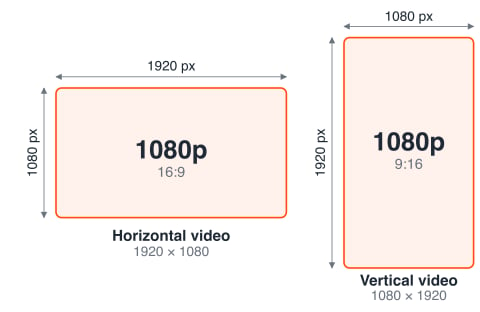
Gcore transcodes horizontal and vertical video alike, including video recorded in mobile apps, and every rendition keeps the orientation of the source. The table lists horizontal 16:9 sizes, while vertical video uses the same sizes with width and height swapped, so 1080p is 1920 × 1080 horizontal and 1080 × 1920 vertical.
Live streams and VOD
Free transcoding covers both content types with the same renditions, and the difference lies in when the source arrives.Live streams
A live stream is transcoded in real time from the master stream that an encoder pushes to Gcore or that Gcore pulls from a source. The master stream must stay stable during the broadcast, so the recommended input settings apply.VOD files
A VOD file is transcoded after upload, and the source can use many containers and codecs. The accepted source parameters list the requirements.Premium encoding
Premium encoding extends free transcoding with 2K, 4K, and 8K resolutions, 240p and 144p renditions, 60+ FPS, HEVC, AV1, and VP9 codecs, and custom bitrate ladders. Enterprise accounts request it from support or a sales manager, as described in premium encoding.Output protocols
The ABR renditions are delivered in four HTTP streaming formats: HLS MPEG-TS, HLS CMAF, MPEG-DASH, and MP4. Select the format that matches the target players, devices, and latency goals. For VOD, these protocols deliver adaptive bitrate playback from uploaded and transcoded videos. For Live, they deliver adaptive bitrate playback of an ongoing broadcast with regular or low latency.HLS MPEG-TS
HLS MPEG-TS is the traditional HLS format that uses.ts segments. It is the safest compatibility option for Live and VOD playback, especially on older devices, set-top boxes, Smart TVs, and legacy players.
-
Segment format: MPEG-TS (
.ts) - Best for: Maximum compatibility
- Live latency: Regular latency, usually higher than low-latency CMAF workflows
- VOD usage: Reliable HLS playback
- Codec fit: H.264 with AAC audio
-
Example manifest:
HLS CMAF
HLS CMAF uses fragmented MP4 (.m4s) chunks. It is recommended for modern HLS playback, and for Live it also supports low-latency playback.
-
Segment format: Fragmented MP4 (
.m4s) - Best for: Modern HLS playback, Apple devices, and low-latency Live
- Live latency: Low latency when configured with partial segments
- VOD usage: Modern HLS playback
- Codec fit: H.264 with AAC audio
-
Example manifest:
MPEG-DASH
MPEG-DASH is widely used for Android, web players, Smart TVs, and advanced player workflows. It serves both VOD and Live, including low-latency Live, with fragmented MP4 (.m4s) chunks.
-
Segment format: Fragmented MP4 (
.m4s) - Best for: Android, web players, Smart TVs, and low-latency Live
- Live latency: Low latency when configured with short segments and chunked delivery
- VOD usage: Adaptive bitrate playback
- Codec fit: H.264 with AAC audio
-
Example MPD structure:
Output examples
The embedded player plays a live stream transcoded to 1080p H.264, and the demo page lists VOD and live players for every output format.- HTML player
- MPEG-DASH CMAF (low latency)
- LL HLS CMAF (low latency)
- HLS MPEG-TS (regular latency)