

Scenario
A startup builds an app where users record a video on the phone, add a title, and publish it to a feed that other users watch in the mobile app and on the website. The workflow must cover these needs:- Recording and uploading from iOS and Android over unstable mobile networks, with large files resuming after a drop.
- Automatic conversion of every upload, including vertical video, into several qualities for any device.
- Playback in the app’s own player on the web, iOS, and Android, with thumbnails for the feed.
- Moderation of user-generated content before it reaches other users.
- Status updates for the creator while the video processes.
- Delivery limited to the markets where the publisher holds the distribution rights, with regional data handling for the audience.
- Control of costs while the audience and the library grow.
Outcome and benefits
One Gcore account replaces a separate upload service, transcoder, storage, and CDN. The app’s back end stays small, because it creates a video entry, passes the upload session to the phone, and listens for status events.- Reliable mobile upload: the resumable TUS protocol continues from the last uploaded segment after an interruption.
- Any player, any screen: every video is transcoded into an adaptive bitrate ladder, with an HLS link that web and mobile players accept.
- Fast publishing: playback starts when the first rendition is ready, while higher qualities continue to process.
- Built-in moderation: AI tasks detect NSFW content and nudity in uploaded videos via AI-Moderation.
- Usage-based cost: transcoding up to 1080p at 30 FPS is free, while storage and delivery are billed by usage.
Architecture
The phone talks to the app’s back end for permission and to Gcore for the file transfer, so the Gcore API token never leaves the server.Step 1. Create the video entry
When the user starts an upload, the back end sendsPOST /streaming/videos to the Gcore upload API without an origin_url. The response returns the video id with the status empty, and the back end then requests the upload parameters with GET /streaming/videos/{id}/upload.
- The upload response contains the list of upload servers, of which the app uses one with
active: true, and a session token that is valid for 4 hours. - The back end sends the server, the session token, the video ID, and the client ID to the app, and it keeps the API token on the server. The Gcore Python and Go SDKs wrap these calls.
- The optional
client_user_idandclient_entity_datafields tag the video with the creator, and the video list can be filtered by them.
Step 2. Upload from the phone with TUS
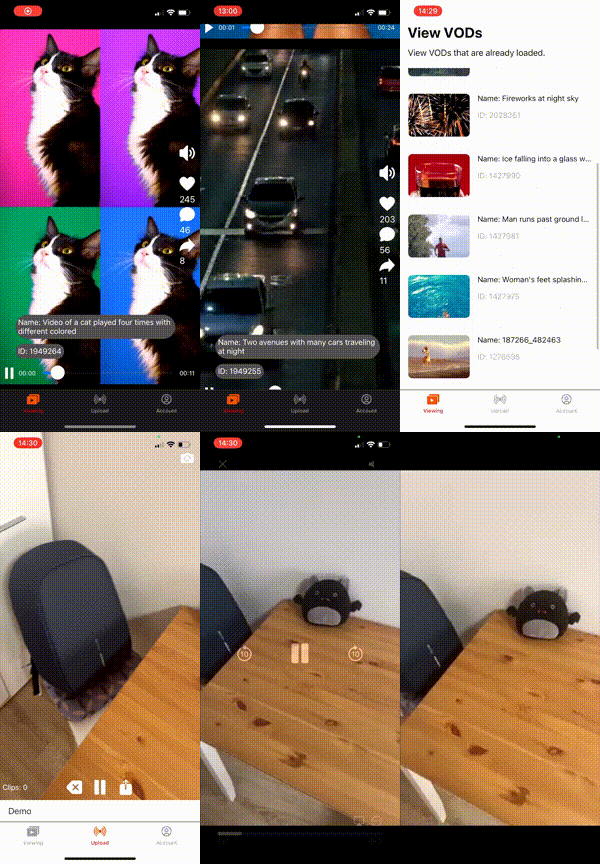
The app uploads the file directly to Gcore with a TUS client library, using the upload server and the session token that the back end received in Step 1. TUS splits the file into segments and resumes from the last completed segment after an interruption, so a long upload from a phone survives a lost connection or a switch between Wi-Fi and mobile data. TUS libraries exist for iOS, Android, and the web, and the open-source demo projects show the full flow of recording, uploading, and playback: the iOS demo project in Swift and the Android demo project in Kotlin.- The app sends the upload to Gcore and never handles the API token. When the session expires or the upload server rejects it, the app asks its own back end for a new session.
- Gcore accepts many containers and codecs for VOD, including the mobile formats MP4, MOV, and 3GP. The input parameters list the formats and the recommended limits.
- An existing video library enters by URL with
origin_urlor through the support-assisted batch migration.
Step 3. Transcode and track the status
After the upload completes, Gcore transcodes the video automatically into the free ABR ladder of 1080p, 720p, 468p, and 360p with H.264 and AAC, and a vertical video keeps its orientation. The transcoding output article lists the ladder, and premium encoding adds larger resolutions and other codecs for enterprise accounts. The video moves through the statusesempty, pending, viewable, and ready, or error when processing fails. The VOD status article describes the statuses, and the key rules for the app are:
- A video is
viewablewhen at least one rendition is ready, and the manifest returns 404 before that. Lower qualities finish first, so the app publishes the video atviewableand the player adapts as more renditions appear. - A video is
readywhen all renditions are complete, and each rendition inconverted_videoshas its own status and error description. - Webhooks report every status change of a video to one endpoint, which support configures. Each event is sent once and is not retried, so the back end checks the video through the API after downtime.
Step 4. Moderate user content (optional)
The back end checks every upload with an AI moderation task before the video reaches the feed. The AI video services offer NSFW detection, soft nudity detection, and hard nudity detection, and the tasks are free.- The back end creates a moderation task for the uploaded video through the API and reads the result when the task completes.
- Each result lists the flagged frames with a confidence score, and Gcore excludes results below 30%. The app decides the threshold at which a video is blocked or sent to a human reviewer.
- The analysis runs on keyframes, so an object that appears only between keyframes isn’t detected.
- The back end keeps the video hidden until the check completes and then sets its visibility in the app’s own database.
Step 5. Play on web and mobile
Every video gets an HLS playback URL in thehls_url field of GET /streaming/videos/{id}. It is one manifest that lists all renditions, so the player picks the quality that fits the viewer’s bandwidth, and the app only stores the video ID and reads the URL from the API when it builds the feed. The HLS playback article describes the URL and its options.
- On the web, the app plays the HLS URL in hls.js, and Safari plays it natively.
- On iOS and Android, the app passes the same HLS URL to the native player.
Step 6. Add thumbnails and subtitles
Each video gets five automatic screenshots in thescreenshots array, and a custom poster of up to 1 MB can replace them, which gives the feed a cover image before the first frame loads.
- The first automatic screenshot is often black, so the app lets the creator choose another screenshot with
screenshot_idor upload a poster. - AI subtitles transcribe the audio automatically. The subtitles are available through the API.
Step 7. Manage videos and creators
The app’s back end updates and deletes videos with the API, and its own database links each video to a user, a title, and a visibility state.- The API changes the name, description, and poster of a video and moves it between directories, which can represent categories or channels.
- Deleting a video removes its renditions, subtitles, and screenshots permanently, and Gcore sends a
video_deletewebhook, as described in delete videos. Storage is billed at the peak of the month, so a deletion lowers the next month’s value only. - The source file of an existing video can’t be replaced, so an edited video is uploaded as a new entry and the app points the feed to the new ID. Gcore deletes the uploaded original after transcoding, so an app that offers re-editing keeps its own copy.
- Each video has its own video ID, which is attached to the video and cannot be changed. The source file of an existing video can’t be updated either, so to replace a video, the app deletes the previous one and uploads a new one, which gets a new video ID.
- The account model keeps all creators in one Gcore account, because strict isolation exists only between separate accounts, and
client_user_idseparates creators inside the app.
Step 8. Restrict and protect videos
Public videos play from the default delivery domain. Videos that only subscribers, buyers, or friends may watch use secure tokens on a custom CDN resource with a paid CDN tariff, because the default domain doesn’t support tokens.- The back end signs the playback URL after it checks the viewer, and one secure token covers the manifest and all segments of the video.
- The custom CDN resource adds country, referrer, IP, and user-agent policies on top of tokens. A country policy allows delivery only in the markets where the publisher holds the distribution rights, and a change takes about 5-15 minutes to apply.
Step 9. Plan costs and scale
Gcore bills transcoding, CDN delivery, and storage separately, and transcoding up to 1080p at 30 FPS is free. The usage reports show transcoding minutes, delivery minutes, and stored minutes and gigabytes.- A trial account has limits on storage, transcoding, and delivery, so the app switches to the active PAYG plan before launch.
- The processing queue has no length limit, and the processing time grows with the video length, from seconds for a short clip to tens of minutes for a long recording.
- Enterprise plans add committed volumes, premium encoding, and premium support for dedicated events, which the account manager arranges.
- Statistics for unique viewers and watching duration are measured at the CDN for any player and can be filtered by
client_user_id, while likes, comments, and feed ranking stay in the app’s own database.